
You're staring at a Google Ads quote and wondering if the numbers make sense, or if you're about to overpay for clicks that never turn into customers. Google Ads cost varies wildly by industry, and without benchmarks, you're guessing instead of budgeting.
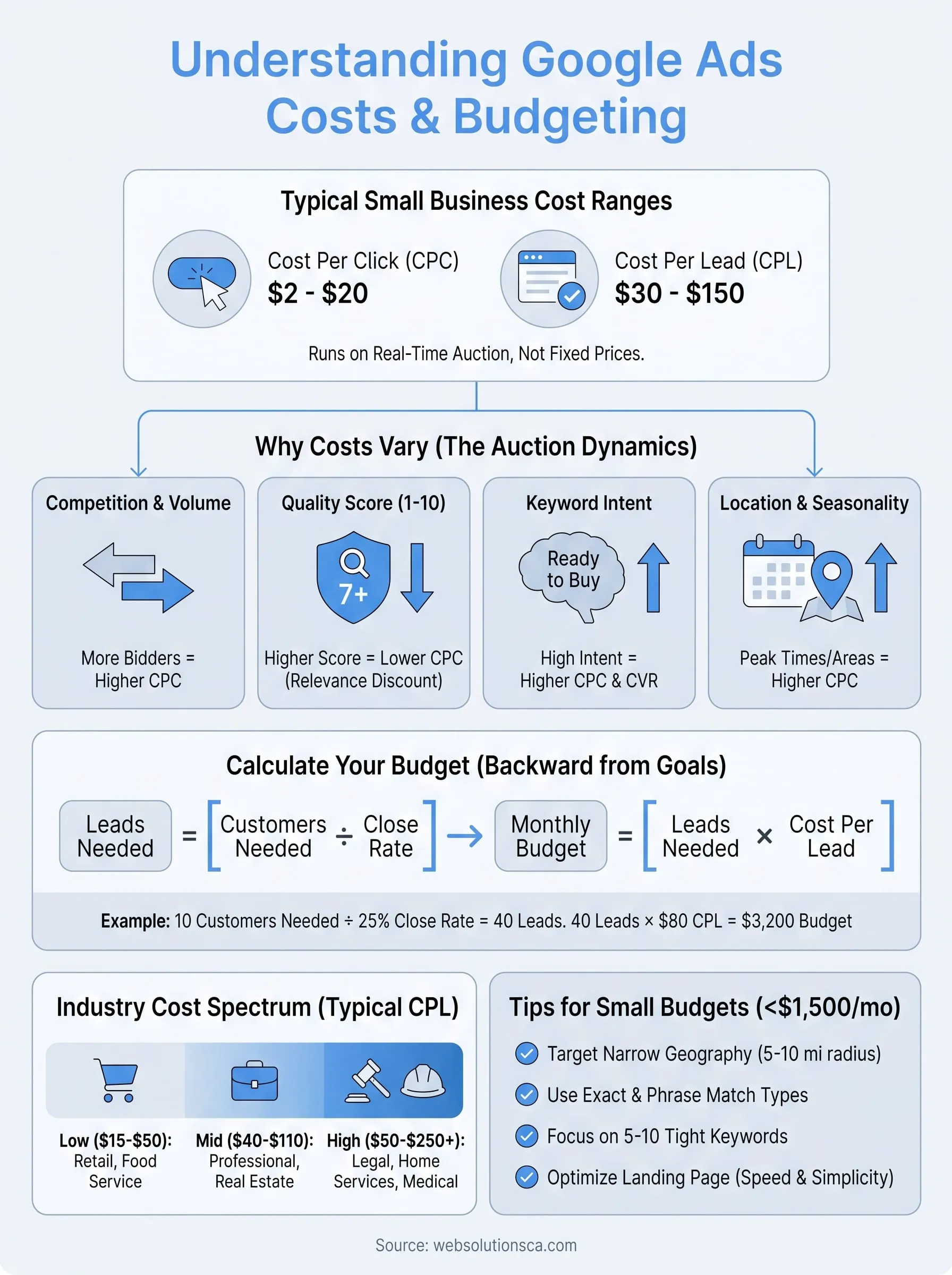
Here's the short answer: most small businesses pay between $2 and $20 per click, and Google Ads cost per lead typically lands between $30 and $150 depending on your industry and competition. Legal and home services tend to sit at the higher end, while local retail and simpler services often pay less. Your actual numbers depend on your keywords, location, and how well your landing pages convert clicks into calls.
In this article, we break down real cost ranges by industry, explain what drives your price per click up or down, and show you how to calculate a realistic monthly budget. We'll also cover quality score and conversion rate since these two factors matter more than your bid amount when it comes to lowering your cost per lead. By the end, you'll know whether Google Ads fits your budget and how to spend it wisely.
Why Google Ads cost varies so much
Google Ads runs on a real-time auction, not a fixed price sheet, and that's the biggest reason your cost per click looks nothing like your competitor's. Every time someone searches, Google runs thousands of tiny auctions in milliseconds, ranking ads by a mix of your bid and your Ad Rank. Two businesses selling the same service in the same city can pay wildly different amounts because their accounts, landing pages, and history with Google differ.
Competition for your keywords sets the floor and ceiling of what you'll pay. When ten personal injury lawyers bid on "car accident attorney near me," the price climbs into the $50-$100+ per click range because everyone fights for the same handful of ad slots. Compare that to a local dog groomer bidding on "dog grooming [city name]," where fewer advertisers compete and clicks often cost $2-$5. The keyword itself carries no inherent price; it's the number of businesses willing to pay for that click that pushes the cost up or down.
Quality Score works like a discount multiplier that Google applies based on how relevant your ads and landing pages are. Google scores every keyword from 1-10 using three components: expected click-through rate, ad relevance, and landing page experience, a system Google explains in detail in its own Quality Score documentation. A Quality Score of 7 or higher can cut your cost per click by 20-30% compared to an advertiser bidding the same amount with a score of 4. This is why two businesses can enter the same auction with identical bids and walk away paying completely different prices; Google rewards relevance, not just money.
The advertiser with the most relevant ad and landing page often pays less per click than the one who simply bids the highest.
Keyword intent changes the math too. Someone searching "how much does a website cost" is still researching, while someone searching "hire web developer Orange County" is ready to buy. Google Ads typically prices high-intent keywords higher because advertisers know those clicks convert at a much better rate, and they're willing to pay for it. Broad, informational searches usually cost less per click but also convert less often, which can make them more expensive on a cost per lead basis even though the click itself is cheap.
Location and seasonality shift your numbers month to month. Advertising in a high-income area like Newport Beach or marketing to customers in Irvine often costs more per click than the same keyword in a lower-cost market, because local businesses are willing to spend more to win a customer worth more. Seasonal demand matters just as much: HVAC companies see costs spike in July and August, tax preparers see costs climb every January through April, and holiday retailers pay premiums in November and December. Your monthly budget in March might look nothing like your budget in December for the exact same campaign.
Quantifying these variables side by side makes the pattern easier to spot. Here's a quick look at how each factor tends to move your price:
| Factor | Effect on cost per click |
|---|---|
| High competitor volume | Increases price, sometimes sharply |
| Strong Quality Score (7-10) | Decreases price by 20-30% |
| High buyer-intent keywords | Increases price but often improves conversion |
| Broad, informational keywords | Decreases price but may lower conversion rate |
| Wealthy or high-cost metro area | Increases price |
| Peak season for your industry | Increases price temporarily |
Recognizing these forces means Google Ads cost isn't unpredictable, it's just situational. You need real benchmarks for your specific industry and location, not a single number pulled from a generic blog post. The next sections give you those benchmarks, plus the formula to translate them into a budget that actually fits your business.
How to calculate your Google Ads budget
Budgeting for Google Ads works backward from your goals, not forward from a random number you feel comfortable spending. Start with how many new customers you need each month, then reverse-engineer the ad spend required to get there. This approach protects you from either underfunding a campaign so it never gets enough data, or overspending on clicks that were never going to convert anyway.
Grab three numbers before you touch the Google Ads dashboard: your average customer value, your close rate on leads, and your expected cost per lead for your industry (we cover real benchmarks in the next section). With those three inputs, the math looks like this:
Leads needed = Customers needed ÷ Close rate
Monthly budget = Leads needed × Cost per lead
Say you're a home services company that wants 10 new jobs a month, and your sales team closes 25% of the leads that call in. You need 40 leads to land those 10 jobs. If your industry's average cost per lead sits at $80, your monthly budget comes out to $3,200. That number gives you something concrete to compare against your average job value; if a typical job nets you $600, spending $3,200 to land 10 jobs at $80 in ad spend each is an easy yes.
Your Google Ads budget isn't a guess, it's ten new customers divided by your close rate, multiplied by your cost per lead.
Conversion rate optimization on your landing page changes this equation more than almost anything else, which is why fixing a slow or confusing page often saves more money than lowering your bids ever will. If your landing page converts at 2% instead of 5%, you need two and a half times more clicks to generate the same number of leads, which means two and a half times the ad spend for identical results. Before you commit real budget, test your page speed, your button placement, and your form length, since designing a landing page that converts matters here; a page that loads in under 3 seconds and asks for only name, phone, and service needed will consistently outperform a bloated form that asks for eight fields.
Seasonality also belongs in your calculation, not just your click cost. If your industry sees demand spike in specific months, build a flexible budget rather than locking in the same number year-round. A tax preparer spending $2,000 a month in July gets almost nothing for it, while that same $2,000 in February might be underfunded given the demand. Adjust your monthly number to match when customers are actually searching.
Working through this math by hand is doable, but most small business owners find it faster to have someone run the numbers alongside live account data. That's exactly what our paid advertising management for Orange County businesses is built for: we plug your real close rates and job values into the formula so your budget reflects your business, not an industry average pulled from a spreadsheet.
Average Google Ads costs by click, lead, and month
Numbers help more than adjectives when you're deciding whether Google Ads fits your budget, so here's what small businesses across Orange County and beyond typically pay. These figures come from real campaign data across dozens of industries, not a single niche, so treat them as a starting point you'll refine once your own account has run for 60-90 days.
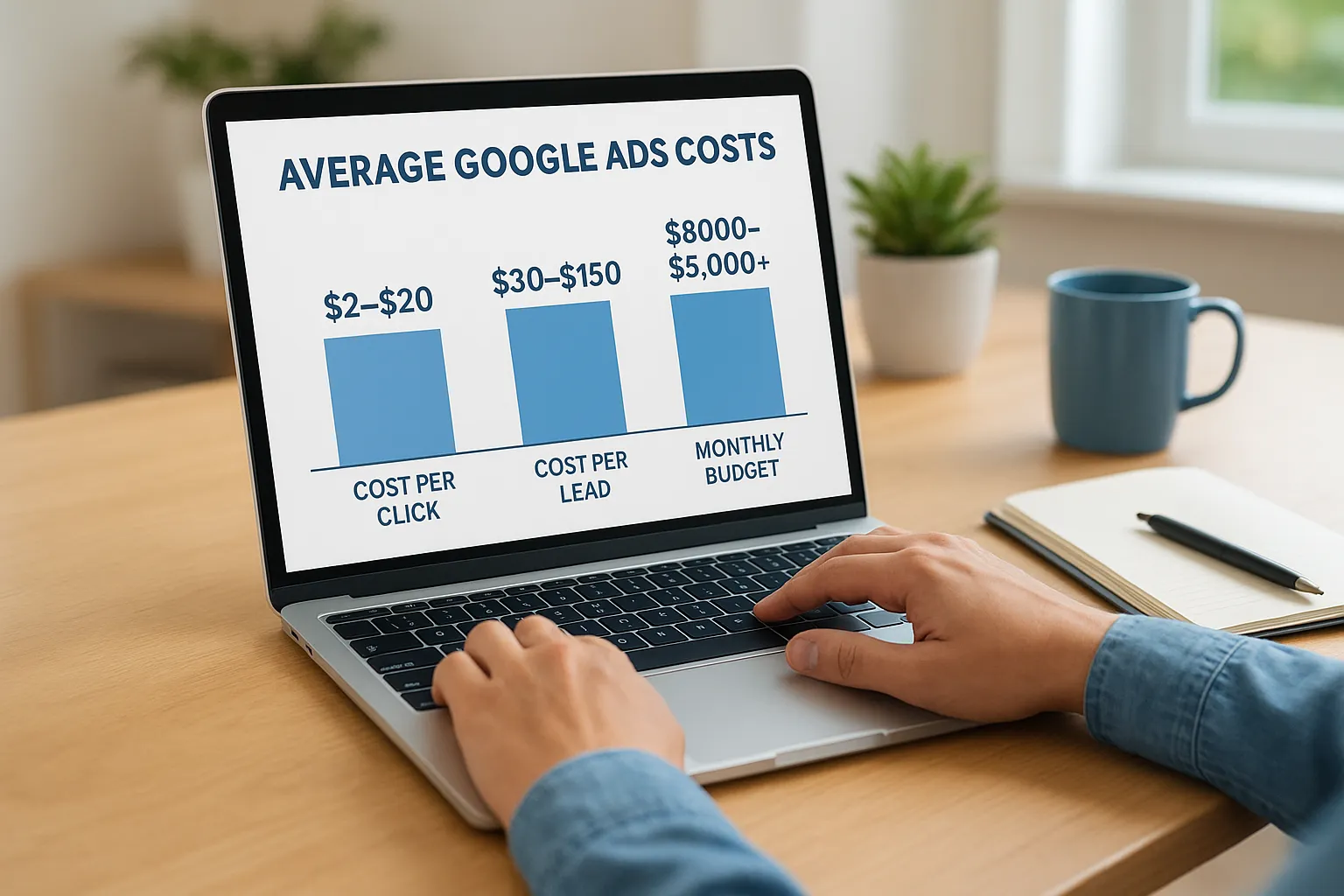
| Metric | Typical small business range |
|---|---|
| Cost per click (CPC) | $2 - $20 |
| Cost per lead (CPL) | $30 - $150 |
| Minimum viable monthly budget | $800 - $1,500 |
| Competitive monthly budget | $2,000 - $5,000+ |
Clicks sit at the bottom of this chain, and they're the easiest number to misread. A $2 click sounds cheap until you realize it takes 50 clicks to generate one lead in a low-converting industry, which puts your real cost per lead north of $100 even though each individual click looked like a bargain. On the flip side, a $15 click in a high-intent, well-optimized campaign can produce a lead for every 8-10 clicks, landing your cost per lead closer to $120-$150 but converting into paying customers at a much higher rate. Click price alone tells you almost nothing about whether a campaign is working.
A cheap click that never converts costs more than an expensive click that does.
Leads are the number that should actually drive your decisions, and this is where Google Ads cost per lead benchmarks matter more than CPC ever will. Home services, legal, and medical practices usually land at the higher end of the $30-$150 range because each customer is worth thousands of dollars over their lifetime, so advertisers can afford to pay more per lead and still profit. Local retail, simple B2C services, and lower-ticket offerings usually sit closer to the $30-$60 range, since the customer value doesn't support a $150 lead the way a kitchen remodel or a personal injury case does.
Monthly totals pull everything together, and this is the figure most business owners actually care about. Spending under $800 a month rarely gives Google's algorithm enough data to optimize your campaign, which means you're stuck paying premium prices for mediocre placement. Once you cross into the $1,500-$3,000 range, most small businesses see Google's machine learning start finding better-qualified clicks, which lowers cost per lead even as total spend holds steady or rises slightly. Businesses spending $3,000-$5,000+ a month are usually competing hard in a crowded market, in industries like legal, home improvement, or medical, where the lifetime value of a single customer easily justifies the spend.
Context matters more than any single number in this table, since a $150 cost per lead is a disaster for a $200 service and a bargain for a $15,000 remodel. Run your own numbers against your average customer value before you panic over a benchmark that doesn't match your business, and use the industry breakdown in the next section to narrow these ranges down to something closer to your specific market.
Google Ads costs by industry
Industry determines your Google Ads cost more than almost any other variable, since customer lifetime value dictates how much advertisers are willing to bid. A personal injury lawyer can justify a $200 lead because one signed case is worth $10,000 or more, while a coffee shop can't justify anything close to that for a $5 latte order. Matching your expectations to your actual industry saves you from panicking over numbers that are perfectly normal for your market.
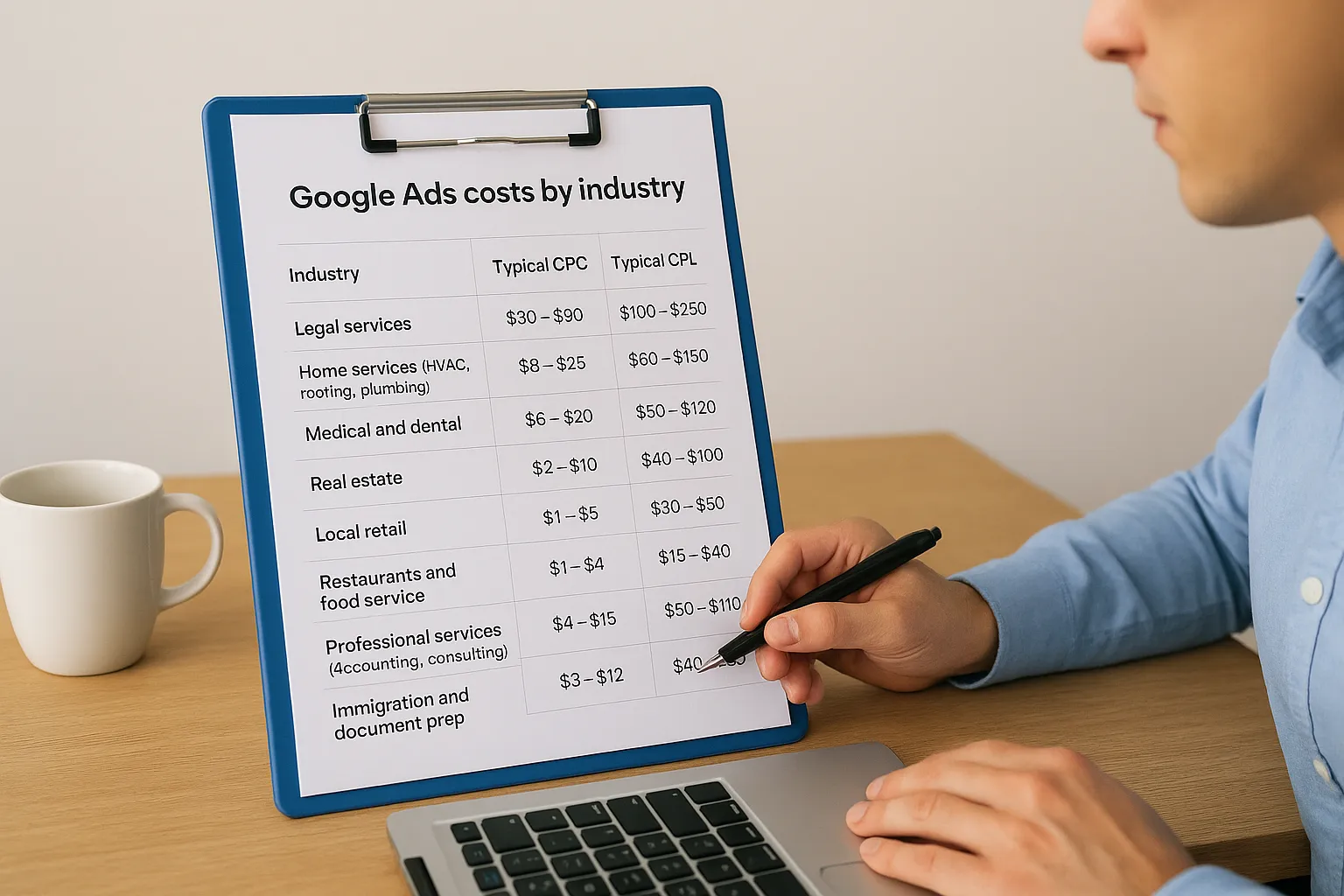
Breaking down real ranges by sector gives you a much better starting point than a single blended average ever could:
| Industry | Typical CPC | Typical CPL |
|---|---|---|
| Legal services | $30 - $90 | $100 - $250 |
| Home services (HVAC, roofing, plumbing) | $8 - $25 | $60 - $150 |
| Medical and dental | $6 - $20 | $50 - $120 |
| Real estate | $2 - $10 | $40 - $100 |
| Local retail | $1 - $5 | $20 - $50 |
| Restaurants and food service | $1 - $4 | $15 - $40 |
| Professional services (accounting, consulting) | $4 - $15 | $50 - $110 |
| Immigration and document prep | $3 - $12 | $40 - $90 |
Legal and home services sit at the top of this list because both industries combine high customer value with intense competition. Dozens of law firms bid on the same handful of injury and accident keywords in any given city, and that scarcity of ad slots pushes prices well past $50 a click in competitive metros. Home services face a similar squeeze during peak seasons, when every roofer and HVAC company in Orange County is chasing the same searches at once.
Medical, dental, and real estate land in the middle of the pack, with costs that reflect steady but not extreme competition. These industries typically see cost per lead figures in the $40-$120 range because the customer value is solid but the buying decision often takes longer, which means some leads take more nurturing before they convert into paying patients or clients.
A $150 lead is expensive for a taco shop and a bargain for a personal injury firm; the industry sets the baseline, not a universal rule.
Retail, restaurants, and lower-ticket local services sit at the bottom of the range, and that's exactly where they should be. These businesses typically sell smaller-ticket items or one-time transactions, so a $20-$50 cost per lead makes financial sense while anything higher would eat into margins fast. If you run a business in this category and you're seeing costs that look more like the legal or home services rows, something in your account needs fixing rather than accepting the number as normal.
Specialized service providers, including immigration consultants and document preparation businesses common among our Orange County clients, tend to fall in the middle-to-lower range because competition is thinner but customer value still supports a reasonable ad spend. If your industry isn't listed here, look for the closest match by customer value and typical sales cycle length, since those two factors predict your placement in this table better than the industry label itself. Our team at Web Solutions CA works across most of these categories daily and can tell you within a few minutes of conversation whether your numbers are in line with what your specific market should expect.
Factors that raise or lower your Google Ads costs
Beyond industry and competition, a handful of controllable factors inside your own account push your Google Ads cost up or down every single day. Some of these you can fix in an afternoon, others take a few weeks of testing, but all of them matter more than most business owners realize when they first launch a campaign.
Account structure and keyword match types
Accounts that lump every keyword into one broad campaign almost always pay more per click than accounts organized into tight, specific ad groups. Grouping "emergency plumber," "24 hour plumber," and "plumber near me" into a single ad group with one generic ad forces Google to write a less relevant match for each search, which drags down your Quality Score and raises your price. Splitting those into their own ad groups with matching ad copy typically drops cost per click within a week or two. Match type choice matters just as much: broad match casts a wide net and often pulls in expensive, irrelevant clicks, while phrase and exact match keep your spend focused on searches that actually resemble your business.
Negative keywords
Every account bleeds money on searches it was never meant to catch, and negative keywords are the fix. A window and door company bidding on general terms will eventually show up for "window jobs hiring" or "DIY door installation," neither of which brings in a paying customer. Reviewing your search terms report weekly and adding negatives is one of the fastest ways to lower wasted spend without touching your bids at all.
Fixing your search terms report often saves more money in a week than adjusting your bids ever will.
Landing page and conversion rate
Your landing page decides how many of those clicks turn into leads, and a weak page inflates your cost per lead even when your cost per click looks perfectly reasonable. Pages that load slowly, bury the phone number, or ask for too much information before a first contact all lose leads that a faster, simpler page would have captured, which is why most websites fail to turn visitors into customers. We cover the exact fixes for this in our website design and development services, since a rebuilt landing page frequently cuts cost per lead by 30% or more without a single change to the ad campaign itself.
Device, location, and schedule targeting
Bid adjustments by device, location, and time of day let you stop paying full price for clicks that rarely convert. A few targeting habits worth checking:
- Mobile bid adjustments: raise or lower bids based on whether mobile users actually call versus just browse
- Radius targeting: exclude ZIP codes outside your real service area to stop paying for clicks you can't fulfill
- Dayparting: pause ads overnight if your business can't answer calls, since unanswered leads are wasted spend
- Location bid modifiers: increase bids in your highest-converting cities and pull back in weaker ones
Running through this checklist monthly keeps your account tuned to how your customers actually behave, rather than treating every click the same way regardless of when or where it happens.
Is Google Ads worth it on a small budget
Yes, but only if you match your expectations to what a small budget can actually deliver. A small Google Ads budget, usually anything under $1,500 a month, won't dominate a competitive market or generate hundreds of leads, but it can absolutely produce a steady trickle of qualified calls if you target narrowly and skip the keywords everyone else is fighting over. The mistake most small business owners make isn't spending too little, it's spending that small amount too broadly, which spreads $800 across dozens of keywords instead of concentrating it where it can actually win.
What a small budget can realistically do
Defining success before you launch keeps you from judging a small campaign against a big-budget benchmark. On $800-$1,200 a month, you should expect 5-15 leads depending on your industry, not the 40-50 leads a $5,000 budget might produce. Local service businesses with a tight radius, like a single-location plumber or a neighborhood tax preparer, tend to see the best return on small budgets because their competition pool is naturally smaller than a citywide law firm's.
A small budget wins by going narrow, not by trying to compete everywhere at once.
Where small budgets struggle
Certain situations make a tight budget a poor fit, and knowing them upfront saves you from a frustrating first three months. Highly competitive keywords in legal, home services, or medical push cost per click into the $30-$90 range, which can burn through $800 in a matter of days without generating a single conversion. Businesses with a wide service area also struggle, since spreading a small budget across an entire county dilutes it too thin to gather the data Google needs to optimize your cost per lead.
How to make a small budget work
Stretching a limited budget takes discipline in exactly where and how you spend it. A few adjustments make the biggest difference:
- Narrow your geography: target a 5-10 mile radius instead of an entire metro area
- Use exact and phrase match: avoid broad match burning cash on irrelevant searches
- Pick 5-10 tightly focused keywords: rather than 50 loosely related ones
- Run ads during business hours only: if you can't answer calls after hours, don't pay for those clicks
- Send traffic to a single, focused landing page: not your homepage, which usually converts worse
Combining these tactics routinely stretches an $800-$1,000 budget further than a $2,000 budget spread carelessly across too many keywords and too wide a service area.
Comparing a lean campaign against your alternatives puts the decision in perspective. Doing nothing costs you the customers your competitors are picking up in the same searches, while a poorly managed $3,000 budget can waste more money than a well-managed $800 one ever would. Choosing between the two isn't really about your total spend, it's about whether someone is watching the account closely enough to catch waste before it adds up, which is worth weighing against the best Google Ads management agencies for small business. That's the gap our Google Ads management services exist to close for small business owners who don't have hours to spend in the dashboard every week, and it's worth knowing what Google Ads management costs on top of ad spend.
Setting a Google Ads budget that fits your business
Getting your Google Ads cost under control comes down to matching your budget to real benchmarks instead of a guess pulled out of thin air. You now know the ranges for clicks, leads, and monthly spend, plus the industry factors that push those numbers up or down. Applying that formula from earlier, customers needed divided by close rate, multiplied by cost per lead, turns a vague budget into a number you can actually defend.
None of this requires perfect precision on day one. Small budgets can work when you target narrowly, and bigger budgets waste money fast without someone watching the account. Either way, the numbers only mean something once they're tested against your own close rates and landing pages, not an industry average.
If you'd rather have someone run these numbers against your actual business instead of guessing, see our Google Ads management for Orange County businesses and we'll build a budget around what your business actually needs.