
You're getting traffic to your site, but the phone isn't ringing and the contact form sits empty. That's the exact problem conversion rate optimization solves. Most Orange County business owners we talk to have already spent money on ads or SEO to drive visitors to their site, only to watch visitors leave without ever converting, never calling, booking, or filling out a form.
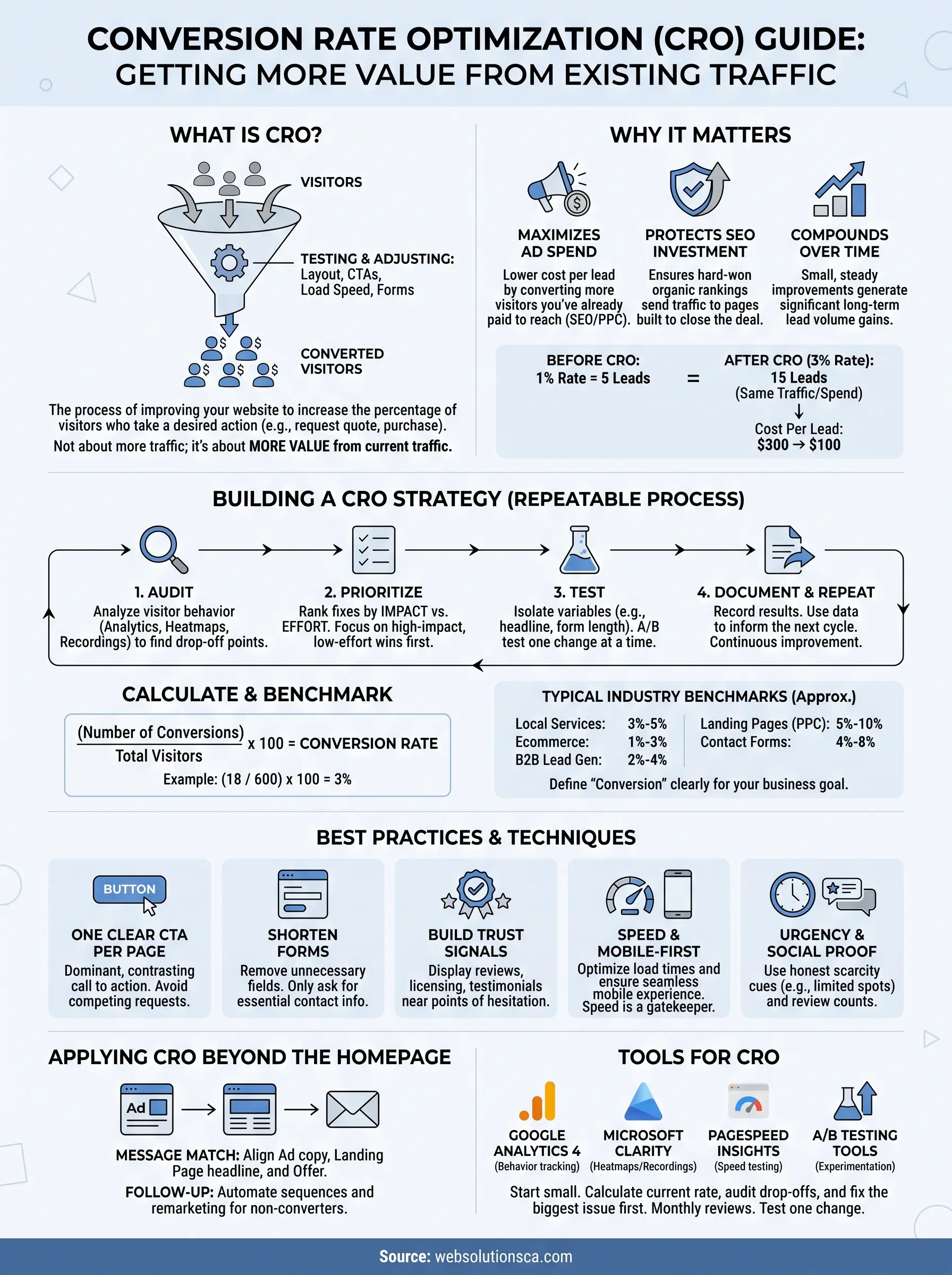
So what is conversion rate optimization, exactly? It's the process of improving your website so a higher percentage of visitors take the action you want, whether that's requesting a quote, scheduling a service, or making a purchase. It's not about chasing more traffic. It's about getting more value from the traffic you already have, through testing and adjusting things like page layout, calls to action, load speed, and form design.
In this guide, we'll break down the definition of conversion rate optimization in plain terms, walk through the CRO process step by step, and cover the strategies and best practices we use when building and improving websites for local service businesses. By the end, you'll know exactly where to start improving your own conversion rate.
Why conversion rate optimization matters for your business
Most small business owners in Orange County make the same mistake: they treat traffic as the goal instead of the starting point. You can rank on page one for "window installation Irvine" or run a flawless Google Ads campaign, but if your site takes eight seconds to load or your contact form asks for twelve fields, that traffic walks away. Conversion rate optimization is what turns visitors you already paid for, through SEO or PPC, into actual customers. Skip it, and every dollar you spend on marketing works twice as hard as it needs to.
Traffic without conversions is money on the table
Think about a local tax preparation service spending $1,500 a month on Google Ads to drive 500 visitors to their site. At a 1% conversion rate, that's five leads a month, roughly $300 per lead. Bump that same traffic to a 3% conversion rate through better page design and a clearer call to action, and you get fifteen leads for the identical ad spend, dropping the cost per lead to $100. Nothing changed about the marketing budget or the audience. The only variable was how well the website converted the people already arriving. This is the core argument for marketing conversion rate optimization: it multiplies the return on every channel you're already using, from organic search to paid ads to referrals.

A higher conversion rate is the cheapest way to grow your business, because it costs nothing extra to capture the customers you're already paying to reach.
CRO makes your other marketing spend more efficient
Here's a comparison that shows exactly what changes when you improve conversion rate without touching your ad budget:
| Metric | Before CRO | After CRO |
|---|---|---|
| Monthly visitors | 500 | 500 |
| Conversion rate | 1% | 3% |
| Leads generated | 5 | 15 |
| Ad spend | $1,500 | $1,500 |
| Cost per lead | $300 | $100 |
Applying this thinking to PPC conversion rate optimization specifically matters because paid traffic is expensive and finite. Every visitor from a Google Ads click has a dollar amount attached to it, so a landing page that converts at 2% instead of 5% is quietly wasting a large chunk of your budget every single month. We've seen local service businesses cut their cost per lead in half simply by rebuilding a landing page to match the ad's promise, remove distracting navigation, and put the phone number above the fold.
It protects the money you've already invested in SEO
Search engine optimization takes months to build momentum, and once you rank, you're competing hard to keep that position. Wasting that hard-won visibility on a website that doesn't convert is one of the most common gaps we find when auditing a new client's site. Optimizing conversions doesn't require you to abandon your SEO work; it means making sure the pages your SEO strategy sends people to are actually built to close the deal. A conversion rate optimization website audit often reveals simple fixes short of a website redesign built for conversion uplift: a service page buried three clicks deep, a quote request form that isn't mobile-friendly, or a homepage with five competing calls to action instead of one clear next step.
Small improvements compound over time
Good CRO work isn't a one-time fix, and that's actually good news for a small business with a limited budget. Testing one headline, one form layout, or one button color at a time lets you make steady, measurable gains without a full site rebuild. Over a year, a business that improves its conversion rate from 2% to 4% has effectively doubled its lead volume without spending an extra cent on traffic. That's the practical definition of conversion rate optimization in action: not a single project you finish, but a habit of testing, measuring, and adjusting that keeps paying off long after the initial changes are made.
Why local businesses can't afford to ignore it
Orange County is a competitive market for nearly every local service, from immigration consultants in Santa Ana to document preparation shops in Anaheim. When three or four competitors show up for the same search, the business that converts visitors most effectively wins the customer, regardless of who has the flashier logo or the bigger ad budget. Owners who treat their website like a static brochure are leaving that advantage on the table. Reviewing conversion data alongside a broader look at your Orange County SEO services and website design shows you exactly where visitors drop off and gives you a clear, prioritized list of what to fix first.
How to build a conversion rate optimization strategy
A real conversion rate optimization strategy isn't a checklist you run once and forget. It's a repeatable process that starts with data, moves to hypotheses, and ends with testing and measurement, then loops back to start again. Businesses that skip straight to "let's change the button color" almost always waste time chasing hunches instead of fixing what's actually broken. Building the strategy the right way means you spend your limited hours and budget on the changes most likely to move the needle.
Start by auditing what's actually happening on your site
Before changing anything, look at how visitors currently behave. Pull up Google Analytics and check where people land, how long they stay, and where they leave. Tools like heatmaps and session recordings show you exactly where someone hesitates on a form or scrolls past your call to action without noticing it. This audit stage is the foundation of any solid conversion rate optimization process, because it replaces guessing with evidence. A local plumbing company we worked with assumed their homepage was the problem, but the recordings showed people leaving from a service page with a broken phone number link. That's a five-minute fix once you know where to look.
You can't optimize what you haven't measured, so the audit always comes before the redesign.
Prioritize fixes by impact and effort
Once you've identified problems, rank them so you tackle the highest-value fixes first. A simple framework works well here:
- High impact, low effort: Fix broken forms, add a visible phone number, shorten a contact form from twelve fields to five.
- High impact, high effort: Rebuild a slow-loading page, redesign a confusing navigation menu.
- Low impact, low effort: Adjust font sizes, tweak minor copy.
- Low impact, high effort: Skip these for now; they rarely justify the time.
Working through fixes in that order keeps momentum going and shows measurable results early, which matters when you're proving the value of ongoing conversion rate optimization marketing to yourself or a business partner.
Test one change at a time
Resist the urge to redesign everything at once. If you change your headline, your form, and your images in the same week, you won't know which change actually moved your conversion rate. Isolate variables. Run one test, whether that's an A/B test on a headline or a simple before-and-after comparison on a landing page, and give it enough time and traffic to produce a reliable result. This discipline is what separates real conversion rate optimization techniques from random tinkering that happens to look like progress.
Document results and repeat
Keep a simple log of every test: what you changed, when, and what happened to your conversion rate afterward. Over months, this log becomes a record of what actually works for your specific audience, not generic advice pulled from a blog post. It also protects you from repeating failed experiments or reversing a winning change by accident. A strategy built this way compounds. Each cycle of audit, prioritize, test, and document leaves your site slightly better than before, and after a year of consistent cycles, the cumulative gain is often dramatic even though no single change felt huge on its own.
How to calculate your conversion rate and benchmark it
Before you can improve your conversion rate, you need a real number to work from, not a guess. Calculating your conversion optimization rate is simple arithmetic, but most business owners skip this step and instead rely on gut feeling about whether their site is "doing okay." Get the actual number first, then use it to set a baseline you can measure every future change against.
The basic conversion rate formula
The formula itself takes seconds to run once you know where to pull the numbers from Google Analytics or your form software.
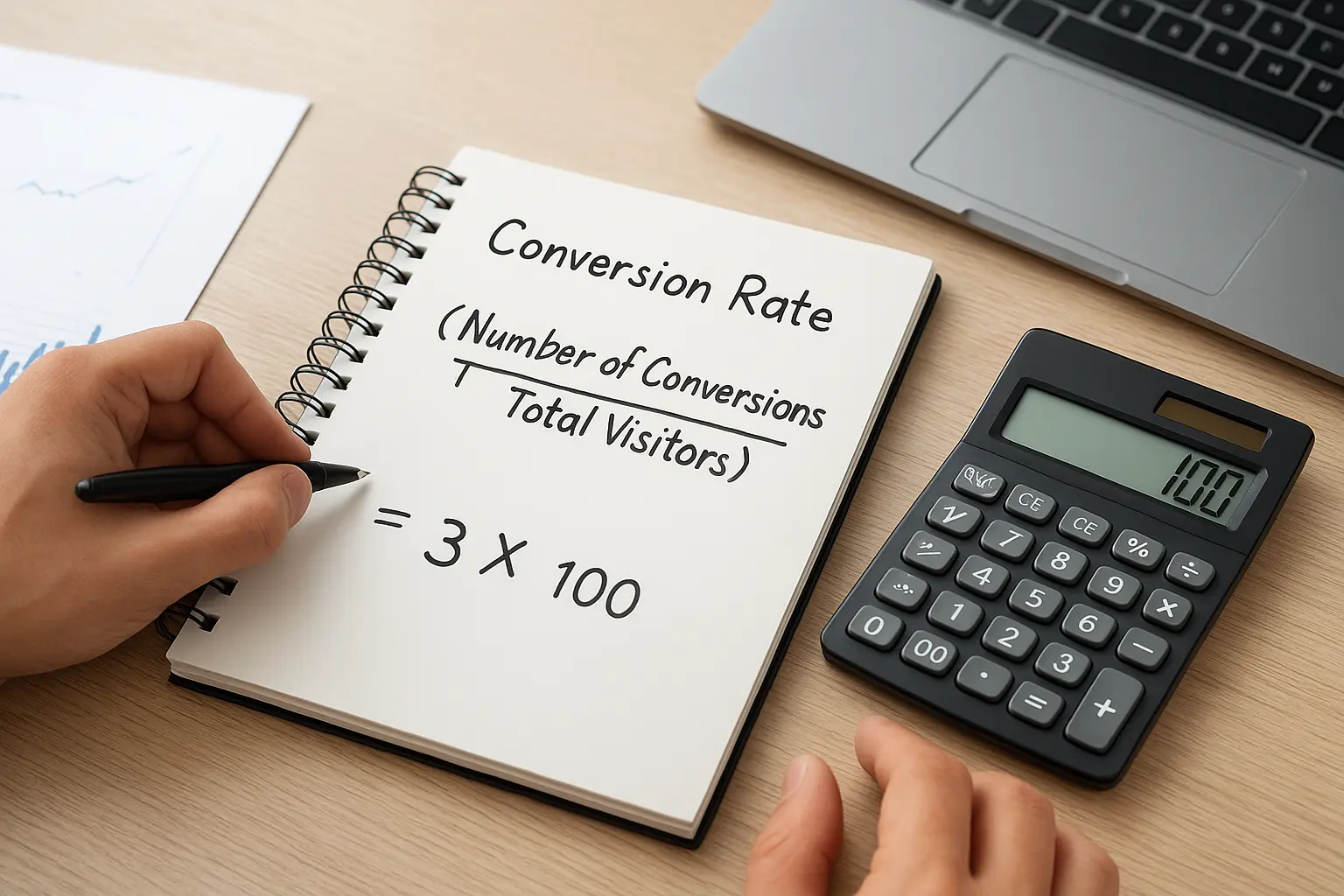
Conversion Rate = (Number of Conversions / Total Visitors) x 100

Example:
18 form submissions / 600 visitors x 100 = 3% conversion rate
Run this calculation monthly, not just once, so you can track whether your changes are actually moving the number in the right direction.
What counts as a conversion depends on your goal
Before you calculate anything, decide what a "conversion" actually means for your business. For a tax preparation service, it might be a completed contact form. For a window and door company, it could be a scheduled in-home estimate. For an ecommerce shop, it's a completed checkout, which brings its own set of Shopify conversion rate tactics to test. Defining this clearly up front prevents you from tracking vanity metrics like page views while ignoring the actions that actually generate revenue. If you run paid campaigns, set up conversion tracking in Google Ads and Google Analytics so every lead source reports back accurately instead of guessing which channel deserves credit.
A conversion rate only means something once you've defined exactly what counts as a conversion for your specific business.
Industry benchmarks to compare against
Once you have your number, compare it against typical ranges for your industry so you know whether you're ahead, behind, or right on track. These figures come from aggregated industry data and should be treated as a starting point, not a hard target:
| Industry | Typical Website Conversion Rate |
|---|---|
| Local services (plumbing, HVAC, legal) | 3% to 5% |
| Ecommerce | 1% to 3% |
| B2B lead generation | 2% to 4% |
| Landing pages (PPC-driven) | 5% to 10% |
| Contact/quote request forms | 4% to 8% |
Don't panic if your number sits below these ranges. Benchmarks vary widely by traffic source, industry competitiveness, and how well your ads match your landing page, so treat these as a rough compass rather than a scorecard.
Segment your data for an accurate picture
Looking at one blended conversion rate across your whole site hides more than it reveals. Break the number down by traffic source, comparing organic search visitors against paid ad visitors, since paid traffic typically converts differently because of the intent behind the click. Split it further by device, because mobile visitors often convert at a noticeably lower rate than desktop visitors if your site isn't fully optimized for smaller screens. A local service business we reviewed found their desktop conversion rate sat at 5%, respectable by any measure, while mobile lagged at just 1.5% because their quote form required pinch-zooming to complete. Segmenting the data pointed straight to the fix instead of leaving them guessing at a single average number that masked the real problem.
Best practices and techniques that drive conversions
Some fixes apply to almost every small business site we touch, regardless of industry. These aren't theories; they're patterns we see repeated across immigration consultants, tax preparers, and home service companies alike. Treat this list as your starting toolkit for conversion rate optimization best practices, then adapt based on what your own data tells you.
Give every page one clear call to action
Confused visitors don't convert, they leave. If your homepage asks people to "Call Now," "Get a Quote," "Schedule Online," and "Chat with Us" all in the same viewport, you've split their attention four ways instead of guiding them toward one decision. Pick the single action that matters most for that page, usually a phone call or a short form, and make it visually dominant with contrasting color and generous white space around it. Everything else on the page should support that one action, not compete with it.

The website that asks for one clear action almost always outperforms the one that asks for five.
Cut every unnecessary field from your forms
Long forms kill conversions faster than almost anything else on a local service site. A twelve-field quote request form feels like a job application, and most visitors bail before finishing it. Strip your form down to what you genuinely need to make first contact, usually name, phone number, and a one-line description of what they need. You can gather the rest during the actual sales conversation.
- Ask for phone or email, not both, unless you truly need it
- Skip dropdown menus with more than five options
- Remove address fields until after the first call
- Add a visible "takes 30 seconds" note near the submit button
Build trust where visitors hesitate
Hesitation is where conversions die, and trust signals are what push people past it. Reviews, licensing badges, before-and-after photos, and a real phone number in the header all tell a visitor this is a legitimate business worth handing their information to. Nervous buyers, especially in fields like immigration or tax prep where the stakes feel personal, need reassurance before they'll fill out anything. Placing a short testimonial directly next to your contact form, rather than buried on a separate page, keeps that reassurance visible at the exact moment someone is deciding whether to submit.
Fix speed and mobile issues before anything else
Speed isn't a nice-to-have, it's a gatekeeper. Google's own research has shown that as page load time increases from one to five seconds, the probability of a visitor bouncing rises sharply, and no amount of clever copywriting recovers a visitor who already left. Work through image optimization, cut unnecessary scripts, and test your site on an actual phone, not just a desktop browser, since most local searches now happen on mobile. These are core conversion rate optimization techniques precisely because they remove friction before a visitor even reaches your call to action.
Use urgency and social proof without overdoing it
Reviews and simple urgency cues, like "limited appointments this week" or "only two openings left," nudge undecided visitors toward action, but only when they're true. Fabricated scarcity gets noticed and damages trust faster than it builds conversions. Pair honest urgency with a review count or star rating near your call to action, and you'll usually see a modest but real lift without changing anything else on the page.
Applying CRO to your website, ads, and marketing campaigns
Conversion rate optimization doesn't stop at your homepage. The same principles you use to fix a contact form apply just as well to a paid landing page, a retargeting ad, or the automated email that goes out after someone requests a quote. Treating CRO as something that touches every channel, not just your main site, is what separates conversion rate optimization strategies that actually move revenue from ones that only tidy up a homepage nobody clicks past.
Match every landing page to its traffic source
A visitor who clicks a Google Ad for "emergency window repair" expects to land on a page about emergency window repair, not your general services homepage with six unrelated offerings competing for attention. Message match between the ad and the landing page is one of the fastest ways to lift conversions, because it removes the split-second doubt of "did I click the right thing?" Build a landing page designed to convert for each major service or ad group instead of funneling all your traffic to one page. Keep the headline, image, and offer on the page consistent with whatever promise got the click in the first place.

The moment a landing page doesn't match the ad that sent someone there, you've already lost half your conversions before the page even finishes loading.
Apply the same discipline to PPC campaigns
Paid traffic gives you the fastest feedback loop for testing, since you can see results in days instead of the months SEO takes to shift. Use that speed to your advantage:
- Send each ad group to its own landing page, never to a generic homepage
- Test one headline variation per campaign at a time, not five at once
- Set up conversion tracking in Google Ads before you spend a single dollar, so every click reports back accurately
- Pause underperforming keywords fast; they're wasting a finite budget every hour they stay live
- Review the Google Ads Help Center documentation on conversion actions if you're setting up tracking for the first time
A campaign run by a Google Ads management agency and tied to a properly optimized landing page consistently outperforms the same budget spread across a generic site, simply because every click lands somewhere built to close that specific visitor.
Extend optimization into follow-up and remarketing
Many businesses stop optimizing the moment someone submits a form, but the conversion isn't finished until that lead turns into a paying customer. Automated follow-up sequences, text confirmations, and remarketing ads to visitors who didn't convert the first time are all part of a complete conversion rate optimization process. If a visitor browses your services page and leaves without submitting a form, a retargeting ad reminding them of your offer, paired with a review or testimonial, often recovers leads that would otherwise disappear for good. Pairing this with workflow automation for lead follow-up means no submitted form sits untouched for hours while a competitor answers the phone first.
Keep campaigns and website changes in sync
When you test a new headline or offer on a landing page, update your ad copy and email templates to match, and vice versa. Disconnected messaging across channels confuses visitors and quietly drags down conversion rates everywhere, even on pages that individually look fine. Reviewing your website, ads, and follow-up sequences together, rather than as separate projects, is what keeps every dollar of traffic working toward the same clear goal.
Real-world conversion rate optimization examples
Theory only goes so far. Seeing how these principles play out on actual local business sites makes the strategy easier to apply to your own. The examples below are composites drawn from patterns we see repeatedly across Orange County service businesses, and each one shows a specific fix tied to a measurable result.
A tax preparation service cuts its form abandonment in half
A tax prep client in Santa Ana had a contact form with eleven fields, including address, referral source, and a dropdown for "how did you hear about us." Analytics showed most visitors started the form and never finished it. Form abandonment was the single biggest leak in their funnel. We cut the form down to name, phone number, and a one-line note about their tax situation, moving everything else to a follow-up call. Submissions rose from roughly 2% to 4.5% of visitors within six weeks, without a single dollar of extra ad spend.
Removing fields from a form almost always beats adding features to a form.
A window and door company fixes message match on paid ads
This Irvine-based company was running Google Ads for "emergency window replacement" but sending every click to a generic homepage listing eight different services. Visitors landed, saw no mention of emergencies or windows specifically, and bounced. Building a dedicated page modeled on service landing page designs that convert, matching the ad's exact headline and including a same-day scheduling option, raised the page's conversion rate from 1.8% to 6.1%. Nothing changed about the ad targeting or budget. The fix was entirely on the landing page side, which is the core lesson behind PPC conversion rate optimization: the click is only half the job.
An immigration consultant builds trust at the point of hesitation
Visitors researching immigration services often hesitate longer than most, since the stakes feel personal and the process feels intimidating. This Anaheim-based consultant had a clean site and a functional form, but conversions stayed flat around 1.5%. Session recordings showed visitors scrolling down to a testimonials page, then leaving instead of returning to the form. Moving three short client testimonials directly next to the contact form, along with a small badge noting years in practice, lifted conversions to 3.2% over two months. The information didn't change. Its placement did.
A document preparation service solves a mobile-only problem
A Fountain Valley document prep business had a healthy 5% desktop conversion rate but only 1.4% on mobile, despite mobile traffic making up over 60% of visits. The culprit was a quote request form that required pinch-zooming to select from a dropdown menu. Rebuilding the form with larger tap targets and removing the dropdown in favor of simple text fields brought mobile conversions up to 4.1%, nearly matching desktop performance. This is a textbook case for why segmenting your data by device matters before you decide what to fix.
| Business type | Problem identified | Fix applied | Conversion rate change |
|---|---|---|---|
| Tax preparation | 11-field form | Cut to 3 fields | 2% to 4.5% |
| Window and door company | Ad-to-page mismatch | Dedicated landing page | 1.8% to 6.1% |
| Immigration consultant | Testimonials buried on separate page | Moved next to form | 1.5% to 3.2% |
| Document preparation | Mobile form unusable | Rebuilt with larger tap targets | 1.4% to 4.1% |
Each of these cases started with the same audit-and-prioritize approach covered earlier in this guide. None required a full site rebuild or a bigger marketing budget. The common thread is that every fix targeted a specific, measured point of friction rather than a general hunch about what "looked outdated." That's the difference between guessing and running a real conversion rate optimization strategy.
Tools that make conversion rate optimization easier
You don't need a massive budget to run a legitimate CRO program. Most of the tools that matter are either free or cost a fraction of what a single missed lead is worth. What matters more than the price tag is picking the right tool for the right job, since a heatmap tells you something completely different than an A/B testing platform. Below is the toolkit we actually use when auditing and improving client sites, drawn from the best conversion rate optimization tools for small businesses.
Analytics tools to see where visitors go
Everything starts with Google Analytics 4, which is free and shows you traffic sources, bounce rates, and where visitors drop off in a funnel. Pair it with Google Search Console to see which search queries actually bring people to your site, since traffic quality varies wildly by keyword. Google's own Analytics documentation walks through setting up conversion events correctly, which matters because a misconfigured goal will feed you bad data for months without you noticing.
A tool only helps if the data it collects actually answers the question you're asking, so set up your goals before you start looking for problems.
Heatmaps and session recordings for behavior insight
Numbers tell you what happened, but heatmaps and session recordings show you why. Microsoft Clarity is free and records real visitor sessions, letting you watch someone hesitate over a form field or scroll past a call to action without clicking it. Watching even ten recordings often reveals a friction point that weeks of staring at analytics dashboards would miss. Look specifically for:
- Rage clicks, where someone taps the same spot repeatedly because nothing responded
- Form fields visitors start but abandon
- Scroll depth that stops well above your main call to action
- Mobile taps that miss buttons because they're too small or too close together
Speed and mobile testing tools
Since page speed directly affects conversion rate optimization strategies built around reducing friction, run your site through Google PageSpeed Insights regularly, not just once. It flags specific issues like unoptimized images or render-blocking scripts, and gives you a mobile score separate from desktop, which matters given how much local search traffic now arrives on a phone. Fixing the top two or three flagged issues usually delivers a noticeable speed gain without a full rebuild, and understanding what makes a website slow helps you decide which ones to tackle first.
A/B testing and form optimization tools
Once you've identified what to fix, an A/B testing tool lets you prove whether the fix actually worked rather than assuming it did. Simple split-testing plugins exist for WordPress sites, and platforms built into most modern page builders let you run two versions of a headline or form side by side. Combine this with form analytics that show exactly which field causes the most drop-off, so you're editing based on evidence instead of a hunch about which question feels too personal.
Tying tools into your existing systems
Collecting data across four or five separate tools becomes overwhelming fast if nothing talks to each other. Connecting your form submissions, tracking, and follow-up sequences through workflow automation means a lead captured through a tested, optimized form gets an instant response instead of sitting in an inbox. The tools matter less than the habit of actually reviewing what they show you every month and acting on it.
Putting CRO into practice
You don't need a bigger ad budget or a full site rebuild to get more leads from the traffic you already have. Conversion rate optimization works because it fixes the gap between visitors arriving and visitors actually calling, booking, or filling out a form. Start small: calculate your current conversion rate, audit where visitors drop off, and fix the highest-impact issue first, whether that's a bloated form or a slow-loading page.
Giving this the same attention you give your ad spend or your SEO rankings is what separates businesses that grow steadily from ones that keep paying for traffic that never converts. Reviewing your numbers monthly and testing one change at a time turns CRO into a habit instead of a one-time project.
If you'd rather have someone audit your site, ads, and follow-up process for you, talk to Web Solutions CA about web design in Orange County built to convert, with a marketing system designed to generate leads from day one.