
Your website gets visitors, but too few of them turn into calls, form submissions, or sales. That gap between traffic and revenue is exactly what a conversion rate optimization tool is built to close. Instead of guessing why people leave without buying, these platforms show you where they click, where they hesitate, and where they abandon your site entirely.
If you're comparing options right now, you want a straight answer on which conversion rate optimization software actually delivers for a small business budget, not an enterprise one. This list breaks down the best conversion rate optimization tools available in 2026, covering heatmaps, A/B testing, session recordings, and on-site surveys, so you can see what each platform does well and where it falls short.
We built this guide the way we evaluate tools for our own Orange County clients: based on ease of setup, pricing that fits a lean budget, and real impact on lead generation. Whether you run an ecommerce shop, a service business, or a local landing page, you'll find a conversion rate optimization platform here that matches your goals and your budget.
1. Google Analytics (GA4)
Google Analytics, now in its GA4 version, is the free foundation every small business should have running before spending a dollar on any other conversion rate optimization tool. Without it, you're optimizing blind. GA4 tells you which pages people land on, how long they stay, and where they drop off before completing a purchase, filling out a form, or calling your business.
What it does
GA4 tracks user behavior across your entire website and, if you set it up correctly, across your app too. It replaced Universal Analytics in 2023 with an event-based data model, meaning every click, scroll, and form submission can become a trackable action. For a service business or ecommerce shop, this means you can finally answer the question that matters most: which pages and traffic sources actually produce leads and sales, not just visits.
A conversion rate optimization tool is only as useful as the data feeding it, and GA4 is the free data layer most other tools plug into.
Key features
Here's what makes GA4 worth setting up correctly from day one:
- Custom conversion events for calls, form fills, purchases, and downloads
- Funnel exploration reports that show exactly where users abandon a multi-step process
- Audience segmentation by device, location, source, and behavior
- Integration with Google Ads for tracking ad spend against actual conversions
- Real-time reporting to see traffic and conversions as they happen
Google documents the full event and conversion setup in its own GA4 support resources, which is worth bookmarking if you're setting this up yourself.
Best for
Every small business needs GA4, full stop, but it's especially valuable for owners who already run Google Ads or rely on organic search traffic. If you're trying to figure out whether your landing page, blog post, or service page is actually generating leads, GA4 gives you the numbers before you invest in a more specialized conversion rate optimization platform. It's less useful on its own for businesses that need to see visual behavior patterns like scroll depth or rage clicks, which is where heatmap tools come in later on this list.
Pricing
GA4 is free for the vast majority of small businesses, and the free tier covers more than enough data volume for most local service providers and small ecommerce stores.
| Plan | Cost | Best suited for |
|---|---|---|
| GA4 Standard | Free | Nearly all small businesses |
| Google Analytics 360 | Custom enterprise pricing | High-traffic sites needing advanced data limits and support |
One caution worth mentioning: GA4's interface has a real learning curve compared to the old Universal Analytics setup, and misconfigured conversion events are one of the most common mistakes we see when auditing a new client's site. If numbers don't match what you expect, check your event setup before assuming your traffic or conversion rate is the problem.
2. Microsoft Clarity
Microsoft Clarity is the tool we recommend right after GA4, mostly because it costs nothing and takes ten minutes to install. Where Google Analytics tells you what happened in numbers, Clarity shows you what happened visually, through heatmaps and session recordings that reveal how real visitors actually move through your site.

What it does
Clarity records anonymized sessions of real visitors and turns that data into heatmaps and session replays you can watch like a video. You see where people click, how far they scroll, and which parts of your page they ignore entirely. For a small business owner without a UX background, this is often the first time you actually watch a stranger try to use your site, and it's usually more revealing than any spreadsheet.
Watching even ten real session recordings will teach you more about your site's friction points than a week of staring at analytics dashboards.
Key features
Microsoft built Clarity to work alongside GA4 rather than replace it, and the integration between the two is genuinely smooth:
- Heatmaps showing clicks, scrolls, and taps by page
- Session recordings of individual visitor journeys
- Rage click detection that flags where users click repeatedly out of frustration
- Dead click tracking for buttons or links that don't respond
- Native GA4 integration for cross-referencing behavior with conversion data
Best for
Businesses that suspect something on a specific page, a form, a checkout step, a pricing table, is causing drop-off but can't pinpoint what should start here. It's especially useful for local service providers testing a new landing page design or diagnosing why a contact form isn't converting. As a conversion rate optimization tool, it pairs particularly well with any A/B testing platform later on this list, since Clarity tells you what to test and the testing tool tells you if your fix actually worked.
Pricing
Clarity is completely free, with no visitor caps, no paywalled features, and no upsell tier. Microsoft documents its data handling and setup process directly, which is unusual generosity for a tool this capable, and there's genuinely no reason a small business site should skip installing it.
3. Hotjar
Hotjar built its reputation on the same heatmap and recording concept as Microsoft Clarity, but it layers on feedback tools and survey features that push it closer to a full conversion rate optimization platform rather than just a behavior tracker. If Clarity is your free starting point, Hotjar is often the paid upgrade small businesses reach for once they need direct visitor feedback, not just click patterns.
What it does
Hotjar combines heatmaps and session recordings with on-site surveys and feedback widgets, so you can watch what visitors do and then ask them why they did it. A visitor abandoning your checkout page can be shown a quick one-question survey asking what stopped them, giving you actual quotes instead of guesswork. That combination of behavioral data and direct visitor input is what sets Hotjar apart from tools that only show you the click patterns.
Watching behavior tells you what happened, but asking visitors directly tells you why, and Hotjar is built to do both from the same dashboard.
Key features
Hotjar packages several research tools into one subscription:
- Heatmaps for clicks, moves, and scroll depth
- Session recordings with filtering by device, page, or behavior
- On-site surveys triggered by exit intent or specific pages
- Feedback widgets for open-ended visitor comments
- Funnel and form analysis to spot exactly where multi-step forms lose people
Best for
Ecommerce shops and service businesses running longer forms or checkout flows benefit most from Hotjar, since the survey feature captures friction that heatmaps alone can miss. It's also a solid fit for a business already using Clarity but ready to add direct customer feedback into the mix without hiring a UX researcher.
Pricing
Hotjar offers a limited free plan capped at daily sessions, with paid tiers scaling by traffic volume.
| Plan | Cost | Best suited for |
|---|---|---|
| Basic | Free (limited sessions) | Testing the tool on a low-traffic site |
| Plus | Around $32/month | Small businesses ready for more session volume |
| Business | Around $80/month | Growing sites needing surveys and deeper filters |
Check Hotjar's own pricing page before committing, since session caps and feature limits shift as the company updates its plans.
4. Crazy Egg
Crazy Egg has been in the heatmap business longer than almost anyone else, and it still holds up as one of the most approachable conversion rate optimization tools for a small business owner who wants visual answers without a steep learning curve. Where Hotjar leans into surveys and feedback, Crazy Egg leans into visual comparison, showing you exactly which page layout wins before you commit to a redesign.

What it does
Crazy Egg tracks clicks, scrolls, and mouse movement across your pages, then layers that data into heatmaps, scrollmaps, and confetti reports that break clicks down by traffic source. Its standout feature is A/B testing built for visual editors, letting you swap headlines, images, or button colors without touching a line of code. That makes it a practical middle step between passive behavior tracking and full-blown testing platforms like VWO.
If you want to see which version of a page actually wins, not just guess which one looks better, this is the kind of tool built for that exact question.
Key features
Crazy Egg's dashboard bundles several visual research tools into one subscription:
- Heatmaps and scrollmaps for click and scroll behavior by page
- Confetti reports segmenting clicks by referral source, device, or browser
- A/B testing with a drag-and-drop visual editor, no developer required
- Session recordings for individual visitor playback
- List reports ranking every clickable element by popularity
Best for
Small business owners who want to run simple split tests, like testing two headlines or button placements, without hiring a developer will get the most value here. It's a strong fit for a local service site or landing page where the design team is one person juggling several other jobs.
Pricing
Crazy Egg keeps its pricing structure simple compared to enterprise-focused testing platforms.
| Plan | Cost | Best suited for |
|---|---|---|
| Basic | Around $29/month | Solo sites needing heatmaps and basic recordings |
| Standard | Around $49/month | Small businesses adding A/B testing |
| Plus | Around $99/month | Sites with multiple pages needing more traffic volume |
A 30-day trial is typically available, which gives you enough time to test a real page redesign before paying anything.
5. VWO
VWO (Visual Website Optimizer) is one of the most established names in conversion rate optimization software, built for businesses that want to move past simple heatmaps into structured, statistically valid testing. Where Crazy Egg gives you a visual editor for basic split tests, VWO adds a full testing engine with multivariate testing, server-side experiments, and behavioral targeting layered on top.
What it does
VWO lets you run A/B tests, multivariate tests, and split URL tests on any page, then measures which version drives more conversions with statistical confidence rather than guesswork. It also bundles heatmaps, session recordings, and on-page surveys into the same platform, so you're not stitching together three separate subscriptions to research and test a page change.
Running a test without statistical confidence is just changing your website and hoping, and VWO exists to remove that guesswork.
Key features
VWO's platform covers the full research-to-testing workflow in one place:
- A/B and multivariate testing with a visual editor and code editor option
- Heatmaps and session recordings built into the same dashboard
- On-page surveys for direct visitor feedback
- Behavioral targeting to serve different experiences by visitor segment
- Server-side testing for backend changes beyond simple page edits
Best for
Growing service businesses and ecommerce shops that have outgrown basic heatmap tools and want a proper testing structure will get the most from VWO. If your site gets enough traffic to reach statistical significance within a few weeks, this conversion rate optimization platform justifies its cost quickly. Smaller sites with light traffic should stick with Crazy Egg or Hotjar until volume grows.
Pricing
VWO structures pricing around traffic volume and feature depth rather than a flat monthly fee.
| Plan | Cost | Best suited for |
|---|---|---|
| Free plan | Free (limited features) | Testing the platform on low-traffic pages |
| Growth | Starts around $217/month | Small businesses ready for structured A/B testing |
| Pro | Custom pricing | Sites needing multivariate and server-side testing |
Check VWO's current plan details directly before signing up, since traffic tiers and included features shift as the company updates its packaging.
6. Unbounce
Unbounce shifts the focus from testing existing pages to building new ones fast. It's a dedicated landing page builder designed around one goal: getting a page live and converting without waiting on a developer or designer. For small businesses running paid ads or seasonal promotions, that speed matters more than almost anything else on this list.

What it does
Unbounce gives you a drag-and-drop builder for landing pages, popups, and sticky bars, plus built-in AI copy and conversion suggestions that flag weak headlines or missing trust signals before you publish. Every page comes with A/B testing baked in, so you're not bolting on a separate tool to compare two versions of your offer. It's built specifically for the moment a visitor lands from an ad and needs to convert in seconds, not the broader site experience GA4 or Clarity track.
A dedicated landing page tool exists because your homepage was never designed to convert a single ad campaign, and forcing it to do that job usually costs you leads.
Key features
Unbounce packages page-building and testing into one workflow:
- Drag-and-drop builder with mobile-responsive templates
- Built-in A/B testing on any published page
- AI-powered copy and conversion insights (Smart Copy and Smart Traffic)
- Dynamic text replacement to match landing pages to ad keywords
- Popups and sticky bars for lead capture without a full page rebuild
Best for
Businesses running Google Ads or Facebook Ads campaigns benefit most, since Unbounce lets you spin up a dedicated page per campaign instead of sending paid traffic to a generic homepage. It's a strong conversion rate optimization software pick for local service providers who need a new promotional page live within a day, not a week.
Pricing
Unbounce prices by traffic and number of published pages, not by feature tier alone.
| Plan | Cost | Best suited for |
|---|---|---|
| Build | Around $99/month | Solo landing pages without AI features |
| Experiment | Around $149/month | Businesses adding A/B testing regularly |
| Optimize | Around $249/month | Higher-traffic campaigns needing Smart Traffic |
Annual billing typically knocks the monthly cost down, worth checking before you commit to a plan.
7. Leadpages
Leadpages competes directly with Unbounce, but it earns its spot on this list by being the cheaper, simpler option for a small business that just needs a page live today, not a full testing suite. If Unbounce is built for marketers who want AI copy suggestions and Smart Traffic routing, Leadpages is built for the owner who wants a clean landing page without a learning curve.
What it does
Leadpages gives you a drag-and-drop builder for landing pages, pop-ups, and alert bars, all aimed at collecting leads faster than a standard website page. It includes built-in conversion tools like countdown timers and opt-in forms, plus real-time analytics on visits, conversion rate, and lead source. As a conversion rate optimization tool, its main strength is speed to publish rather than depth of testing.
A landing page that goes live today and converts at 20% beats a perfect page still sitting in a designer's queue next month.
Key features
Leadpages keeps its feature set focused on lead capture rather than trying to be an all-in-one platform:
- Drag-and-drop page builder with mobile-optimized templates
- Unlimited landing pages on paid plans, with no traffic caps
- A/B testing for headlines, images, and calls to action
- Pop-ups and alert bars for lead capture on existing pages
- Payment integration for selling directly from a page
Best for
Solo operators and small service businesses that want one dependable page builder without paying for AI features they'll never use fit Leadpages well. It's also a solid choice for anyone who wants to sell a single product or service directly from a page, since the built-in checkout removes a step most conversion rate optimization platform options don't handle natively.
Pricing
Leadpages generally undercuts Unbounce on cost while still covering the essentials most small businesses need.
| Plan | Cost | Best suited for |
|---|---|---|
| Standard | Around $37/month | Solo businesses needing one site's worth of pages |
| Pro | Around $79/month | Businesses adding A/B testing and online sales |
Annual billing lowers the effective monthly rate noticeably, so check current pricing before choosing monthly.
8. OptinMonster
OptinMonster shifts focus again, this time toward capturing leads from traffic you already have instead of building new pages or testing existing ones. It's a popup and opt-in builder that layers behavioral targeting on top of exit-intent triggers, making it one of the more practical conversion rate optimization tools for a small business that just wants more emails and phone numbers from the visitors already landing on its site.
What it does
OptinMonster creates popups, slide-ins, floating bars, and gamified spin-to-win wheels that trigger based on visitor behavior rather than a fixed timer. Its exit-intent detection watches cursor movement and fires an offer the moment someone looks ready to leave, which recovers leads that would otherwise vanish for good. Unlike Unbounce or Leadpages, OptinMonster doesn't build full pages, it enhances the site you already have.
Most visitors never scroll back up once they start moving toward the back button, so catching that exit moment is often the cheapest lead you'll ever generate.
Key features
OptinMonster bundles targeting logic most small business tools skip entirely:
- Exit-intent popups triggered by cursor movement toward the browser close or back button
- Behavior-based targeting by page, referral source, or time on site
- A/B testing for popup copy, design, and timing
- Drag-and-drop campaign builder with mobile-specific triggers
- Integrations with major email platforms and CRMs for instant lead delivery
Best for
Ecommerce shops and content-heavy service sites trying to capture emails before a visitor bounces get the most value here. It also suits any business already running paid traffic to a landing page, since a well-timed popup can salvage leads that a static form would miss, especially when paired with a dedicated conversion rate optimization platform like Unbounce for the page itself.
Pricing
OptinMonster prices by traffic volume and feature access rather than a flat rate.
| Plan | Cost | Best suited for |
|---|---|---|
| Basic | Around $9/month (billed annually) | Solo sites needing simple popups |
| Plus | Around $19/month | Small businesses adding A/B testing |
| Pro | Around $29/month | Sites needing exit-intent and full targeting |
Annual billing is required to access the lowest published rates, so factor that into your budget before signing up.
9. HubSpot
HubSpot moves beyond single-purpose tools into full CRM territory, bundling marketing, sales, and service data into one system that tracks a lead from first click to closed deal. For a small business juggling spreadsheets, email, and a separate form tool, HubSpot consolidates that mess into one dashboard, and its free CRM tier makes it one of the more accessible conversion rate optimization platform options on this list despite its enterprise reputation.
What it does
HubSpot connects your website forms, email campaigns, and sales pipeline so you can see exactly which marketing touchpoint actually produced a paying customer, not just a form fill. Its smart forms and lifecycle stages track a contact through every interaction, letting you spot where leads stall between first visit and signed contract. That visibility into the full funnel, not just the landing page, is what separates HubSpot from the standalone tools earlier on this list.
A lead that fills out your form isn't a conversion until they become a customer, and HubSpot is built to track that entire journey, not just the click.
Key features
HubSpot bundles CRM, marketing, and reporting tools into a single platform:
- Free CRM with contact and deal tracking built in
- Smart forms that adapt questions based on what a contact already told you
- Landing page and email builders with native A/B testing
- Lifecycle reporting showing conversion rates at every funnel stage
- Workflow automation for follow-up emails and lead assignment
Best for
Service businesses managing a real sales pipeline, quotes, consultations, contracts, get the most value here, since HubSpot ties website conversions directly to revenue. It's overkill for a business that only needs a simple landing page, but a strong fit once you're ready to combine conversion rate optimization software with actual lead management.
Pricing
HubSpot's free tier covers a surprising amount before you need to upgrade.
| Plan | Cost | Best suited for |
|---|---|---|
| Free CRM | Free | Solo businesses starting to track leads |
| Starter | Around $20/month | Small teams adding automation and reporting |
| Professional | Around $890/month | Growing businesses needing advanced workflows |
Costs climb fast once you add contacts and marketing seats, so map your actual needs before upgrading past the free tier.
10. SurveyMonkey
SurveyMonkey shifts the focus from watching behavior to asking questions directly, and it remains one of the most recognizable names in online surveys for good reason. Where Hotjar's surveys live inside a behavior-tracking platform, SurveyMonkey is built purely for collecting structured feedback at scale, whether that's a post-purchase satisfaction check or a broader customer research project.
What it does
SurveyMonkey lets you build surveys with dozens of question types, then distribute them by email, embedded link, or website popup. Its survey logic and branching adjust questions based on how someone answers a previous one, so a customer who says they had a bad experience gets follow-up questions a happy customer never sees. For a small business, this turns vague complaints into specific, actionable feedback you can actually act on.
A survey that asks the right follow-up question at the right moment tells you more than a hundred generic five-star ratings ever will.
Key features
SurveyMonkey packages research tools most small businesses would otherwise need a separate consultant for:
- Skip logic and branching to personalize question paths
- Pre-built templates for customer satisfaction, NPS, and market research
- Website and email distribution with embeddable widgets
- Analytics dashboard with filtering by demographic or response pattern
- Integrations with CRMs and email marketing platforms
Best for
Businesses that need structured customer feedback beyond what an exit-intent popup or a two-question survey can capture will get the most from SurveyMonkey. It suits service businesses running periodic satisfaction checks and ecommerce shops wanting deeper post-purchase insight than a star rating provides. As a conversion rate optimization tool, it works best paired with a heatmap tool like Clarity, since surveys tell you why while heatmaps show you where.
Pricing
SurveyMonkey's pricing scales with the number of questions and responses you need.
| Plan | Cost | Best suited for |
|---|---|---|
| Free | Free (limited questions/responses) | Occasional, short surveys |
| Standard | Around $39/month | Small businesses running regular feedback surveys |
| Team Advantage | Custom pricing | Businesses needing multiple users and advanced logic |
Annual billing brings the effective monthly rate down noticeably, so compare both options before choosing a plan.
11. Typeform
Typeform takes the same idea as SurveyMonkey, asking visitors questions, and rebuilds it around design and conversation rather than spreadsheet-style forms. Its one-question-at-a-time format feels more like a chat than a survey, which is why small businesses often see higher completion rates on Typeform forms than on a traditional multi-field contact page. As a conversion rate optimization tool, its real strength is turning a boring lead form into something people actually finish filling out.

What it does
Typeform presents one question per screen with smooth transitions, conditional logic, and visual polish that standard HTML forms rarely match. It works for lead capture forms, quizzes, product recommendation flows, and customer surveys, all built through the same drag-and-drop editor. The conversational format reduces the visual overwhelm of a long form, which matters most on mobile, where a wall of fields tends to scare people off before they submit anything.
A form that feels like a conversation gets finished more often than one that feels like paperwork, and that gap shows up directly in your conversion rate.
Key features
Typeform's editor focuses on design and logic rather than raw data volume:
- One-question-at-a-time flow with animated transitions
- Logic jumps that branch questions based on prior answers
- Custom design themes matching your brand colors and fonts
- Native integrations with CRMs, email tools, and Google Sheets
- Calculator and scoring logic for quizzes and lead qualification
Best for
Businesses using quizzes, applications, or qualifying questions before a sales call get the most value from Typeform, since the format keeps people engaged through longer question sets. It also suits any local service provider replacing a plain contact form with something that captures more detail without scaring off mobile visitors.
Pricing
Typeform prices by number of responses rather than questions asked.
| Plan | Cost | Best suited for |
|---|---|---|
| Free | Free (limited responses) | Testing the format on a low-traffic page |
| Basic | Around $29/month | Small businesses replacing a standard contact form |
| Plus | Around $59/month | Businesses adding logic jumps and branding removal |
Response limits reset monthly, so check your expected volume before choosing a tier.
12. Google Search Console
Google Search Console rounds out this list because conversion rate optimization means nothing if nobody finds your site in the first place. It's free, it's built by Google, and it tells you exactly how your pages perform in search results before a visitor ever lands on your page. Pair it with GA4 from the top of this list and you cover both sides of the funnel: how people find you and what they do once they arrive.
What it does
Search Console shows you which queries bring people to your site, your average position for those queries, and your click-through rate for every page Google indexes. It also flags technical problems, broken pages, slow mobile loading, missing structured data, that quietly suppress traffic before optimization even becomes relevant. Think of it as the diagnostic layer sitting one step earlier in the funnel than any heatmap or A/B testing tool on this list.
You can optimize a landing page all day, but if Search Console shows nobody's finding it in search, that page will never get enough traffic to test.
Key features
Google packs a surprising amount of diagnostic power into a free tool:
- Performance reports showing clicks, impressions, and average position by query and page
- Index coverage reports flagging pages Google can't crawl or has excluded
- Core Web Vitals data measuring load speed and visual stability
- Mobile usability alerts for pages that render poorly on phones
- Manual action notices if Google penalizes a page for policy violations
Google documents setup and verification steps directly in its own Search Console Help resources.
Best for
Every small business with a website should have this running, but it's especially valuable for owners investing in SEO or content marketing, since it's the only place to see actual search query data driving traffic. It's a natural companion to GA4 rather than a replacement, since Search Console covers pre-click behavior and GA4 picks up everything after.
Pricing
Search Console is entirely free, with no paid tier, no traffic caps, and no feature gate. There's no reason a small business site should skip setting this up alongside GA4.
Putting these tools to work for your business
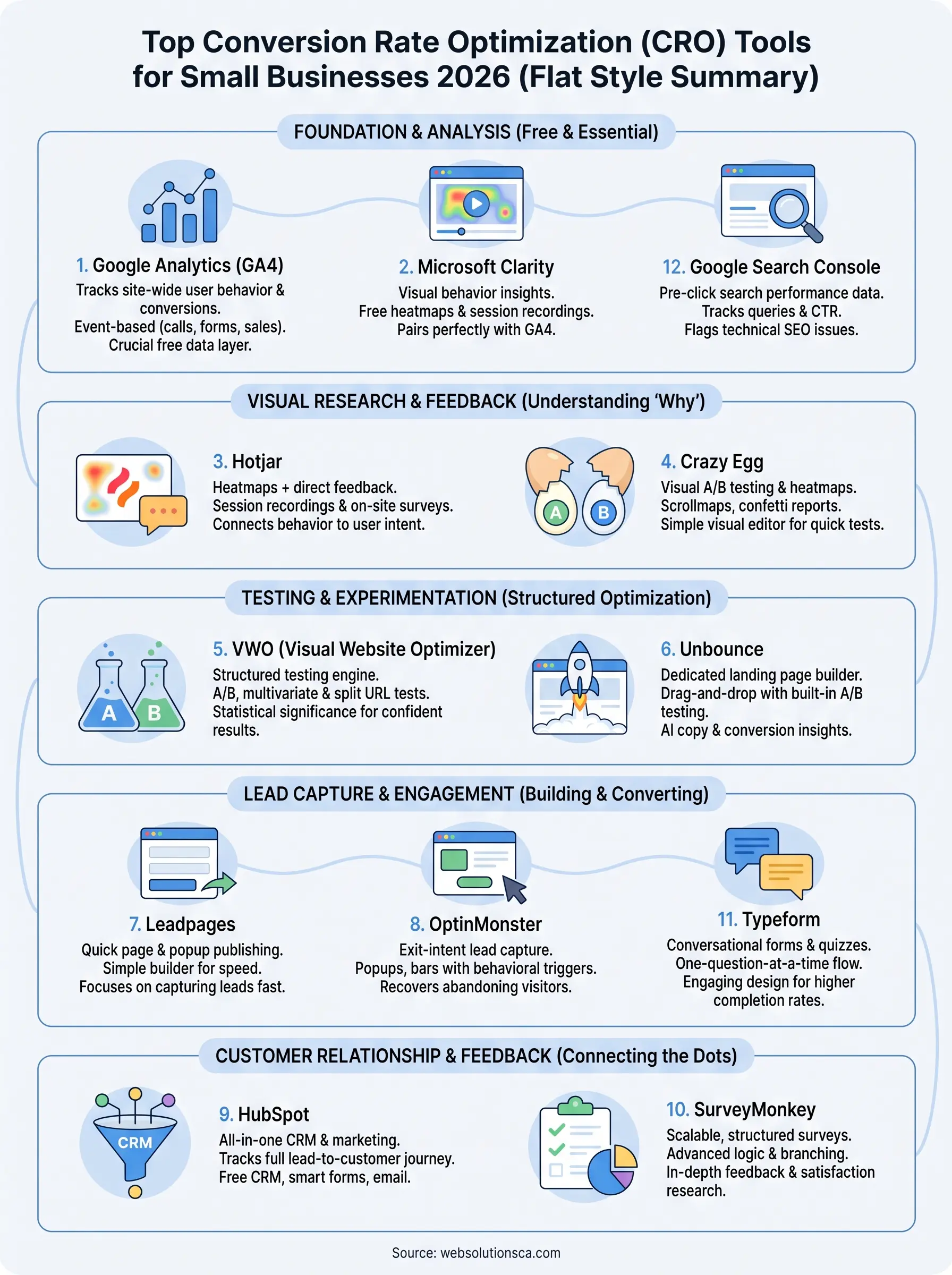
Twelve tools is a lot to sort through, so start small. Install Google Analytics and Microsoft Clarity first since both are free and give you the data every other tool on this list depends on. Once you know where visitors drop off, add one specialized tool, a landing page builder, an exit-intent popup, or a testing platform, that fixes the specific problem you found. Chasing every conversion rate optimization tool at once just spreads your attention thin and your budget thinner.
Most small businesses in Orange County don't need all twelve running simultaneously. They need the right two or three set up correctly, watched consistently, and acted on. That's the part agencies get paid for, not picking software, but turning the data into actual changes that move your number.
If sorting through setup, tracking, and testing sounds like more than you want to handle alone, talk to Web Solutions CA about building a conversion system tailored to your site and your budget.