

If you run a local business in Orange County and Google still doesn't show your hours, reviews, or address in search results, local business schema is probably the missing piece. It's a snippet of structured code you add to your website that tells Google exactly what your business is, where it's located, and when you're open, instead of leaving Google to guess. Most small business sites skip this step entirely, which means competitors with schema markup get the rich search results while you don't.
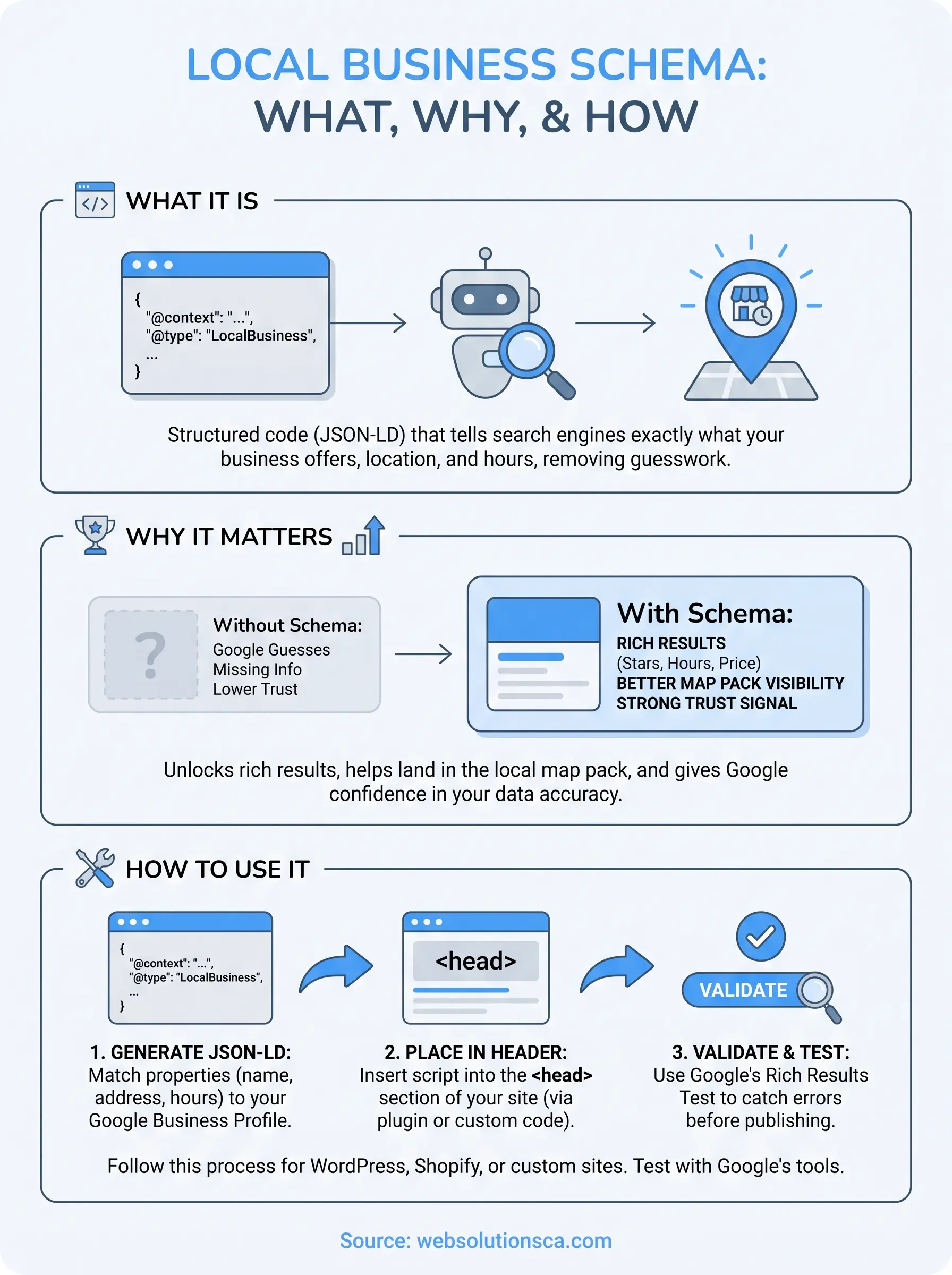
Here's the direct answer: local business schema is a type of structured data markup that uses a standardized vocabulary (Schema.org) to describe your business details in a format search engines can read instantly. Done right, it can help you land in the local map pack, show star ratings in search results, and give Google the confidence to display your info accurately.
In this article, we'll break down what local business schema actually does, why it matters for local SEO, and walk through exactly how to generate and add it to your site, whether you're on WordPress, Shopify, or a custom-built platform. We build this into every site we launch, so we'll show you the same approach we use for clients across Costa Mesa, Irvine, and Santa Ana.
Why local business schema matters for your visibility
Google's algorithm doesn't read your website the way a human does. It crawls text, images, and code, then tries to piece together what your business actually offers. Structured data for local business removes the guesswork by handing Google a clean, machine-readable answer key: your name, address, phone number, hours, price range, and service area, all labeled in a format Google's systems already understand. Without it, Google has to infer these details from scattered mentions on your homepage, contact page, and footer, and inference leads to errors. We've seen client sites where Google pulled an old address from a directory listing instead of the correct one on the site itself, simply because there was no schema telling it otherwise.
Rich results and the local map pack
The biggest visibility win comes from rich results, the star ratings, business hours, and price indicators you see under some search listings but not others. Schema markup doesn't guarantee a spot in the local map pack, but it's one of the trust signals Google's own documentation on structured data points to as a way to help search engines understand page content more accurately. When your NAP data (name, address, phone) is marked up consistently and matches what's on your Google Business Profile set up for local search, you're giving Google fewer reasons to doubt your listing and more reasons to show it prominently.
If Google has to guess your business hours, it'll often play it safe and show nothing at all.
The competitive gap this creates
Here's what most Orange County small business owners don't realize: local SEO schema isn't a fringe technical tactic anymore, it's baseline expectation for anyone who wants to compete in a crowded market like Irvine or Santa Ana. If two window and door companies in the same zip code have nearly identical content, but only one has proper schema, the one with schema is more likely to get the enhanced listing, the higher click-through rate, and eventually the call. The other one just looks less credible, even if the actual business is just as good.
| Without schema markup | With schema markup |
|---|---|
| Google guesses business type from text | Business type explicitly declared |
| Hours may not appear in search results | Hours can display directly in results |
| Reviews aren't eligible for star display | Star ratings can appear next to listing |
| Inconsistent NAP data across the web | Search engines can verify NAP accuracy |
| Lower trust signals for map pack ranking | Stronger local relevance signals |
Why this compounds over time
Once it's implemented correctly, schema keeps working in the background every time Google recrawls your site. It's not a one-time ranking boost, it's an ongoing accuracy layer that supports everything else you do for local SEO, from mastering your Google Business Profile to citation building. Small businesses that skip it often end up fixing the same visibility problems repeatedly (wrong hours showing up, missing reviews, inconsistent addresses) without realizing the root cause is a markup gap, not a content problem. Treat schema as infrastructure, not decoration, and the rest of your local SEO work has a better foundation to stand on.
How to add local business schema to your website
Adding local business schema markup isn't complicated once you know where the code goes and what format Google expects. The standard is JSON-LD, a lightweight script block that sits in your page's HTML without touching the visible design. Google explicitly recommends JSON-LD over the older microdata format because it's easier to maintain and less likely to break when you update your site's layout.
Get the placement right once, and every future Google crawl reads your business details correctly.
Where to place the code
Generally, you'll insert the JSON-LD script inside the <head> section of your homepage, or on every page if your business has multiple locations. Here's the basic structure before you fill in your actual details:
<script type="application/ld+json">
{
 "@context": "https://schema.org",
 "@type": "LocalBusiness",
 "name": "Your Business Name"
}
</script>
This skeleton alone won't do much. You need to expand it with the properties covered in the next section, then paste the completed block into your site's code.
Adding it on WordPress
If you're on WordPress, plugins like Yoast SEO or Rank Math generate much of this schema automatically based on fields you fill in, like your address and business type. For more control, a dedicated schema plugin lets you customize every property manually, which matters if your business has unusual hours or multiple service areas across Orange County.
Adding it on Shopify or a custom build
Shopify stores usually need a theme code edit or a schema app, since Shopify's default templates don't include local business markup out of the box. On a custom-built site, your developer inserts the JSON-LD directly into the template file that renders your header, so it appears sitewide without manual duplication. This is exactly the kind of technical detail we handle as part of every Orange County website design and development project, so clients don't have to track down a developer later just to fix missing schema.
A quick implementation checklist
- Choose JSON-LD format over microdata
- Match every field to your Google Business Profile setup exactly
- Place the script in the head or template header
- Test before publishing (covered in the validation section below)
- Re-check after any major site redesign
Local business schema example you can copy
Seeing a full, working example makes this whole process click faster than reading about abstract properties. Below is a complete JSON-LD snippet for a fictional Orange County business, a window and door company in Irvine, with every field a typical local business needs. Copy it, swap in your own details, and you have a working schema block ready to paste into your site.

A complete JSON-LD example
<script type="application/ld+json">
{
 "@context": "https://schema.org",
 "@type": "LocalBusiness",
 "name": "Coastal Window & Door Co.",
 "image": "https://example.com/images/storefront.jpg",
 "telephone": "+1-949-555-0142",
 "priceRange": "$$",
 "address": {
 "@type": "PostalAddress",
 "streetAddress": "123 Main Street",
 "addressLocality": "Irvine",
 "addressRegion": "CA",
 "postalCode": "92602",
 "addressCountry": "US"
 },
 "geo": {
 "@type": "GeoCoordinates",
 "latitude": 33.6846,
 "longitude": -117.8265
 },
 "url": "https://example.com",
 "openingHoursSpecification": [
 {
 "@type": "OpeningHoursSpecification",
 "dayOfWeek": ["Monday", "Tuesday", "Wednesday", "Thursday", "Friday"],
 "opens": "08:00",
 "closes": "17:00"
 }
 ]
}
</script>
This single block gives Google a structured data example it can parse without ambiguity: the exact street address, the phone number formatted with a country code, hours broken out by day, and even the geographic coordinates that help tie your listing to the map pack.
A schema block like this one turns a page full of scattered text into a single, unambiguous answer for Google.
Customizing the example for your business
Swap every value above for your own, but don't stop at the basics if your business has more going on. Add a sameAs array linking to your social profiles and Google Business Profile, or a hasMap property pointing to your Google Maps listing. If you serve a radius rather than a fixed storefront, like a mobile locksmith covering Santa Ana and Tustin, use areaServed instead of relying only on the address. The goal isn't to copy this example word for word, it's to use it as scaffolding you fill in with details that are accurate and consistent with what's already published on your Google Business Profile and directory listings.
Key properties and schema types to include
Not every field in a local business schema needs to be filled in, but skipping the wrong ones weakens the whole markup. Google's structured data guidelines separate properties into what's required for eligibility and what's simply recommended for a fuller listing. Getting this distinction right saves you from over-engineering a script that Google can't even use because a core field is missing.
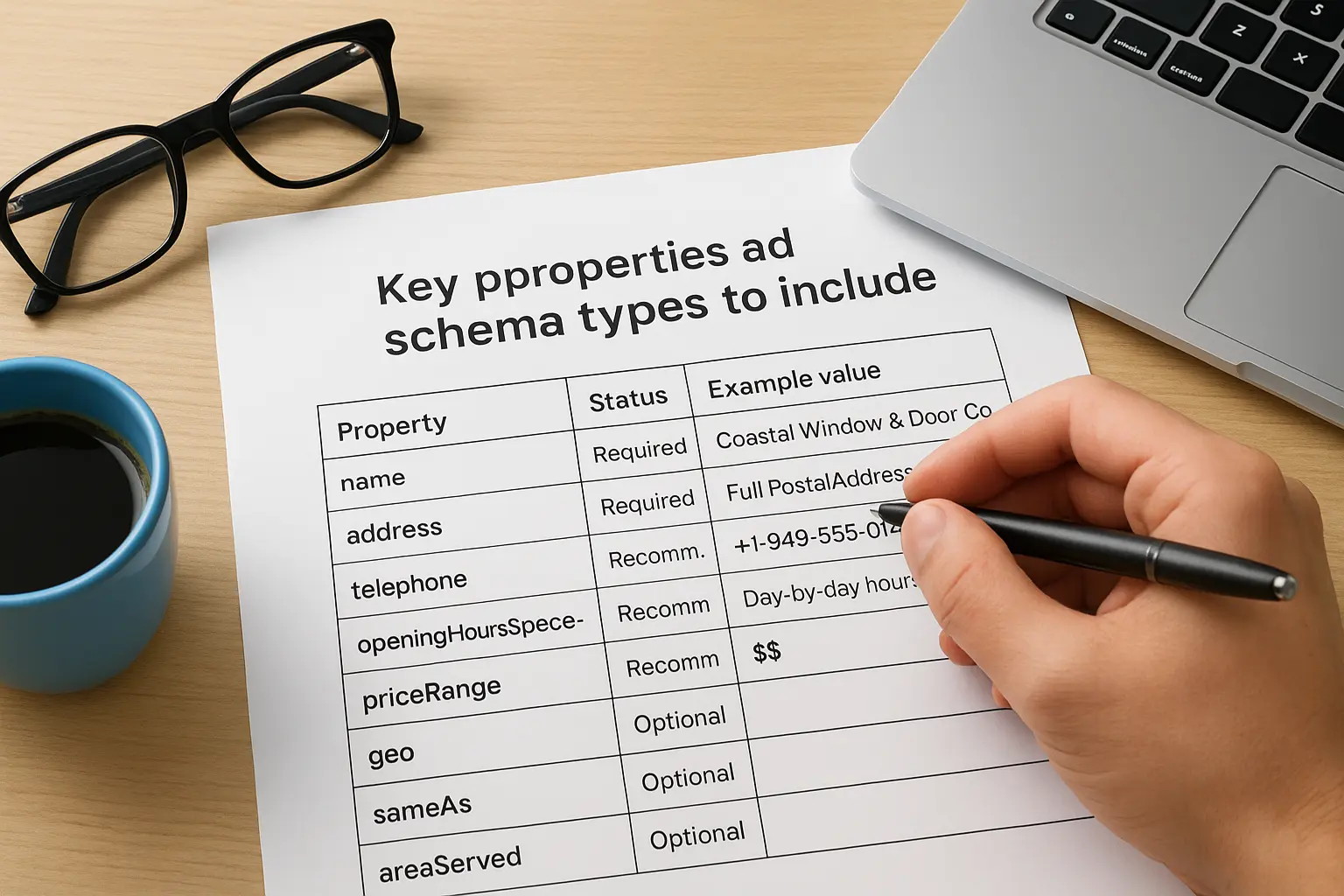
Required and recommended properties
Think of these as the backbone of any working schema block. Miss the required ones and Google may ignore the markup entirely, even if everything else is technically correct.
| Property | Status | Example value |
|---|---|---|
name |
Required | Coastal Window & Door Co. |
address |
Required | Full PostalAddress object |
telephone |
Recommended | +1-949-555-0142 |
openingHoursSpecification |
Recommended | Day-by-day hours |
priceRange |
Recommended | $$ |
geo |
Recommended | Latitude/longitude |
sameAs |
Optional | Social and GBP links |
areaServed |
Optional | City or radius served |
Choosing the right schema type
Beyond the properties, the @type you select matters just as much. Schema.org business types go far deeper than the generic "LocalBusiness" label, and Google can display more specific rich results when you pick a subtype that actually matches your industry. A tax preparation office should use AccountingService, a window and door company fits under HomeAndConstructionBusiness, and an immigration consultant might use ProfessionalService. Search Google's full list of supported business types before defaulting to the generic option.
The more specific your schema type, the more specific the rich result Google can show.
Selecting a narrow, accurate type also protects you from a mismatch penalty of sorts, where Google's systems see generic markup on a clearly specialized business and trust it less. Ultimately, the right combination of properties and type comes down to matching what a real customer searching in Irvine or Fountain Valley would expect to see: your hours, your specialty, your service area, and your price range, all labeled correctly instead of buried in paragraph text Google has to interpret on its own.
How to validate and test your schema markup
Writing the code is only half the job. Testing your schema markup before you publish catches typos, missing required fields, and formatting mistakes that would otherwise sit invisible on your site for months. Google offers free tools built specifically for this, and running your JSON-LD through them takes less than five minutes once you know what to look for.
A schema block that hasn't been tested is just a guess wearing code.
Using Google's Rich Results Test
Start with Google's own Rich Results Test, which checks whether your markup is eligible for enhanced search features like star ratings or business hours. Paste in your page URL or the raw code snippet, and the tool tells you immediately whether Google can parse the LocalBusiness type correctly, along with any warnings about optional fields you left out. Errors here mean Google may ignore the entire block, so fix these before anything else.
Running the Schema Markup Validator
Beyond Google's tool, the independent Schema.org Validator checks your code against the broader Schema.org vocabulary, not just Google's specific rich results criteria. This catches issues the Rich Results Test sometimes misses, like a malformed geo object or a dayOfWeek array with an invalid entry. Running both tools gives you a fuller picture than relying on just one.
A quick pre-launch checklist
Before you push any schema live, run through this list:
- Paste the code into Google's Rich Results Test and resolve every error
- Cross-check the Schema.org Validator for structural issues
- Confirm NAP details match your Google Business Profile exactly
- Re-test after any redesign, replatform, or theme update
- Set a calendar reminder to spot-check schema every few months
Watching for silent failures
Schema errors rarely announce themselves. Your site keeps working, your pages keep loading, and nothing visibly breaks, which is exactly why so many Orange County business owners never notice the problem. Testing isn't a one-time task tied to launch day. Your site's schema needs a recheck any time you switch themes, migrate platforms, or update your hours and address, since any of those changes can quietly break a block that used to validate cleanly.
Getting your local business found online
Getting local business schema right isn't about chasing a technical checkbox, it's about giving Google no reason to guess. Every property you fill in correctly, every type you match to your actual industry, and every validation pass you run adds up to a listing search engines trust enough to show prominently. Skip it, and you're leaving rich results, map pack visibility, and clicks on the table for competitors in Irvine, Santa Ana, or Costa Mesa who bothered to do it, often with help from one of the top local SEO agencies in Orange County.
Schema is one piece of a bigger picture that includes your Google Business Profile, your site speed, and your content, but it's the piece most small business owners overlook entirely. If you'd rather have someone build this correctly into your site from day one instead of troubleshooting it later, see how our local SEO plan for Orange County businesses builds visibility in from the start.