
If your business doesn't show up in the Google Map Pack when someone nearby searches for what you offer, you're losing customers to competitors who do. Fixing that starts with optimizing your Google Business Profile for local SEO, and it's one of the highest-leverage moves a small business in Orange County can make right now, especially since most of these fixes cost nothing but time.
This guide gives you the exact steps to turn a half-finished, ignored profile into a local ranking asset. You'll learn how Google decides which businesses appear for "near me" searches, and what specific fields, categories, and habits push your listing higher. This isn't theory pulled from a Google help page. It's the same google business profile seo process we run for clients across Costa Mesa, Irvine, and Santa Ana who need more calls and foot traffic, not just a prettier listing.
We'll walk through claiming and verifying your profile, choosing the right categories, writing descriptions that convert, managing reviews, posting updates consistently, and tracking whether any of it actually moves your local rankings and visibility. Follow it in order and you'll have a profile working harder for you by the end of the week.
Why your Google Business Profile matters for local SEO
Most small business owners treat their Google Business Profile like a digital business card, something you fill out once and forget. That's a mistake. Google uses your profile as one of the primary signals for deciding who shows up in the Local Map Pack, the three-listing block that appears above organic results for searches like "plumber near me" or "tax preparer Costa Mesa." If you're not actively managing it, you're handing that visibility to a competitor who is.
The three factors Google actually weighs
Understanding google business profile for local seo starts with knowing what Google measures. According to Google's own documentation on local search ranking, three factors determine placement: relevance, distance, and prominence. Relevance is how well your profile matches what someone searched for. Distance is how close your business is to the searcher or the location they typed. Prominence is how well-known your business is, based on reviews, links, articles, and directory listings across the web.
| Ranking Factor | What It Means | What You Control |
|---|---|---|
| Relevance | Match between search query and your business info | Categories, description, services listed |
| Distance | Physical proximity to searcher or searched location | Accurate address, service area settings |
| Prominence | Overall reputation and online presence | Reviews, citations, backlinks, profile completeness |
You can't move your storefront, so distance is mostly fixed. But relevance and prominence are almost entirely in your hands, and that's where the rest of this guide focuses.
A complete, active Google Business Profile isn't a listing, it's a ranking signal you control every single day.
Why half-finished profiles lose to complete ones
Orange County has no shortage of competition. Search "window replacement Anaheim" or "immigration consultant Santa Ana" and you'll find a dozen businesses fighting for the same three Map Pack spots. Profiles with missing hours, no photos, generic descriptions, and zero recent posts consistently rank behind profiles that check every box. Google rewards completeness because it correlates with a better experience for the searcher, and a searcher who finds accurate hours, real photos, and recent activity is more likely to click, call, or visit.
Skipping this work doesn't just hurt rankings. It costs you money directly. A profile that's 30% filled out gives searchers almost nothing to act on, so they scroll past it to the next result. Your google business profile seo effort isn't a side project, it's the difference between showing up and showing up empty-handed.
What a fully optimized profile actually does for your business
Beyond rankings, an optimized profile changes behavior once someone finds you. Businesses with complete profiles, active review responses, and regular posts see measurably higher click-through rates to their website, more direction requests, and more phone calls straight from the listing. Those actions happen before a searcher ever lands on your site, which means your profile is functioning as a landing page in its own right.
Think about the last time you searched for a local service on your phone. You probably tapped the first result with a strong rating, recent reviews, and clear photos, without ever visiting a website. That's the behavior you're optimizing for. Every section of this guide, from verification to insights tracking, exists to make your profile the obvious choice in that split-second decision. Get the fundamentals right and the ranking benefits follow naturally, because you're solving the same problem Google is trying to solve: connecting nearby searchers with the business that best matches what they need.
Step 1. Claim and verify your Google Business Profile
Before you can optimize anything, you need to actually own your listing. Google auto-generates profiles for millions of businesses based on public data, and if you've never claimed yours, someone else, including a competitor or a disgruntled ex-employee, could be managing what searchers see. Claiming your Google Business Profile is step zero, and skipping it means every other tactic in this guide is out of your hands.
How to claim your profile
Head to Google Business Profile Manager and search for your business name and address. If a listing already exists, you'll see an option to claim it. If nothing comes up, you'll create a new profile from scratch. Either way, you'll need a Google account tied to your business, ideally one you control long-term rather than a personal Gmail that a former employee set up years ago.
Choosing the right verification method
Google wants proof that you're a real business at a real location, so verification is mandatory before your profile goes live in search results. The method offered depends on your business type and location:
- Postcard by mail: Google sends a code to your business address, typically within 5 business days. Most common method for storefronts and offices.
- Phone: Some businesses get an instant code by text or automated call.
- Email: Occasionally available for businesses with a verified domain.
- Video verification: Newer option where you record your location and equipment on request.
- Instant verification: Available if you've already verified the same business through Google Search Console.
A profile that isn't verified doesn't rank, no matter how well you fill it out.
If you're a service-area business without a public storefront, like many contractors and consultants across Orange County, you'll set your service areas by city or zip code rather than displaying a street address. This still counts as a fully claimed, verifiable profile.
What to do if you inherit a messy profile
Many clients we work with in Costa Mesa and Irvine come to us with profiles claimed years ago by a web developer or marketing vendor who's long gone. If that's you, request ownership transfer through Google's ownership request process rather than creating a duplicate listing, which will hurt your rankings by splitting reviews and confusing Google's algorithm about which profile is legitimate. Duplicate listings are one of the most common reasons a profile stalls despite everything else being done right, so resolve this before moving to Step 2.
Step 2. Complete your info and keep NAP consistent
Once your profile is claimed and verified, the next job is filling in every field Google offers, not just the ones that feel important. Google rewards completeness with visibility, and it penalizes gaps with silence. This step is where most Orange County businesses leave easy rankings on the table, because they fill out a name and address, hit save, and move on.
Fields you can't skip
Work through this checklist and don't stop until every line is filled:
- Business name: Exactly as it appears on your signage and website, no keyword stuffing like "Costa Mesa Best Plumber Inc."
- Address: Exact match to your storefront, or service-area settings if you don't have a public location.
- Phone number: A local number tied to your business, not a call-tracking number that changes across platforms.
- Website URL: Link to your homepage or a location-specific landing page if you have multiple sites.
- Hours: Include holiday hours and update them before long weekends, since incorrect hours drive one-star reviews from frustrated customers.
- Attributes: Wheelchair accessible, women-owned, veteran-owned, whatever applies. These attributes surface in filtered searches.
- Services and products: List everything you offer, not just your top three services.
Why NAP consistency decides your prominence score
NAP stands for name, address, and phone number, and it needs to match exactly across every place your business appears online: your website footer, Yelp, Facebook, industry directories, and your Google Business Profile. Google cross-references these listings to confirm your business is legitimate and to calculate the prominence factor covered in Step 1. A mismatch, like "123 Main St, Suite 4" on your website but "123 Main Street #4" on Google, tells Google's algorithm it's looking at two different businesses, which weakens the trust signal both listings could otherwise build together.
Inconsistent NAP data across the web is the quiet ranking killer nobody notices until they audit it.
Run a quick audit before moving forward. Search your business name plus city on Google, then check the top five directories that come up: Yelp, Facebook, Apple Maps, Bing Places, and any industry-specific directory relevant to your trade. Fix mismatches as you find them rather than waiting until the end. This kind of google business profile for local seo groundwork feels tedious, but it's the foundation every other tactic in this guide sits on top of. Skip it, and you're optimizing a profile that Google already half-distrusts.
Step 3. Pick precise categories and write your description
Categories tell Google exactly what kind of business you run, and they're one of the strongest relevance signals in the entire profile. Choose vague or generic categories and you'll match fewer searches, even if your description is perfect. This step is where a lot of google business profile seo work goes wrong, because owners default to the first category Google suggests instead of digging for the one that matches their actual service.
Choosing your primary and secondary categories
Your primary category should describe the core of your business, not a broad umbrella term. "Tax Preparation Service" beats "Accountant" if that's genuinely your main offering. Secondary categories let you capture adjacent searches without diluting your main match.
- Search your exact service in the category field first, like "Immigration Attorney" instead of "Lawyer."
- Add up to 9 secondary categories that reflect real services you provide, not aspirational ones.
- Check competitors' categories in the Map Pack for your target search to see what's already ranking.
- Avoid category stuffing. Google can suppress profiles that pile on unrelated categories chasing extra traffic.
The right category can do more for your ranking than a paragraph of keyword-stuffed description text.
Writing a description that actually converts
Google gives you 750 characters for your business description, and only the first 250 or so show without a tap, so front-load what matters. Skip the generic "we provide quality service you can trust" filler that says nothing about who you are. Name your city, your specific services, and what makes you different, in plain language a customer would actually use when searching.
Here's a template you can adapt:
[Business Name] provides [specific service 1], [specific service 2], and
[specific service 3] to [city/neighborhood] and surrounding Orange County
communities. Founded in [year], we specialize in [specific niche or
differentiator]. Call us for a [free estimate/consultation/quote] or visit
our showroom at [neighborhood landmark].
This works because it mirrors how someone searches: by service and by location. Resist the urge to repeat your city name five times hoping it boosts rankings. Google doesn't reward keyword stuffing here, and readers find it off-putting. Testimonials from clients we've worked with in Tustin and Fountain Valley consistently show that a description written for a human, not an algorithm, gets more clicks once the profile is already ranking. Treat this field as ad copy, not metadata, and it'll pull its weight alongside the categories you just set.
Step 4. Add photos, videos, and product listings
Visuals do more work than most Orange County business owners realize. Google itself has said that profiles with photos get significantly more requests for directions and more clicks to their website than profiles without them. Beyond the click-through boost, photos and videos feed the relevance and prominence signals covered earlier, since an active, image-rich profile reads as a legitimate, well-run business rather than an abandoned listing someone forgot to finish.

What to upload and how often
Don't just upload a logo and call it done. Google organizes photos into categories, and filling each one gives searchers a fuller picture of what they'll get:
- Cover photo: Your best, most recognizable shot, ideally your storefront or work in action.
- Logo: Used across Google Search and Maps to identify your brand at a glance.
- Interior and exterior shots: Help customers recognize your location before they arrive.
- Team photos: Build trust faster than any stock image ever will.
- Product or service photos: Show the actual work, not generic clip art.
- Video (up to 30 seconds): A quick walkthrough or before-and-after clip outperforms static images for engagement.
A profile with fresh photos every month signals an active business; a profile with three-year-old stock images signals the opposite.
Aim to add at least four to eight new photos monthly. Consistency matters more than volume here, since a burst of 50 photos followed by a year of silence doesn't help nearly as much as a steady drip that keeps your profile looking current.
Building out your product listings
The products and services section is underused by most small businesses, which makes it an easy win. If you sell physical products, list them individually with photos, prices, and short descriptions, the same way you would in an online store. Service-based businesses, like tax preparers or window and door installers, should list each service as its own entry rather than lumping everything into one vague line.
Product: Vinyl Window Replacement (Single Pane to Double Pane Upgrade)
Price: Starting at $450 per window
Description: Energy-efficient vinyl replacement windows installed same-week
for Orange County homes. Includes measurement, removal, and installation.
This level of specificity gives Google exact-match language to surface when someone searches your service by name, and it gives the searcher enough detail to call instead of shopping around for a competitor's listing. Treat this section like a mini storefront, because for a lot of searchers, it's the only storefront they'll see before they pick up the phone.
Step 5. Generate and respond to customer reviews
Reviews carry more weight in Google's prominence calculation than almost anything else you control, and they're often the first thing a searcher checks before dialing your number. A business with 80 reviews at 4.7 stars beats a business with 5 reviews at 5.0 stars nearly every time, because volume and recency signal an active, trusted operation. If you're only picking up a review here and there, you're leaving the single biggest lever in google business profile for local seo untouched.

Building a system that generates reviews consistently
Stop waiting for happy customers to think of it themselves. Build the ask into your workflow so it happens every time, not occasionally:
- Text or email a direct review link within a few hours of finishing a job, while the experience is fresh.
- Grab your short link from your Business Profile dashboard under "Get more reviews" instead of sending a long, awkward URL.
- Train staff to ask verbally at the point of a good outcome, then follow up with the link.
- Automate the follow-up through your CRM or booking system so no satisfied customer slips through.
A steady trickle of new reviews beats one big push every quarter, because Google weighs recency almost as heavily as volume.
Don't offer discounts or incentives for reviews. Google's policy on prohibited and restricted content bars incentivized reviews outright, and getting flagged can suppress your entire profile, not just the offending review.
Responding to every review, good or bad
Respond to reviews within 24 to 48 hours whenever you can. A quick, specific reply to a positive review reinforces the details a searcher wants to see, like your city and the service performed, while showing Google your profile is actively managed.
Negative reviews need a calmer approach. Acknowledge the issue, avoid getting defensive, and take the resolution offline:
Hi [Name], thanks for the feedback. We're sorry the [specific issue] didn't
meet expectations. Please call us at [phone number] so we can make it right.
This kind of response does two things at once. It shows future customers you handle problems professionally, and it gives Google fresh, relevant text tied to your business and location. Owners in Garden Grove and Mission Viejo who've adopted this habit consistently see their star average climb within a few months, simply because the volume of new, responded-to reviews starts outweighing a handful of old complaints. Ignoring reviews, especially negative ones, reads as neglect to both customers and Google's algorithm, and neglect never ranks well.
Step 6. Use posts, Q&A, and messaging to engage customers
Most Orange County business owners set up their profile once and never touch it again, which is exactly why the ones who post regularly stand out. Google Business Profile posts work like mini social updates that show up directly in your listing, and they give Google fresh, dated content to associate with your business. Think of this step as the ongoing maintenance that keeps everything from Step 1 through Step 5 from going stale.
Posting a rhythm Google notices
You don't need a marketing team to keep this going. A simple weekly or biweekly schedule works better than sporadic bursts:
- Offers: Seasonal discounts or limited-time promotions with a clear expiration date.
- Updates: New services, holiday hours, or changes customers should know about.
- Events: Anything happening at your location, from open houses to community sponsorships.
- Products: Highlight a specific service or item you want more calls on.
A profile that posts weekly tells Google, and every searcher who lands on it, that someone is actually running the show.
Each post should include a photo and a short call to action, like "Call now" or "Learn more," since posts without a next step rarely convert even when they get views.
Answering the questions before they're asked
The Q&A section lets anyone, including you, post questions and answers publicly on your profile. Competitors sometimes seed odd or misleading questions here, so check it regularly rather than letting strangers control the narrative. Seed your own frequently asked questions proactively: pricing ranges, service areas, turnaround times, whatever your front desk answers on the phone every day. This does double duty for google business profile seo, since it adds more relevant, searchable text tied to your listing without cluttering your description.
Turning on messaging without letting it go quiet
Messaging lets customers text your business straight from the Maps listing or Search results, often before they've decided whether to call. Turn it on only if you can commit to responding fast, ideally within a few hours, because Google displays your average response time and a slow or unanswered thread does more harm than having messaging off entirely.
Clients we work with in Newport Beach and Huntington Beach who commit to same-day replies on messages and Q&A consistently report more first-contact leads than those who only rely on phone calls. Combined with a steady posting habit, this turns your profile from a static listing into a channel customers actually interact with before they ever reach your website.
Step 7. Track insights and keep optimizing your profile
Everything you've done so far is guesswork until you check the numbers behind it. Google Business Profile gives you built-in performance data, and ignoring it means you're optimizing blind, repeating whatever worked (or didn't) last quarter without knowing which lever actually moved. This is the step most Orange County business owners skip entirely, which is a shame, because it's the fastest way to know if your google business profile for local seo work is paying off or just sitting there.
What to check in your profile's performance data
Open your Business Profile dashboard and look at the performance tab regularly, not just when something feels off. A few metrics matter more than the rest:
- Search views: How many people saw your profile from direct searches (your business name) versus discovery searches (a service or category).
- Map views: How often your pin showed up when someone browsed the map itself.
- Website clicks, calls, and direction requests: The actions that actually translate to revenue.
- Photo views compared to competitors: Google shows you this benchmark directly, and it's a quick gut check on whether your visuals are pulling their weight.
- Top search queries: The exact terms triggering your profile, which tells you whether your categories and description are matching the right searches.
If you're not checking your profile's insights monthly, you're optimizing on guesses instead of data.
Turning data into your next move
Monthly is the right cadence for most small businesses. Weekly is overkill unless you're running an active promotion. Look for patterns: a spike in discovery searches after you add a new category, a jump in calls the week you post consistently, or a photo view count that's flatlined for months. Each of those tells you exactly where to focus next.
Compare month over month rather than obsessing over daily swings, since local search data is noisy and a single slow day means nothing on its own. If website clicks are climbing but calls aren't, your landing page might need work, not your profile. If discovery searches are flat despite a solid posting habit, revisit your categories and description before touching anything else. Treat insights as a feedback loop, not a report card. Every fix you make in Steps 1 through 6 should show up here eventually, and if it doesn't, that's your signal to adjust rather than assume the job is done.
Making local SEO a habit, not a one-time task
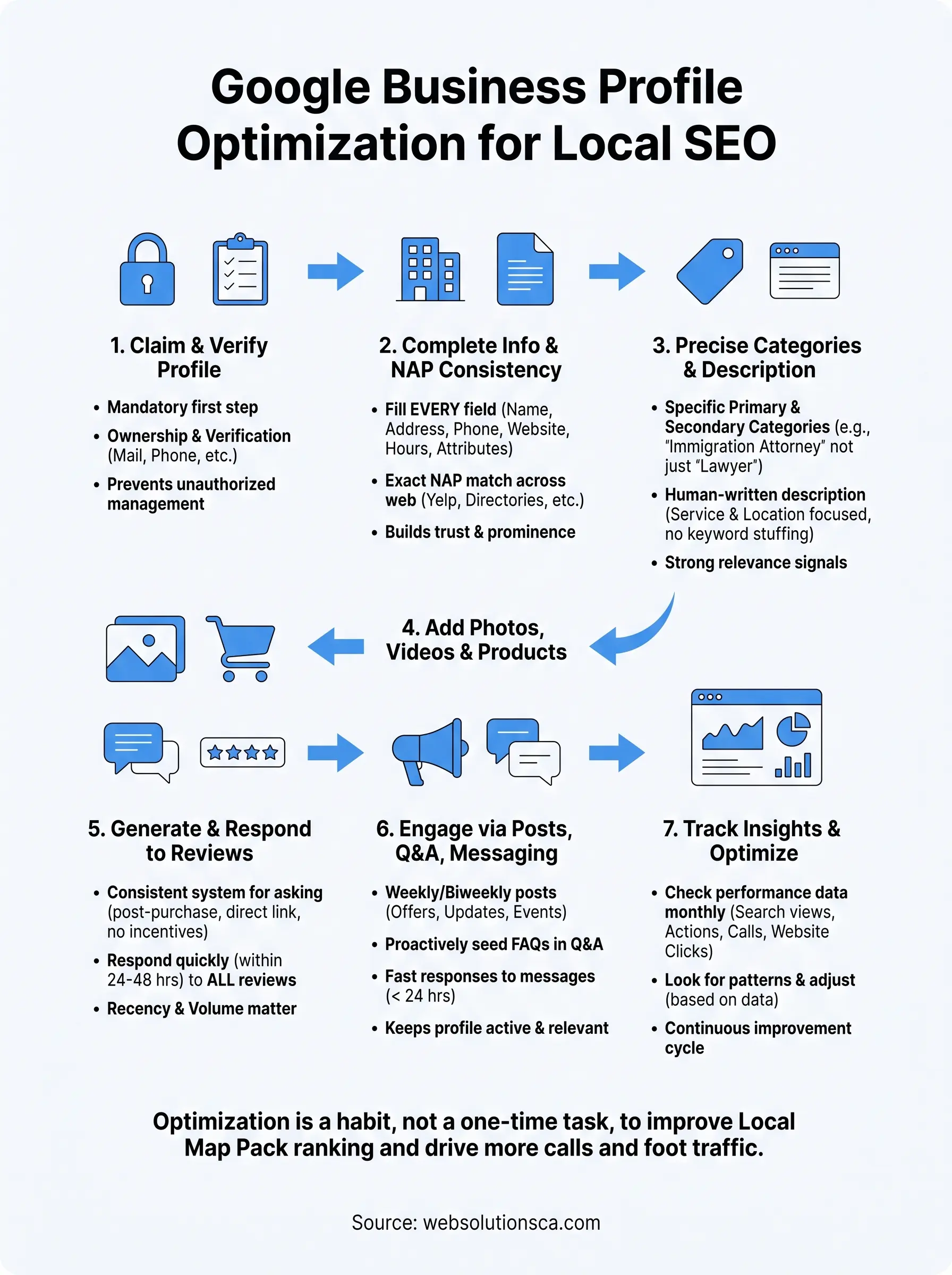
A fully optimized Google Business Profile isn't a project you finish and forget. It's a habit built from small, repeated actions: a new photo this week, a review response tomorrow, a post before the weekend. The businesses winning Map Pack spots in Costa Mesa, Irvine, and Santa Ana aren't the ones with the biggest budgets. They're the ones who kept showing up in their profile long after the initial setup was done.
Revisit the seven steps here monthly, starting with your insights tab, and you'll catch problems before they cost you calls. Google rewards activity because it rewards businesses that actually care about the people finding them.
If managing all of this on top of running your business sounds like more than you have time for, that's exactly the gap we fill. Talk to Web Solutions CA about handling your Google Business Profile and local SEO so you can get back to the work that pays.