
You know you need a website, but you're stuck on the basics. Do you build it yourself on Squarespace or Wix over a weekend, or hire someone to do it right? Website design for small business isn't complicated once you understand the real tradeoffs between cost, time, and results, but most guides online skip straight to selling you a template or a package without explaining how the pieces fit together.
This guide walks you through how to design a small business website step by step, from picking a platform to launching a site that actually brings in calls and leads, not just a digital brochure nobody visits. We'll break down what DIY builders can and can't do, when a professional web design service is worth the investment, and what realistic pricing looks like for hosting, design, and ongoing maintenance.
We've built and redesigned sites for tax preparers, immigration consultants, and home service companies across Orange County, so this isn't theory. You'll get a clear process for planning your site, choosing between DIY and hiring a pro, and setting your business up to generate real traffic once the site goes live.
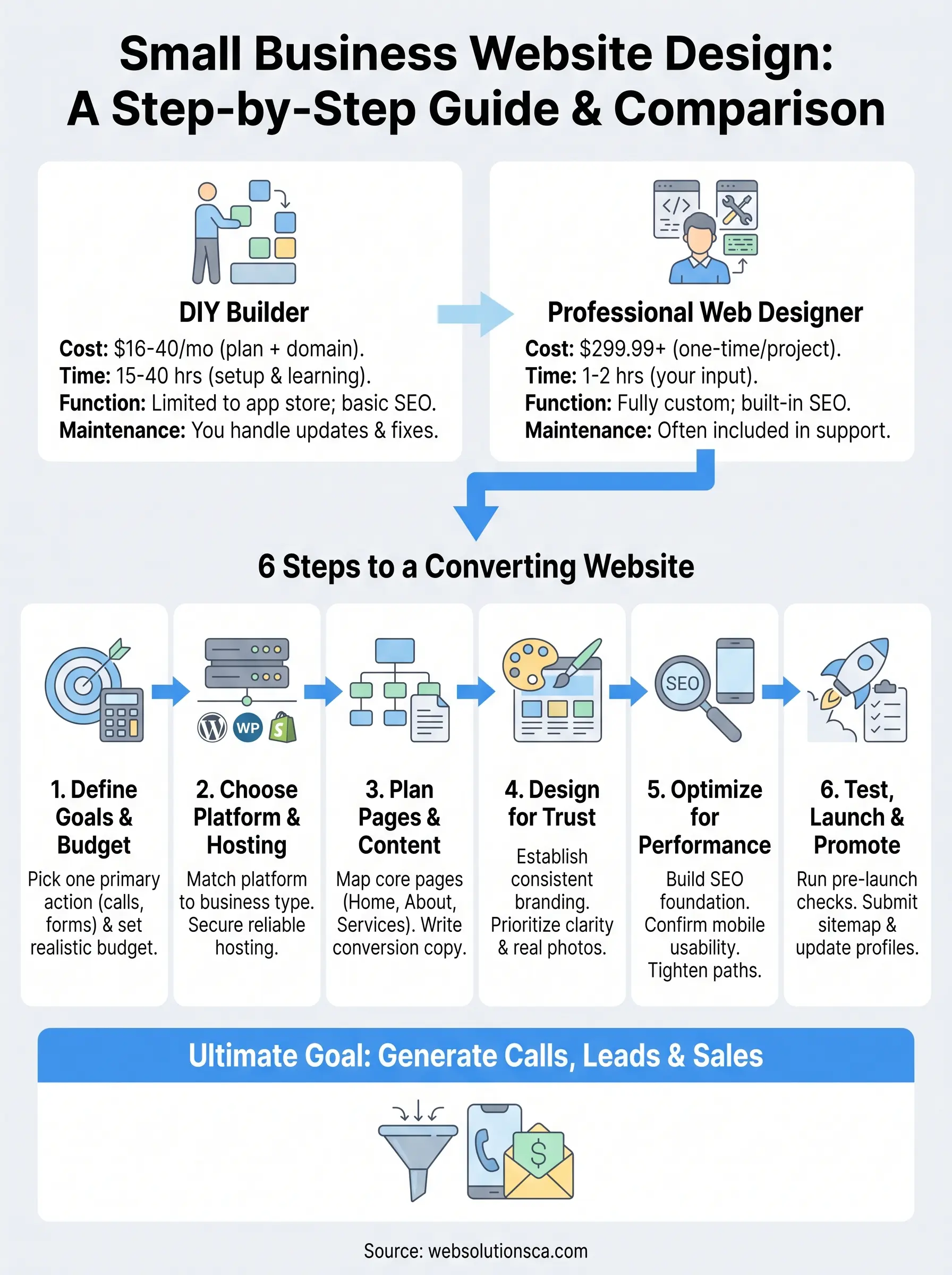
DIY vs. hiring a professional web designer
Before you touch a single template, decide honestly how much time you have and what your site actually needs to do. DIY website builders like Wix, Squarespace, and GoDaddy work fine for a solo consultant who needs a simple online business card. They fall short fast once you need custom lead forms, integrations with your CRM, or a site that ranks for competitive local keywords. The real question isn't which platform looks nicest in a demo, it's whether you can maintain the site once it's live.

What DIY builders actually get you
Most small business owners underestimate the time cost of DIY. You're not just dragging blocks around for an afternoon. You're learning a new interface, writing copy, sourcing images, testing on mobile, and troubleshooting when something breaks two weeks later. Here's a realistic breakdown of what DIY involves versus hiring out:
| Factor | DIY builder | Professional web designer |
|---|---|---|
| Upfront cost | $16 to $40/month (plan + domain) | $299.99+ one-time or project-based |
| Time investment | 15 to 40 hours for a basic site | 1 to 2 hours of your input, rest handled for you |
| Custom functionality | Limited to platform's app store | Fully custom (booking, automation, integrations) |
| SEO foundation | Basic, often needs manual fixes | Built in from the structure up |
| Mobile optimization | Template-dependent, hit or miss | Tested and tailored to your audience |
| Ongoing maintenance | You handle updates and backups | Often included in support packages |
A DIY site that never gets finished costs you more than a professional one that launches on time.
That table isn't meant to scare you off DIY entirely. If you're testing a new business idea with almost no budget, a $16/month Squarespace site is a reasonable way to get something live while you validate demand. Small business website hosting and design through a DIY platform bundles hosting into your monthly fee, which simplifies things when you're just starting out.
When hiring a professional actually pays off
Problems show up once your business depends on the site for revenue. We've seen tax preparation clients try to build their own intake forms on a builder platform, only to lose leads because the form didn't route submissions anywhere useful. A window and door company we worked with had spent four months on a DIY site before realizing it wasn't showing up in local Google searches at all, because the platform's default settings weren't configured for local SEO.
Hiring a professional web design service makes sense when any of these apply to you:
- You need the site live within a few weeks and don't have spare evenings to learn a new tool
- Your business depends on the site generating calls, form submissions, or online bookings
- You want the site to rank locally, not just exist
- You need integrations, like automated follow-up emails when someone fills out a form
- You've already tried DIY and the site still isn't converting visitors into leads
The middle ground most guides skip
You don't have to pick one lane forever. Plenty of business owners start with a DIY site to get something live fast, then bring in a professional once they see traction and need something more robust. The mistake is waiting too long to make that switch while a slow, poorly structured site quietly costs you leads every month. If your current site hasn't generated a single qualified lead in 90 days, that's your signal to stop tinkering and get it rebuilt properly. Google's own guidance on helpful, people-first content applies here too: a rushed site with thin pages and no real structure won't earn trust from visitors or search engines, no matter which platform built it.
Step 1. Define your website goals and budget
Start by writing down what you want the site to actually do, not what you want it to look like. Most small business owners jump straight to colors and fonts before answering the harder question: is this site supposed to generate phone calls, collect form submissions, book appointments, or sell products directly? A tax preparation service needs a secure intake form and clear tax-season deadlines. A window and door company needs a quote request form and a gallery of finished jobs. Your goals determine everything downstream, from which platform you pick to how many pages you need.
Get specific about your primary conversion goal
Pick one primary action you want visitors to take, then design everything around supporting that action. If you list five equally important goals, you'll end up with a homepage that asks visitors to do too much and end up doing nothing. Ask yourself these questions before moving to Step 2:
- What single action, call, form, booking, or purchase, matters most to your revenue?
- How many pages do you realistically need? Most small business sites need 5 to 8: home, about, services, gallery or portfolio, contact, and maybe a blog
- Do you need any integrations, like a booking calendar or a CRM connection, on day one or later?
- Who is your ideal visitor, and what do they need to see in the first 10 seconds to trust you?
A website without one clear conversion goal ends up converting nobody.
Set a realistic budget range
Costs vary widely depending on whether you go DIY or hire a professional, and the biggest mistake we see is business owners budgeting only for the launch and forgetting ongoing costs like hosting, maintenance, and updates. Here's what typical budgets look like across the spectrum:
| Budget tier | What you get | Best for |
|---|---|---|
| $16 to $40/month | DIY builder, template, basic hosting | Testing an idea, solo services |
| $299.99+ one-time | Professional custom design, mobile-optimized, basic SEO setup | Businesses ready to invest once |
| $499.99+/month | Design plus ongoing SEO, reporting, and updates | Businesses depending on the site for leads |
| Custom packages | Web design, SEO, paid ads, and automation combined | Businesses wanting a full growth system |
Realistically, decide how much monthly revenue this site needs to generate before it pays for itself, then work backward. If one new client is worth $500 to you, a $299.99 site that brings in even two clients a month has already paid for itself several times over. Setting that number now keeps you from either overspending on features you don't need or underspending on a site too thin to convert anyone.
Step 2. Choose your platform, hosting, and domain
Once you know what the site needs to accomplish, the platform choice gets a lot easier. Choosing a platform isn't about which one has the prettiest templates, it's about which one supports the features your business actually needs, like booking calendars, secure forms, or e-commerce checkout. WordPress, Shopify, Wix, and Squarespace all handle small business sites differently, and picking the wrong one means either paying for features you don't use or hitting a wall when you need to add something custom later.
Match the platform to your business type
Service businesses, e-commerce shops, and content-heavy sites each have different platform needs. Here's how the major options stack up for small business use:
| Platform | Best for | Watch out for |
|---|---|---|
| WordPress | Custom sites, blogs, service businesses needing flexibility | Requires more setup, plugin management |
| Shopify | Product-based businesses, online stores | Monthly fees add up with apps |
| Wix / Squarespace | Simple service sites, portfolios | Limited custom functionality, harder to migrate later |
| Custom-built | Businesses needing integrations, automation, or unique features | Higher upfront cost, needs a developer |
A tax preparation service with a secure client portal has very different needs than a landscaping company that just needs a quote form and photo gallery. Match the platform to the job, not the other way around.
Pick reliable hosting
Hosting determines how fast your site loads and how often it stays online, and both directly affect whether visitors stick around or bounce. Website hosting for small business typically comes bundled with DIY builders, but WordPress and custom sites need you to choose a host separately, and quality varies a lot between providers.
- Confirm the host offers at least 99.9% uptime, backed by a published guarantee
- Check load times before committing, aim for under 2.5 seconds on mobile, which aligns with Google's Core Web Vitals thresholds
- Make sure daily backups and SSL certificates are included, not sold as add-ons
Slow hosting quietly kills conversions before a visitor even reads your headline.
Lock down your domain name
Your domain is often the first impression a potential customer forms about your business, so treat it as more than a technicality. Register a domain that matches your business name exactly if it's available, and avoid hyphens, numbers, or extra words that make it harder to remember or type correctly. Stick to a .com when possible since it still reads as more trustworthy to most visitors, even though extensions like .co or .biz work in a pinch. Renew your domain for multiple years upfront so you don't accidentally lose it to an expiration lapse, which happens more often than you'd think and can take weeks to untangle.
Step 3. Plan your pages, content, and compliance
Before you design anything, map out every page your site needs and what job each one does. Skipping this step is how business owners end up with a bloated site structure that confuses visitors and buries the one page that actually converts. Think of this step as the blueprint that makes how to design a small business website far less overwhelming, because you're building toward a plan instead of guessing page by page.
Map your core pages
Most small business sites need a tight set of pages, not a sprawling menu. Start with this list and add only what your business genuinely needs:
- Home: states what you do and who you serve within the first screen
- About: builds trust with your story, credentials, or team photos
- Services or products: one page per major offering, not one page trying to cover everything
- Gallery or portfolio: proof for service businesses, especially contractors and consultants
- Contact: phone, address, hours, and a simple form, never buried three clicks deep
- Blog (optional): useful once you're ready to invest in ongoing SEO content
Write content that converts
Content should answer the visitor's question before they have to search for it elsewhere. Write your headlines around the specific problem you solve, not generic phrases like "quality service you can trust." Every page needs a clear next step, whether that's a phone number, a form, or a booking button, placed where visitors don't have to scroll to find it.
A page nobody can act on is just an expensive digital brochure.
Don't skip legal compliance
Compliance gets ignored until a complaint or a lawsuit forces the issue, and by then it's expensive to fix. At minimum, cover the basics below before launch:
| Requirement | Why it matters |
|---|---|
| Privacy policy | Required if you collect emails, forms, or use analytics tracking |
| ADA accessibility | Reduces legal risk and widens who can actually use your site |
| Accurate business info | Builds trust and supports local SEO consistency |
| SSL certificate | Protects submitted data and avoids browser security warnings |
Review the Americans with Disabilities Act guidance from ADA.gov if you're unsure what accessibility level applies to your site. Getting these details right now saves you from a costly redesign later, and it signals to both visitors and Google that your site was built with care, not thrown together over a weekend.
Step 4. Design your site to match your brand
Once your pages and content are mapped out, design decisions get much easier because you already know what each page needs to accomplish. Design your site around consistency first, not creativity for its own sake. A visitor should be able to tell they're still on your site whether they're looking at your homepage or your contact page three clicks deep. That consistency builds trust faster than any clever layout ever will, especially for service businesses where visitors are deciding whether to hand over their phone number or credit card.
Build a simple style guide before you touch layouts
Skip the temptation to design page by page as you go. Instead, lock in a handful of brand basics first so every page pulls from the same toolkit:
- Color palette: one primary color, one accent, and a neutral for text and backgrounds
- Fonts: one for headlines, one for body text, both readable at small sizes on mobile
- Logo placement: consistent position and size across every page, usually top left
- Button style: same shape, color, and wording pattern for every call-to-action
A site that looks like five different businesses stitched together loses trust before a visitor reads a word.
This short list takes an afternoon to nail down, but it saves you from redoing pages later when you notice your "Contact Us" button is blue on one page and green on another.
Prioritize clarity over decoration
Resist the urge to fill every inch of space with graphics or stock photos that don't say anything specific about your business. Best website design small business owners actually see results from tends to favor plenty of white space, large readable text, and real photos of the actual team, storefront, or completed jobs over generic stock imagery. A landscaping company showing real before-and-after photos of finished yards will always outperform a template filled with stock images of unrelated lawns.
Keep your navigation menu short, five to seven items at most, and make sure your primary conversion action, the phone number, the quote form, the booking button, appears above the fold on every page, not just the homepage. If someone lands on your services page from a Google search, they shouldn't have to scroll or hunt to find a way to contact you.
Test your design against real use cases
Before you move to launch, pull up your site on an actual phone, not just a browser window resized smaller, and walk through it as if you were a first-time visitor trying to book an appointment or request a quote. If you get frustrated finding the contact form, your customers will too, and they won't stick around long enough to tell you why.
Step 5. Optimize for SEO, mobile, and conversions
A site can look great and still fail if nobody finds it or nobody acts once they arrive. This step covers the three things that actually determine whether your site produces leads: search visibility, mobile performance, and conversion paths. Skip any one of these and you're left with a site that either sits unfound on page five of Google or gets found and loses visitors before they call.
Build your SEO foundation
Start with the fundamentals before chasing advanced tactics. Every page needs a unique title tag, a meta description, and at least one heading that includes the terms your customers actually search for, not internal jargon. Claim and fully fill out your Google Business Profile, since that's often what shows up before your website in local searches. Add your business name, address, and phone number identically across your site and every directory listing, because inconsistent info quietly undermines local SEO even when the site itself is solid.
- Write unique titles and descriptions for every page, no duplicates
- Use your city and service names naturally in headings and copy
- Compress images before uploading so pages load fast
- Submit your sitemap through Google Search Console once the site is live
A beautiful site nobody can find in search is just an expensive brochure sitting in a drawer.
Confirm mobile performance, not just mobile appearance
Most of your traffic will arrive on a phone, so mobile testing matters more than desktop polish. Check that buttons are large enough to tap without zooming, forms don't require pinching to fill out, and text stays readable without horizontal scrolling. Google indexes the mobile version of your site first, a practice it documents in its mobile-first indexing guidance, so a desktop-only mindset actively hurts your rankings.
Tighten your conversion paths
Once visitors can find you and view the site properly, make sure every page pushes toward that one primary action you defined back in Step 1. Place your phone number in the header on every page, not just the contact page. Keep forms short, name, phone, and a brief message field covers most service businesses, since every extra field drops completion rates. Add a clear call-to-action button above the fold that repeats your main offer, whether that's "Get a Free Quote" or "Book a Consultation." Test your contact form yourself by submitting it and confirming you receive the notification within minutes, because a broken form silently kills leads for weeks before anyone notices.
Step 6. Test, launch, and promote your website
Getting a site live is only half the job. A launch without a checklist invites broken links, missing analytics, and forms that quietly fail the first week nobody's watching. Website design and online marketing for small business only pays off once real visitors start arriving, so treat launch day as the start of the work, not the finish line.

Run a pre-launch checklist
Catch problems before customers do. Walk through every page on desktop and mobile, and don't skip anything on this list just because it seems minor:
- Test every form and confirm you receive the notification email within minutes
- Click every link, including footer links, to catch 404s before Google does
- Check page load speed on mobile using a tool like PageSpeed Insights
- Verify your phone number and address match your Google Business Profile exactly
- Confirm the SSL certificate is active, no browser warnings on any page
- Set up analytics tracking so you can measure traffic from day one
A site that launches with a broken form costs you leads before you even know it's live.
Handle the launch itself
Once the checklist is clean, launching a DIY site usually means flipping a publish toggle, while a custom-built site involves your developer pushing files to the live server and pointing your domain at it. Either way, check the site again within an hour of going live, since DNS changes and caching sometimes cause pages to look different than what you approved. Have someone outside your business, a friend or employee who's never seen the site, try to complete your main conversion action without help. If they get stuck, your customers will too.
Promote your site once it's live
Submitting your site to Google isn't automatic just because it's online. Add your sitemap through Google Search Console so Google can crawl and index your pages faster than waiting for it to happen naturally. Post about the launch on your Google Business Profile and any social accounts your customers actually use, and update every existing directory listing, Yelp, industry associations, chamber of commerce, with a link to the new site. If you're running or planning paid ads on Google or Facebook, point that traffic directly at the pages built for conversion, not your homepage, since a targeted landing page converts far better than a general one. Momentum after launch matters as much as the launch itself, and a site with no promotion behind it will sit quietly no matter how well it's built.
Moving forward with your new website
Building a site that actually works for your business comes down to the six steps you just read: define your goals, pick the right platform, plan your pages, design for trust, optimize for search and conversions, then launch with a real checklist. Website design for small business isn't about picking the trendiest template, it's about matching every decision to whether it brings you calls, leads, and paying customers. Skip a step and you end up with a site that looks fine but quietly underperforms for years.
If you've read this far and realized your current site (or lack of one) is costing you leads every month, don't keep tinkering with a DIY builder that isn't built for your goals. Talk to Web Solutions CA about a site built around your business from day one, backed by SEO and ongoing support that keeps it working long after launch.