
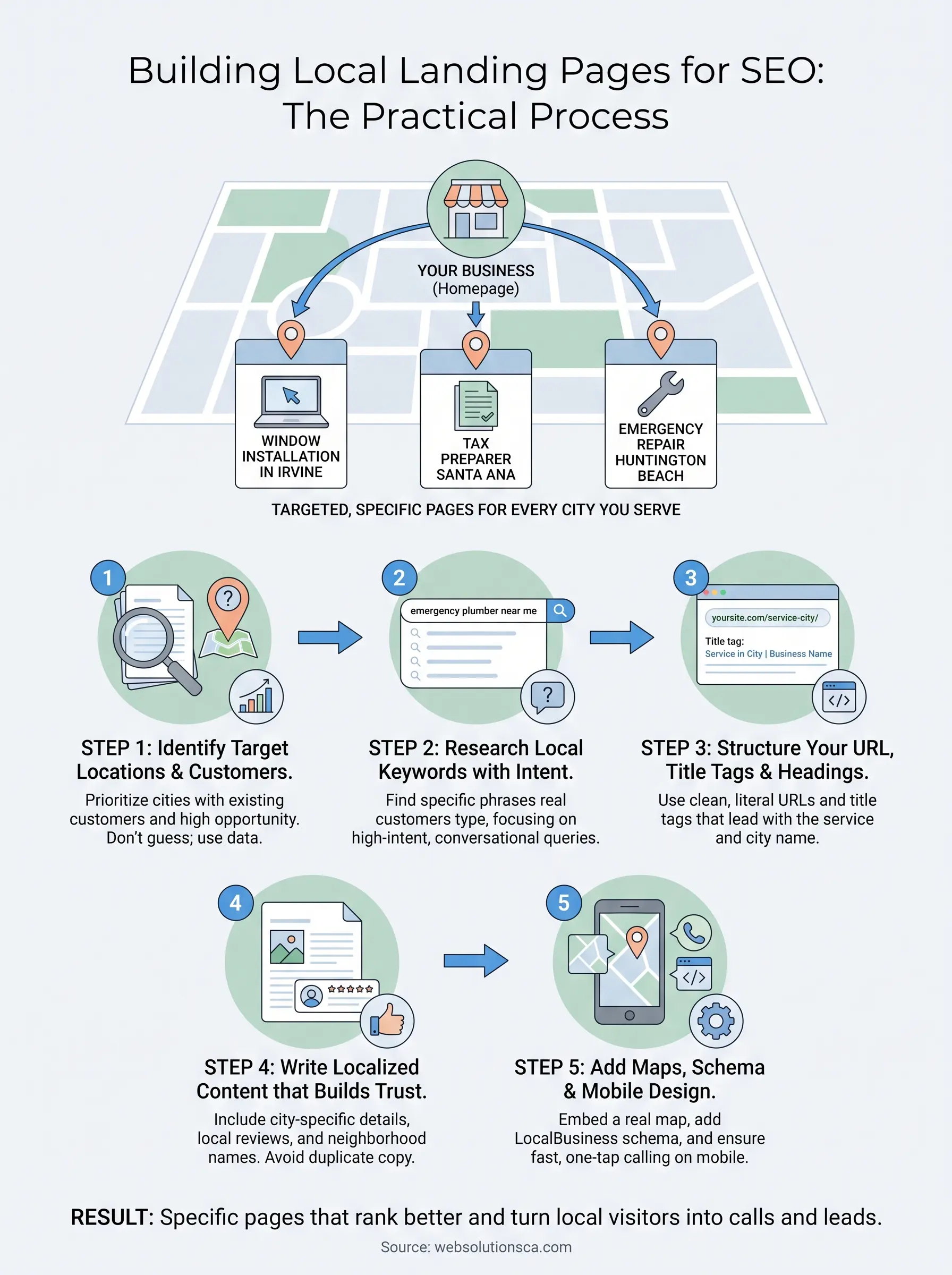
If you run a small business in Orange County and serve more than one city, one website page trying to rank for every location is probably holding you back. Google wants specific, relevant answers for searchers in Irvine, Santa Ana, or Huntington Beach, not one generic "we serve all of Southern California" page. That's where local landing pages come in, and getting them right is often the difference between showing up on page one and staying invisible.
This guide answers the question directly: what local landing pages actually are, why they matter for local SEO, and how to build ones that both rank in Google and turn visitors into calls and leads. You'll learn the structure that works, from unique location-specific content to the on-page elements Google expects, plus the mistakes that get pages flagged as duplicate content or ignored entirely.
We've built these pages for tax preparers, window companies, and immigration consultants across Orange County, so this isn't theory. You'll get a practical, repeatable process you can apply whether you serve two cities or twelve, without hiring an agency to do it for you first.
What is a local landing page and why it matters
A local landing page is a standalone page built for one city, neighborhood, or service area, with content, keywords, and proof points that speak to that specific location instead of your business in general. If you're a window and door company serving Irvine, Santa Ana, and Huntington Beach, you'd have three separate pages, each answering the question "why should someone in this city hire you" rather than one page trying to cover all three at once. Google's own guidance on local search confirms this: relevance to a searcher's location is one of the top ranking factors for local queries, alongside proximity and prominence, as explained in Google's guide to local ranking factors. A single generic page can't send those location signals nearly as clearly as a dedicated one can.
How a local landing page differs from a homepage
Your homepage is built to convert anyone who lands on it, wherever they're searching from. A local landing page is narrower on purpose. It targets one geographic area, references landmarks or neighborhoods a local reader would recognize, and often includes location-specific proof like a job you completed nearby or a review from a customer in that city. Think of your homepage as the front door to your business and each local page as a side door built for a specific neighbor who already knows roughly what they want.
| Element | Homepage | Local Landing Page |
|---|---|---|
| Audience | Anyone, anywhere | One city or service area |
| Keyword focus | Broad brand or service terms | "[service] in [city]" terms |
| Proof points | General testimonials | Reviews and jobs from that city |
| Schema markup | Organization-wide | LocalBusiness tied to that location |
| Call to action | General contact form | Location-specific phone or form |
Why Google, and your customers, reward specificity
Searchers typing "tax preparer in Santa Ana" or "emergency window repair Costa Mesa" want proof that you actually work in their area, not just that you technically could. Location-specific SEO works because it matches intent at every level: the searcher's query, Google's ranking algorithm, and the reader's trust threshold all favor a page that clearly says "we work here" over one that vaguely says "we work everywhere." A page built for Anaheim that mentions Anaheim neighborhoods, references local zip codes, and shows a review from an Anaheim customer answers the searcher's unspoken question before they even have to ask it.
A page that speaks to one city will always outrank a page that speaks to none.
That's the core mechanic behind city landing pages: they narrow the topic enough that both Google's algorithm and a skimming human reader can immediately tell the page is relevant to their exact situation.
The mistake that undoes all of it
Here's where most small businesses go wrong. They build a page for each city, then copy and paste the same paragraphs, swapping only the city name. Google's systems are built to detect this, and pages that read as duplicate or near-duplicate content typically get filtered out of results entirely, sometimes replaced by a single canonical version Google picks for you. We've seen this happen to a document preparation client who had eight nearly identical city pages; only one ever ranked, and it wasn't even their preferred location. If you can't commit to writing genuinely different content for each city, you're better off with fewer, stronger pages than a dozen thin ones competing against each other. The rest of this guide walks through exactly how to avoid that trap while still scaling to as many locations as your business actually serves.
Step 1. Identify your target locations and customers
Before you write a single word of content, you need a real list of cities and neighborhoods worth targeting, not a guess based on where you'd like to work. Pull up your Google Business Profile insights, your CRM, or even old invoices, and map where your paying customers actually came from over the last twelve months. If you're a window and door company and 40% of your jobs came from Irvine, 30% from Santa Ana, and the rest scattered thin across ten other cities, you've just found your first two local landing pages. Don't build a page for every city in Orange County on day one. Build one for the cities already sending you business, then expand once those pages start ranking.

Rank your cities by opportunity, not ambition
Once you have a list, score each city against a few practical factors so you know which pages to build first:
- Existing customer volume: how many past jobs or leads came from this city
- Drive time and service radius: can your team realistically show up same-day
- Competition level: how many other local businesses already have a dedicated page for this city
- Search volume: whether people are actually searching "[your service] in [city]" at meaningful volume
A city with high past volume and low competition should always beat a city that just sounds impressive on paper.
Build local landing pages for where your customers already are, not where you wish they were.
Define the customer, not just the city
Each page also needs a specific person in mind, not just a specific place. A tax preparation client targeting Santa Ana isn't writing for "anyone in Santa Ana," they're writing for a small business owner filing quarterly estimates, or a family that needs bilingual support. Naming that customer changes the content you write later: the headline, the FAQs, even the photos you choose. Two businesses can serve the same city and need completely different pages because their customers have different problems.
Getting this step right saves you from the trap most agencies fall into: cranking out ten thin pages for ten cities nobody searches from. Ten strong pages built around real demand will always outperform thirty built around a map. Once your city list is locked and each one has a defined customer in mind, you're ready to figure out exactly what those customers are typing into Google, which is where keyword research for location-specific SEO comes in next.
Step 2. Research local keywords with real search intent
Once you know which cities to target, you need to know exactly how people in those cities search for what you offer. Keyword research for local pages isn't about guessing; it's about finding the specific phrases a real customer types into Google right before they call someone. A window company in Costa Mesa might assume people search "window replacement Costa Mesa," but the actual data could show "emergency window repair near me" or "double pane windows Costa Mesa cost" getting more traffic. Guessing wrong here means building a page around a phrase nobody types.
Start with Google's own signals
Open an incognito browser window and type your core service plus a target city into Google. Scroll to the "People also ask" box and the related searches at the bottom of the page. Both are free lists of real queries Google already knows people ask around that topic. Pair that with the autocomplete suggestions that pop up as you type, since those come directly from actual search volume. Google's own Keyword Planner inside Google Ads gives you rough monthly search volume by city, even if you never plan to run a paid campaign, and it's free to use with any Google Ads account.
Separate high-intent phrases from vague ones
Not every keyword mentioning a city is worth targeting. Someone searching "Irvine home improvement ideas" is browsing; someone searching "kitchen remodel contractor Irvine" is close to hiring. Sort your list before you write a word of copy:
| Keyword type | Example | Priority |
|---|---|---|
| Transactional, local | "emergency plumber Santa Ana" | High |
| Service plus city | "tax preparer Costa Mesa" | High |
| Informational, local | "average cost of window replacement" | Medium |
| Broad, no city | "best contractor" | Low |
Rank your keywords by how close the searcher is to hiring, not by how many searches the term gets.
Build a short list, not a spreadsheet monster
Resist the urge to target twenty keywords per page. Pick one primary phrase that combines your service and location terms naturally, like "immigration consultant in Anaheim," and two or three supporting variations that could work as subheadings or FAQ questions. Keeping the list tight forces the page to stay focused, which is exactly what both Google and a skimming visitor reward. With your keyword list locked, you're ready to translate it into the actual URL, title tag, and headings that carry those terms on the page.
Step 3. Structure your URL, title tags, and headings
Once you know the keyword each page is built around, the next job is making sure Google can read that keyword in the right places before it ever reads a paragraph of copy. On-page structure for local landing pages follows a predictable pattern: a clean URL, a title tag that leads with the service and city, and a heading hierarchy that repeats the location naturally without stuffing it. Get this scaffolding right and the content you write in Step 4 has somewhere solid to sit.
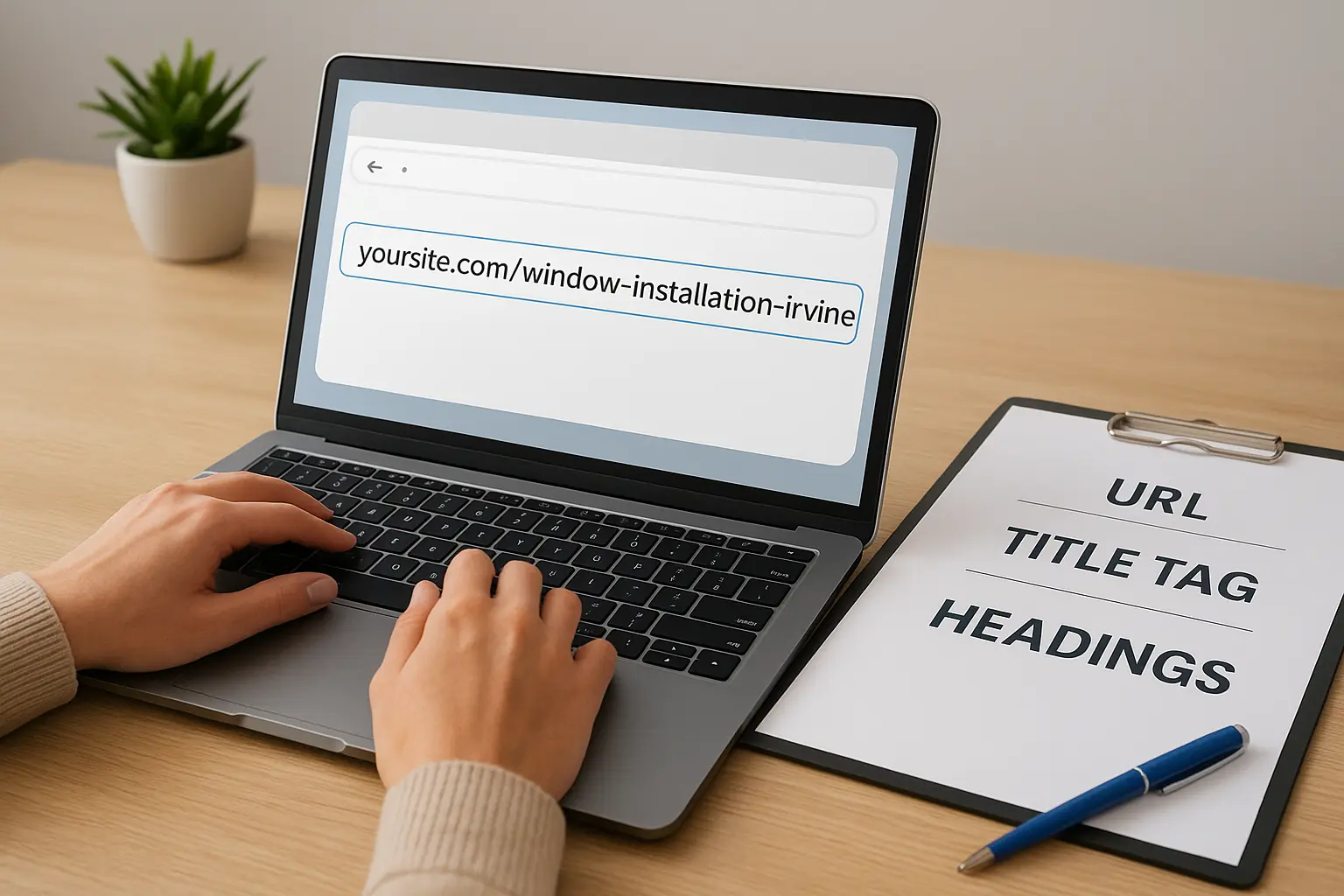
Keep the URL short and literal
Your URL should tell Google and the searcher exactly what the page is about before they click. Avoid dumping every city into one URL or burying the location three folders deep. A simple, flat pattern works best:
yoursite.com/window-installation-irvine/
yoursite.com/window-installation-santa-ana/
yoursite.com/window-installation-huntington-beach/
Notice the pattern stays identical except for the city name. That consistency helps Google understand these are related but distinct pages, not duplicates of each other.
Write title tags that lead with intent
Your title tag is the single most important on-page signal for local search, and it's often the first thing a searcher reads in the results. Lead with the service, follow with the city, and keep it under 60 characters so it doesn't get cut off. Compare a weak version to a strong one:
| Weak title tag | Strong title tag |
|---|---|
| Home | Window Installation | Window Installation in Irvine, CA | [Business Name] |
| Services - Santa Ana Office | Emergency Plumber Santa Ana | Same-Day Service |
A title tag that names the city and the service outperforms a clever tagline every time.
Your meta description won't directly boost rankings, but it earns the click, so mention the city again along with a concrete reason to choose you, like same-day service or a phone number.
Build headings that reinforce the location
Your H1 should mirror the primary keyword you picked in Step 2, something like "Tax Preparation Services in Costa Mesa." From there, use H2s and H3s to break the page into sections a local reader actually needs: services offered in that city, service area boundaries, local reviews, and FAQs specific to that location. Each subheading is a chance to naturally repeat the city name without forcing it, which keeps both local landing pages and skimming readers oriented on exactly where they are, the same pattern you'll see in these service page layouts that convert.
Step 4. Write localized content that builds trust
With your URL, title tag, and headings in place, the actual copy is what convinces a Google algorithm and a skimming visitor that this page belongs to a real business operating in that specific city. Localized content means naming the neighborhoods you serve, referencing landmarks a local reader would recognize, and describing jobs you've actually completed nearby, not swapping one city name into an otherwise generic paragraph. A window company writing for Huntington Beach might mention coastal homes dealing with salt-air corrosion on window frames, a problem an Irvine page wouldn't need to address at all. That kind of detail can't be copied and pasted, which is exactly the point.
Lead with a local proof point
Open the page with something a competitor copying your template couldn't fake: a finished job, a review, or a specific neighborhood you've worked in recently. Structure that opening section around a short list so it's easy to scan:
- Name the city and one or two neighborhoods or zip codes you serve there
- Mention a recent job or project completed in that city
- Include a review or testimonial from a customer in that exact location
- State your response time or service radius from that city
A single real review from that city carries more trust than a paragraph of generic praise.
Answer the questions only that city would ask
Every city has its own quirks: permit requirements, HOA rules, older housing stock, or a competitor everyone in town already knows. Build an FAQ section around those specifics instead of recycling the same three questions across every page. A tax preparer writing for Santa Ana might address bilingual filing support, while a Newport Beach page might focus on high-net-worth quarterly estimates. This is also where localized content earns its keep for search intent: FAQs pull in the long-tail, conversational searches Step 2 uncovered, without forcing them into the main body copy.
Write for the person, not just the place
Remember the specific customer you defined back in Step 1, and write directly to them. Skip the corporate-brochure tone and describe outcomes the way you'd explain them to a neighbor: what happens on day one, what it costs, how fast you show up. Vary sentence length, use the city name naturally rather than mechanically, and read the page out loud before publishing. If it sounds like it could describe any city with a find-and-replace, rewrite it. Once the copy genuinely earns its place, you're ready to layer in the visual and technical elements, maps, schema, and mobile design, that Step 5 covers next.
Step 5. Add maps, schema, and mobile-friendly design
With the copy written, the last layer is the technical and visual proof that tells Google, and a skimming visitor on their phone, that this page is tied to a real, physical location. Local schema markup and an embedded map do work that copy alone can't: they hand Google structured facts instead of asking it to infer them, and they reassure a visitor that you're not just claiming to serve their city, you're actually there.
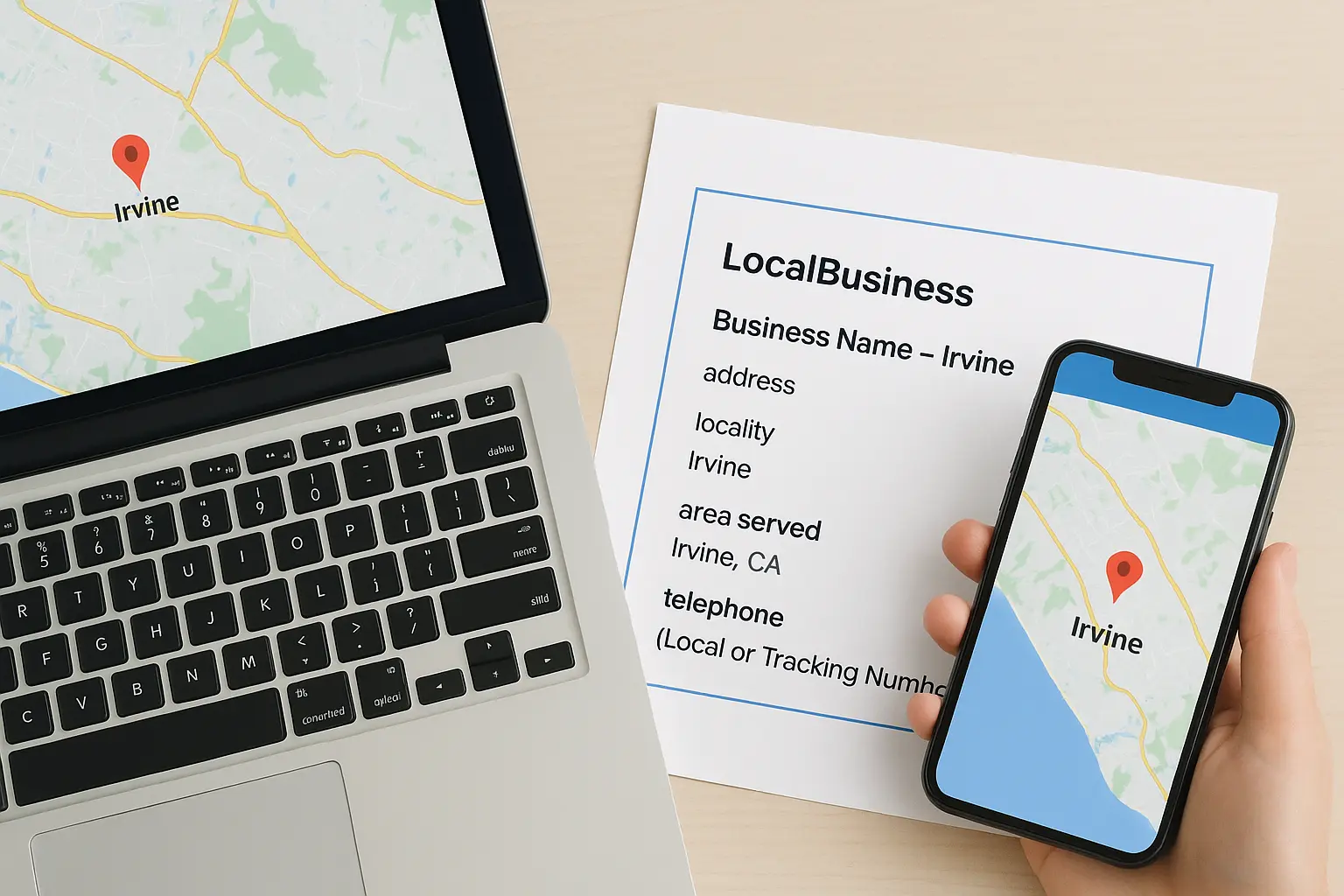
Embed a map tied to that specific location
Drop a real Google Map into the page, centered on your office or the service area for that city, not a generic map of Orange County. If you have a physical location in or near the city, use the address in the embed. If you're service-area only, center the map on the city itself and note your typical response radius nearby. This small addition does double duty: it satisfies a searcher's quick glance for proximity, and it reinforces the same location signal your title tag and headings already established.
Add LocalBusiness schema for that city
Schema markup won't rank a page on its own, but it removes any ambiguity about which city a page serves. Add a LocalBusiness block with the correct address, service area, and phone number for that location:
{
 "@context": "https://schema.org",
 "@type": "LocalBusiness",
 "name": "[Business Name] - Irvine",
 "address": {
 "@type": "PostalAddress",
 "addressLocality": "Irvine",
 "addressRegion": "CA"
 },
 "areaServed": "Irvine, CA",
 "telephone": "[Local or Tracking Number]"
}
Google's own structured data guidelines confirm this markup helps search engines match your page to the right local queries, so use a unique block on every city page rather than one shared script across all of them.
A map and schema block turn a claim of "we serve this city" into a fact Google can verify.
Test the page on an actual phone
Most local searches happen on mobile, often from someone standing in front of the problem your service fixes. Open the finished page on your own phone and check that the click-to-call number works with one tap, the map loads without a long delay, and no text requires pinching to read. A local landing page that loads slow or breaks on mobile loses the exact searcher it was built to convert, no matter how strong the content underneath it is, which is why a fast, mobile-friendly site build matters as much as the copy.
Putting your local pages to work
Building local landing pages isn't a one-time project you check off and forget. Cities change, competitors launch their own pages with help from Orange County local SEO agencies, and Google updates how it weighs relevance and proximity. Come back to each page every few months, add a new review, update the job photos, and check that your schema still matches your current service area. Doing this for two or three cities well beats spreading thin effort across ten.
Getting the structure right on your own takes real time, especially if you're juggling the actual work of running your business. If you'd rather have someone who's already built these pages for Orange County tax preparers, window companies, and immigration consultants handle the research, writing, and technical setup, see how our monthly local SEO plans for Orange County businesses are built around the cities you actually serve, not a generic template swapped city to city.