
If you run a small business in Orange County, you already know the frustration. You show up on page three for the search terms you guessed at, while competitors down the street rank on page one for the phrases customers actually type. Local keyword research fixes that gap by showing you the exact words your neighbors use when they need what you sell, right now, on their phones.
This guide walks you through a real process, not vague advice. You'll learn how to pull location-based search terms from free tools like Google Business Profile insights and Google's autocomplete, how to check search volume without paying for expensive software, and how to organize everything into a simple keyword template you can actually use. We built this process working with tax preparers, window installers, and immigration consultants across Costa Mesa, Irvine, and Santa Ana, so it's tested on businesses like yours.
By the end, you'll have a repeatable keyword list tied to your city and service area, ready to plug into your website copy, Google Business Profile, and blog posts. No guessing, no generic advice pulled from national SEO blogs that ignore how local search actually works.
Why local keyword research matters for small businesses
Most searches for a plumber, dentist, or tax preparer already carry a location baked into the searcher's intent, even when they don't type a city name. Someone searching "emergency plumber" from their phone in Tustin gets Tustin results because Google reads their GPS signal and matches it against location-based keywords in your content and Google Business Profile. If your website only talks about "plumbing services" with no neighborhood, city, or service-area language woven in, you're invisible to that searcher no matter how good your work actually is.

"Near Me" Searches Keep Climbing
Google has reported for years that mobile searches including phrases like "near me" and "open now" have grown dramatically, and that pattern hasn't slowed down. Search behavior data from Google's own research shows people increasingly skip typing a city name because their phone already supplies it, then click on results that best match both the service and the surrounding language search engines associate with that area. This shift means your keyword strategy can't just target "window installation," it needs to target the way people in Huntington Beach or Garden Grove actually phrase that need, including the neighborhoods, landmarks, and shorthand only locals use.
If your keywords don't match how your neighbors search, your website is invisible to the customers standing closest to your door.
Generic Keywords Waste Your Budget
Ranking for a broad, national keyword sounds impressive until you check who's actually converting. A tax preparation firm in Santa Ana chasing "tax preparation services" competes against TurboTax, H&R Block, and every accounting firm in the country. Swap that for "tax preparation Santa Ana" or "bilingual tax preparer Orange County," and suddenly you're competing against a handful of local firms instead of national brands with seven-figure marketing budgets. This is why local SEO keywords consistently produce better return on effort than generic ones for small business owners with limited time and money to spend chasing rankings.
What Local Keyword Research Actually Delivers
Once you know the exact phrases customers near you use, everything downstream gets easier: your website copy writes itself, your Google Business Profile posts target the right terms, and your ad spend stops leaking money on searches that were never going to convert. Here's what changes when you do this work properly instead of guessing:
| Without local keyword research | With local keyword research |
|---|---|
| Competing against national brands for broad terms | Competing against a handful of nearby businesses |
| Website copy uses industry jargon, not customer language | Copy mirrors exact phrases customers type |
| Google Business Profile posts get generic engagement | Posts target searches with buying intent |
| Ad spend wasted on clicks from outside your service area | Budget focused on searchers who can actually become customers |
| Rankings stall on page two or three | Rankings climb for terms that drive calls and visits |
Skipping this step is the single biggest reason small business websites in Orange County get traffic that never turns into leads. You can have a beautiful site and still lose to a competitor with a plain-looking page, simply because their page matches the words customers actually search.
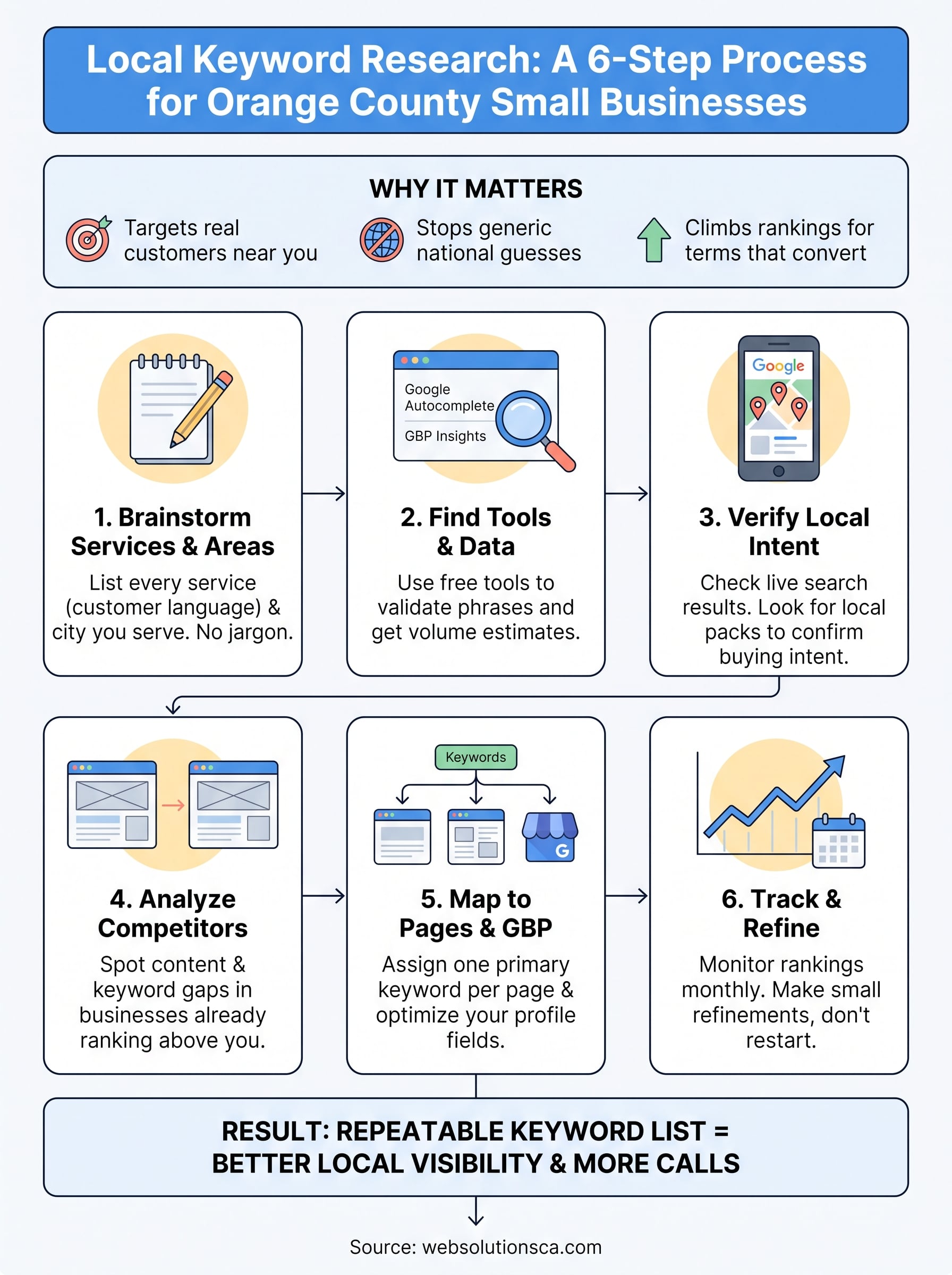
Step 1. Brainstorm your services and service areas
Before you touch a single tool, sit down and list out everything you actually do, in the words a customer would use, not the language you use internally. A window installer might think in terms of "fenestration solutions," but nobody searches that. Brainstorming keywords starts with plain language: window replacement, sliding door installation, emergency window repair. Write down every service, every variation, and every problem you solve, because each one becomes a potential landing page and a potential search term someone in your area is typing right now.
List Every Service, Not Just Your Top Three
Owners often stop after listing their three main services and miss the smaller jobs that bring in steady work. A tax preparer might list "tax preparation" and stop there, ignoring "ITIN application help," "back tax filing," or "bilingual tax preparer." Grab a notebook or spreadsheet and write down:
- Every service you offer, including add-ons and smaller jobs
- Problems customers describe when they call you (not the technical term you'd use)
- Seasonal services that spike at certain times of year
- Services competitors offer that you also do but never mention on your site
The services you forget to list are the ones a competitor down the street is already ranking for.
Map Your Actual Service Area, City by City
Next, list every city and neighborhood you actually serve, not just your headquarters address. If you're based in Costa Mesa but drive to Irvine, Newport Beach, and Tustin regularly, each of those cities deserves its own set of local search terms. Pair each service with each location: "window installation Costa Mesa," "window repair Irvine," "emergency window replacement Tustin." This combination is where local keyword research really starts producing usable phrases instead of guesses.
Build a Simple Two-Column Worksheet
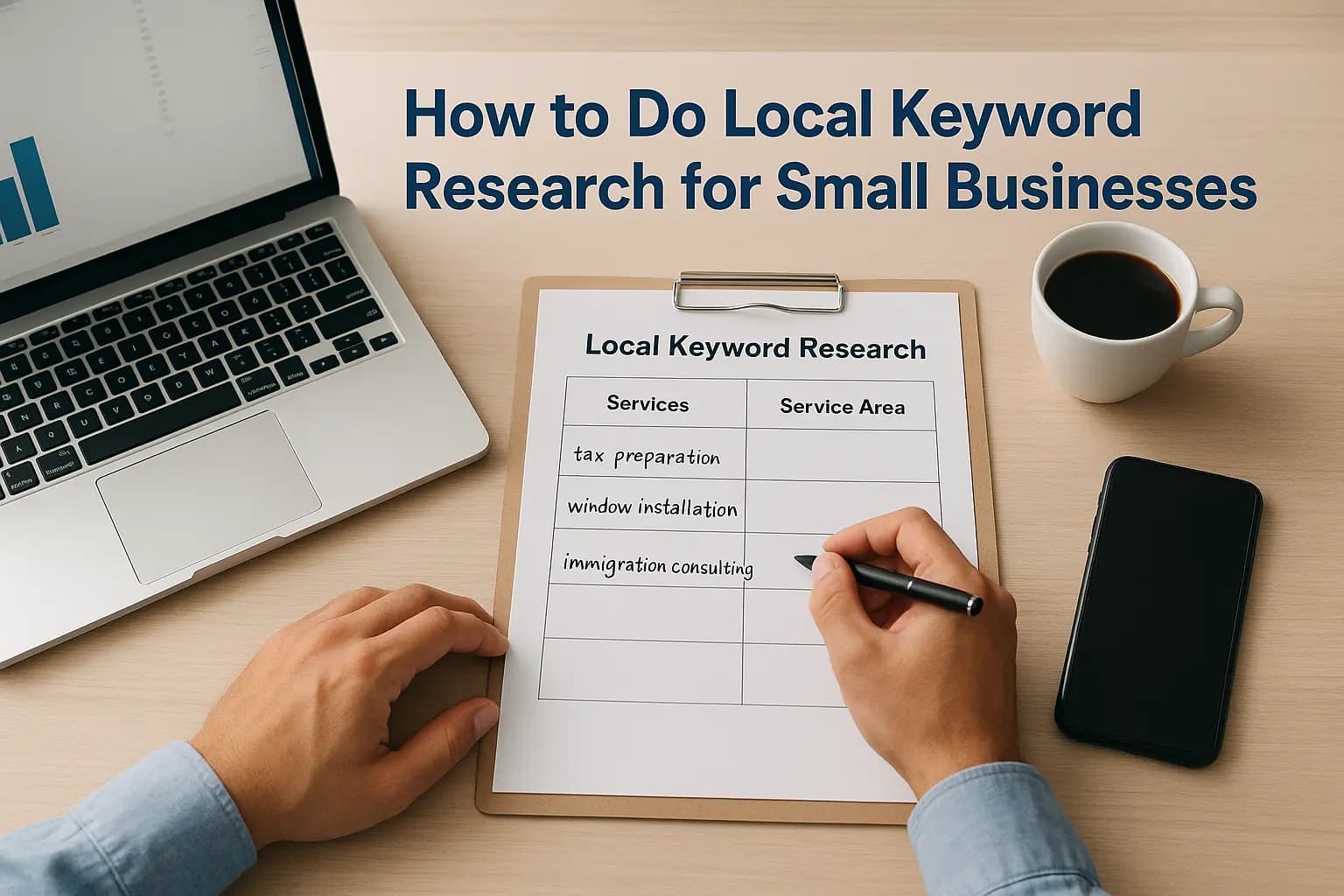
Once you have both lists, cross them into a worksheet. Put services down one column and cities across the top, then fill in the grid with the exact phrase a customer in that city would type for that service. This grid becomes your raw material for step two, where you'll check which of these guesses actual customers are searching, and at what volume. Skipping this brainstorm step is why many small business owners end up with a website that talks about their business the way they see it, instead of the way their next customer is searching for it.
Step 2. Find local keywords with research tools
Now you take the worksheet from Step 1 and run every guess through real data. Keyword research tools show you whether people actually search those phrases, how often, and what related terms you're missing. You don't need an expensive subscription to start, Google gives away most of what a small business needs for free.
Mine Google's Own Search Data First
Open an incognito browser window and type your service into Google, one city at a time. Autocomplete fills in the exact phrases people near you search most, and the "People also ask" and "Related searches" boxes at the bottom of the results page hand you more variations without any extra tool. Google's free Keyword Planner adds monthly search volume ranges by city, which tells you whether "window repair Tustin" gets real traffic or whether you should fold it into a broader "window repair Orange County" page instead.
If Tustin is one of your target markets, see our SEO and digital marketing services in Tustin.
Autocomplete and Keyword Planner cost nothing, and together they'll validate or kill half the guesses on your worksheet.
Check Your Own Google Business Profile Insights
Your Google Business Profile already tracks the exact search terms that led customers to your listing. Log in, open the Performance tab, and review the "Search terms" report. This data is gold because it's not a guess, it's proof of what real customers near you typed before finding your business. If you haven't fully built out your profile yet, here's how your profile feeds local rankings, with this data collection folded in from day one.
Add a Low-Cost Tool for Volume and Difficulty
Once you've exhausted the free options, a low-cost tool fills in the gaps with search volume, keyword difficulty, and competitor keyword lists.
| Tool | Cost | Best for |
|---|---|---|
| Google Keyword Planner | Free | Baseline volume by city |
| Google Business Profile Insights | Free | Confirmed customer search terms |
| Ubersuggest | Low-cost | Difficulty scores, related terms |
| Semrush | Paid | Competitor gap analysis |
Run each surviving phrase from your worksheet through one of these tools and note the monthly search volume next to it. Phrases with zero volume aren't worth a page of their own, but they're often worth folding into a broader page as supporting language.
Step 3. Verify local intent in the search results
Search volume numbers only tell half the story. A phrase can show 50 searches a month and still be worthless if Google interprets it as informational rather than transactional. Before you build a page around any keyword from your worksheet, run it through Google yourself and check what actually shows up. This step is where local search intent gets confirmed or killed, and skipping it is how business owners end up writing pages nobody was ever going to convert on.

Search the Phrase Yourself, Incognito
Open an incognito window, turn off location spoofing if you've used it, and type the exact phrase from your worksheet. Look at what Google returns for the first page. If you see review sites, "best of" lists, or Reddit threads dominating the results, that phrase leans informational and won't drive calls on its own. If you see local business listings, service pages, and the map pack, you've found a buyer intent keyword worth building a page around.
Look for Local Pack and Map Results
The three-listing map pack that appears near the top of results is the clearest signal Google treats a search as local, and it responds to a specific set of local pack ranking factors. When "emergency window repair" pulls up a map pack full of Orange County businesses, you know customers searching that phrase want someone nearby, fast. Note which phrases trigger the map pack and which don't:
| Signal in search results | What it means |
|---|---|
| Map pack with 3 local businesses | Strong local intent, build a service page |
| Mostly blog articles or guides | Informational intent, save for a blog post |
| Mix of local listings and national brands | Moderate intent, worth testing with a landing page |
| Shopping ads or product listings | Transactional but not local, likely not worth chasing |
A keyword only earns a page on your site once you've confirmed real local businesses are already ranking for it.
Watch for Mixed Intent Keywords
Some phrases split intent depending on the searcher. "Window replacement cost" pulls research-minded homeowners comparing prices, not necessarily ready to book. Those still deserve a spot on your site, just as blog content or an FAQ section rather than a core service page keyword, since forcing every phrase into a sales page dilutes the pages that are actually built to convert.
Step 4. Analyze competitors for keyword gaps
Competitors ranking above you already know something you don't, and reverse-engineering their pages is faster than guessing again. Competitor keyword analysis means pulling up the businesses sitting in the map pack and organic results for your target phrases, then reading their site copy line by line to see which service pages, city pages, and blog posts they've built that you haven't. This step often reveals entire categories of local keyword research you missed in Step 1, because a competitor's site structure exposes the phrases they're chasing even when they never publish their keyword list.
Study the Businesses Beating You
Grab the top three to five results for your main service plus city combinations and open each one in a separate tab. Look specifically at page titles, headers, and the services listed in their navigation menu. A window installer in Irvine ranking above you might have a dedicated "sliding glass door repair Irvine" page while you've only got one general services page covering everything. Note every gap like this on your worksheet next to the matching keyword.
The fastest way to expand your keyword list is to read the pages already beating you in the rankings.
Run a Formal Gap Analysis
Once you've eyeballed the competition manually, a tool like Semrush or Ubersuggest can pull a full list of keywords a competitor's domain ranks for that yours doesn't. Paste in three competitor URLs and export the difference. You'll typically find:
- Neighborhood-specific pages you never built
- Service variations you offer but never wrote a page about
- Blog posts answering questions your customers ask but your site ignores
- Keywords tied to reviews or testimonials mentioning specific cities
Prioritize Gaps by Effort and Payoff
Not every gap deserves an immediate new page. Rank the gaps you find by how much local search volume they carry and how directly they tie to a service you actually want more of. Skip chasing every keyword a bigger competitor ranks for, especially phrases tied to services outside your area or budget. If you'd rather have someone else run this analysis and turn it into a build plan, local SEO services built for small businesses usually include this gap work in the first month, comparing your site against the specific competitors already winning in your service area.
Step 5. Map keywords to pages and your Google Business Profile
Now that your worksheet has confirmed, high-intent keywords sitting in it, turn each one into an assignment. Keyword mapping means deciding exactly which page on your site owns each phrase, so you never end up with three pages quietly competing against each other for the same search. Grab your worksheet and add a column labeled "Page," then fill in a URL, existing or planned, for every keyword that survived Step 3.
Assign One Primary Keyword Per Page
Give every page a single primary phrase and two or three supporting variations, not a dozen unrelated terms crammed into one paragraph. A page targeting "window replacement Irvine" can naturally include "vinyl window installation Irvine" and "window replacement cost Irvine" as supporting language, but it shouldn't also try to rank for your Tustin or Santa Ana traffic. Spreading one page across five cities dilutes it in Google's eyes and confuses the searcher landing on it.
One page, one primary keyword, one city, every time you build a new service area page.
Build City Pages Without Duplicating Content
When you serve multiple cities, resist the shortcut of copying one city page and swapping the city name, and instead build city landing pages that rank on their own. Google recognizes duplicate content fast, and thin, repetitive city pages rarely rank for anything. Instead, write each page with details specific to that location:
- A real neighborhood or landmark you've worked near
- A short mention of drive time or service radius from that city
- Local testimonials or project photos tied to that area when you have them
- Pricing or availability notes if they differ by location
Optimize Your Google Business Profile Fields
Your keyword map also feeds directly into your Google Business Profile. Add your primary service keywords into your business description, your services list, and your Q&A section, using the same phrasing customers actually search rather than internal jargon. Post updates using your geo-targeted keywords whenever you finish a job in a specific city, since Google weighs recent, location-tagged activity when deciding who shows up in the map pack. If your profile still reads like a placeholder, this guide to field-by-field profile optimization walks through the mapping step by step so every field pulls its weight.
Step 6. Track rankings and refine your keywords
Keyword research isn't a one-time project you finish and forget. Rankings shift as competitors update their sites, Google adjusts its algorithm, and your own business adds new services or cities. Rank tracking turns your worksheet into a living document instead of a file you built once and never opened again. Set a recurring reminder, monthly works for most small businesses, to check where each of your mapped keywords actually sits in the results.

Pick a Tracking Method That Matches Your Budget
You don't need enterprise software to track a few dozen local phrases. Google Search Console shows you the exact queries bringing traffic to each page, along with your average position, for free. Pair that with a manual incognito search on your top ten priority phrases once a month, noting whether you've climbed into the map pack or fallen out of the first page. If your list grows past thirty keywords across multiple cities, a low-cost tool like Ubersuggest or a paid option like Semrush automates the check and alerts you when a ranking moves.
A keyword you stop tracking is a keyword you'll eventually lose without noticing.
Watch for Seasonal and Competitive Shifts
Some local search terms spike at predictable times, tax preparers see "tax preparation Orange County" climb every February and March, window companies see storm-related repair searches jump after a windy week. Note these patterns next to each keyword on your worksheet so you can push content and Google Business Profile posts ahead of the spike instead of reacting after it's already passed. Also watch what happens when a new competitor opens nearby or an existing one redesigns their site, since both events can shuffle rankings within a matter of weeks.
Refine, Don't Restart
When a keyword stalls or drops, resist the urge to throw out the page and start over. First check whether the content still matches search intent from Step 3, whether a competitor has published a stronger page, or whether your Google Business Profile activity has gone quiet. Small refinements, adding a recent project photo, updating a service list, answering a new customer question, usually recover a ranking faster than a full rebuild. Keep a running log of what you changed and when, so over time you build a record of what actually moves your rankings instead of guessing again every few months.
Helpful tools and templates for local keyword research
You've now run through six steps, and pulling them into one reusable system beats rebuilding your process from scratch every time you add a service or city. This section gives you the actual template columns and tool shortlist so you can start your next keyword research project in minutes instead of hours.
Your Local Keyword Worksheet Template
Copy this structure into a spreadsheet and you've got everything from Steps 1 through 6 in one place. Every keyword that survives should carry these fields:
Service | City | Search Phrase | Monthly Volume | Search Intent | Map Pack? (Y/N) | Assigned Page | Notes
Fill a new row for every service and city combination, then delete rows once a phrase proves informational or shows zero volume. Keep the file in Google Sheets so you and anyone helping you with your site can edit it together without emailing versions back and forth.
A keyword worksheet only earns its keep if you keep opening it, not if it sits forgotten after the first pass.
Free and Low-Cost Tools Worth Bookmarking
Before paying for anything, exhaust what's already free. Bookmark these and check them on the same day each month:
- Google Search Console, for queries already driving clicks to your site, filtered fast with a free Search Console regex generator
- Google Business Profile Insights, for confirmed search terms customers used before finding your listing
- Google Keyword Planner, for baseline volume by city
- Google autocomplete and "People also ask", for real phrasing straight from searchers
Once your list grows past what you can track manually, Ubersuggest handles difficulty scores at a low monthly cost, and Semrush earns its higher price tag once you're running full competitor gap reports across multiple cities.
When to Bring in Outside Help
Building this system by hand teaches you how your customers search, and that knowledge pays off even if you eventually hand the ongoing work to one of the local SEO firms serving Orange County. Owners juggling a full schedule often find the research itself takes less time than the follow-through, writing pages, updating the Google Business Profile, tracking rankings monthly. If that follow-through keeps sliding down your to-do list, our SEO services team runs this exact worksheet process for Orange County clients every month, so the keywords don't just sit in a spreadsheet.
Turning your keyword research into local customers
Getting this far puts you ahead of most small businesses in Orange County still guessing at what customers type into Google. Local keyword research only pays off once those phrases show up in your website copy, your Google Business Profile, and the pages you build for each city you serve. The worksheet you built across these six steps isn't a one-time project, it's a working document that should keep shaping your local SEO strategy every month as rankings shift and your services grow.
If building and maintaining that worksheet feels like one more job on top of running your business, you don't have to do it alone. Our monthly Orange County SEO plans handle this exact process for tax preparers, contractors, and service businesses across Costa Mesa, Irvine, and the rest of the county, turning keyword lists into pages that actually bring in calls.