
If you run a local business in Orange County, you already know referrals and foot traffic only get you so far. Google Ads for local businesses puts you in front of people searching for what you offer right when they're ready to call or book, but most owners waste money on campaigns built for national brands instead of a plumber in Tustin or a tax preparer in Santa Ana. That gap between generic setup and local reality is where budgets disappear fast.
This guide walks you through setting up Google Ads the right way for a local service business, including when to use standard Search campaigns versus Local Services Ads, how to structure location targeting so you're not paying for clicks outside your service area, and what realistic costs actually look like for a small business budget. You'll also see how conversion tracking ties your ad spend directly to calls and leads, not just clicks.
We built this from what actually works for the small businesses we manage campaigns for across Orange County, from our Costa Mesa web design and paid advertising clients to Huntington Beach. By the end, you'll have a clear, practical setup process and the best practices that separate profitable campaigns from wasted spend.
What you need before launching Google Ads
Jumping into Google Ads without a few pieces in place is how small business owners burn through $500 in a weekend and see zero calls. Before you build a single campaign, you need a landing page that actually converts, a realistic sense of what you're willing to pay per lead, and the tracking infrastructure to know if any of it worked. Skip this prep and you're just guessing with real money.
A landing page that does its job
Sending Google Ads traffic to your generic homepage instead of a purpose-built landing page is one of the most common mistakes we see with local business advertising. A homeowner searching "emergency plumber Irvine" wants a page that says exactly that, with your phone number above the fold, a short list of services, and a form that takes 30 seconds to fill out. If your site is slow, cluttered, or missing a clear call to action, you'll pay Google for clicks and get nothing back. Our team builds these conversion-focused pages through lead-focused web design in Orange County specifically because a bad landing page kills good ad spend faster than bad keywords do.
If your landing page can't convert a visitor in under 10 seconds, your Google Ads budget is paying for someone else's website to look better.
Know your numbers before you set a budget
You need three numbers before you touch the Google Ads dashboard: your average customer value, your acceptable cost per lead, and your monthly ad budget, and it helps to know typical Google Ads costs per click and per lead before you set them. A window and door company with a $4,000 average job can afford to pay $60 for a qualified lead. A document preparation service charging $150 per client cannot. Work backward from your margins, not from what a competitor is spending.
| What you need | Why it matters |
|---|---|
| Average job or customer value | Determines what you can afford per lead |
| Target cost per lead | Sets your bidding strategy from day one |
| Monthly ad budget | Small local campaigns often start between $500 and $1,500 |
| Defined service area | Prevents wasted spend outside your zip codes |
| Google Business Profile | Required for Local Services Ads and helps Search Ads too |
Accounts and access you'll need ready
Getting these pieces lined up ahead of time saves you a frustrating back-and-forth once your campaign is live and already spending. Nothing stalls momentum like realizing halfway through setup that you don't have admin access to your own business profile.
- A verified Google Business Profile with accurate hours, service categories, and photos
- Admin or owner access to your website (or a developer who can add tracking code)
- A dedicated phone number or call-tracking number for measuring calls from ads
- A billing method and a clear monthly budget you've committed to for at least 60 to 90 days
- Basic photos or service descriptions ready to use in ad copy and extensions
Once these are in place, you're not starting from zero when you open your Google Ads account. Every hour you spend here saves you money once the campaign starts running, because you're launching with a plan instead of improvising while the meter runs.
Step 1. Create your Google Ads account
Head to ads.google.com and sign in with the Google account tied to your business, not a personal Gmail you'll lose access to later. Google will walk you through a guided setup that defaults to "Smart" campaigns, but skip that option. Smart campaigns hand almost all control to automation and give you far less visibility into which keywords or locations are actually driving calls. For a local service business, you want the "Expert Mode" or "Switch to Expert Mode" link, which unlocks standard Search campaigns where you control keywords, bids, and targeting directly.
Skipping Expert Mode is the fastest way to hand your ad budget to Google's guesswork instead of your own.
Choosing your campaign type
Once you're in Expert Mode, Google asks what result you want. Pick "Leads" as your objective, since that's what a local business actually needs, not brand awareness or website traffic for its own sake. From there, choose Search as your campaign type. This keeps your ads text-based and intent-driven, showing up when someone types "HVAC repair Costa Mesa" or "immigration consultant near me" rather than displaying banner ads to people who aren't actively looking.
Filling in the account basics
Before your first campaign goes live, Google requires a few account-level details. Work through these in order:
- Business name and website URL
- Billing country, currency, and payment method
- Time zone (this affects reporting and can't be changed later, so get it right)
- Account-level conversion tracking setup (covered more in Step 5)
Getting the time zone wrong is a small mistake that quietly skews every report you pull for the life of the account, so double-check it before you save.
Verify before you spend
Google occasionally requires identity or business verification before ads start running, especially for service categories tied to home services or professional licensing. Submitting this early prevents a delay right when you're ready to launch. If you'd rather have someone handle account setup, campaign structure, and verification correctly the first time, our team handles Google and Meta ads management for Orange County businesses daily and knows exactly where new advertisers get stuck.
Step 2. Set your budget and location targeting
Now you tell Google where to spend your money and how much it's allowed to spend each day. This step is where most local business advertising budgets get wasted, because owners either set a daily cap too low to gather data or target a radius so wide they're paying for clicks from people who'll never drive to their shop.

Setting a realistic daily budget
Divide your monthly budget by 30.4 to get your daily cap, then let Google know this number can fluctuate day to day within your monthly total. Start with the target cost per lead you calculated earlier, choose from the available Google Ads bidding strategies, and make sure your daily budget covers at least 3 to 5 clicks at your expected cost per click, otherwise the algorithm won't have enough data to optimize. A Costa Mesa plumber with a $900 monthly budget should expect roughly $30 a day, which is tight but workable if your keywords are tightly focused on service and city.
A budget that can't afford at least a handful of clicks a day never gives Google's system enough signal to find you good customers.
Building your location targeting
Under campaign settings, choose "Enter another location" and add every city, zip code, or radius you actually service, then remove the default setting that shows ads to "people in, or who show interest in" your area. That default box quietly expands your reach to people outside your service zone who merely searched about your area, which burns budget fast.
| Location setting | Recommended for local businesses |
|---|---|
| Presence: people in your targeted locations | Yes, keep this checked |
| Presence or interest (default) | No, uncheck this |
| Radius targeting | Good for single-location shops (5 to 15 miles) |
| City/zip list | Better for multi-city service areas like Irvine and Tustin |
Work through your service map city by city rather than relying on a single radius circle, especially if you serve Orange County towns with overlapping but distinct boundaries. Setting location targeting this precisely means every dollar you spend is aimed at someone who could actually become a paying customer, not a curious browser three counties away.
Step 3. Build your campaign and write local ad copy
With your budget and location settings locked in, it's time to build the actual campaign structure that determines which searches trigger your ads. Group your keyword research into tight ad groups organized by service, not one giant list of every term you can think of. A roofing company should split "roof repair Costa Mesa" and "roof replacement Costa Mesa" into separate ad groups, each with its own ad copy, rather than lumping every roofing term together and hoping one generic ad performs for all of them.
Picking keywords that convert
Start with exact and phrase match keywords tied to your service plus your city or neighborhood, since broad match tends to burn budget on searches that only loosely relate to what you offer. Add negative keywords early, things like "jobs," "DIY," "free," and "how to," so you're not paying for clicks from people who were never going to hire you. Google's Keyword Planner inside Ads gives you real search volume for local terms, so use it when finding the local terms worth bidding on and confirm demand before committing budget to a phrase you assume people search for.
Vague ad copy attracts vague clicks, and vague clicks rarely turn into paying customers.
Writing ads that speak to your zip code
Generic ad copy blends into every other listing on the page. Local specificity is what earns the click.
- Headline 1: name the exact service ("Emergency Water Heater Repair")
- Headline 2: name the city or area ("Serving Tustin & Santa Ana")
- Headline 3: a trust signal or offer ("Same-Day Appointments")
- Description: mention licensing, response time, or a guarantee specific to your trade
- Call to action: tell them exactly what to do ("Call Now" or "Book Online")
Write at least three headline variations and two descriptions per ad group so Google's system can test combinations and show you which ones actually get clicked and, more importantly, which ones lead to calls. Skip the temptation to write clever taglines here. A homeowner searching at 9pm with a leaking pipe wants proof you're nearby, available, and qualified, not wordplay. Review your search terms report weekly during the first month, since it shows the exact phrases triggering your ads and lets you catch mismatched keywords before they drain your budget.
Step 4. Add extensions and link your business profile
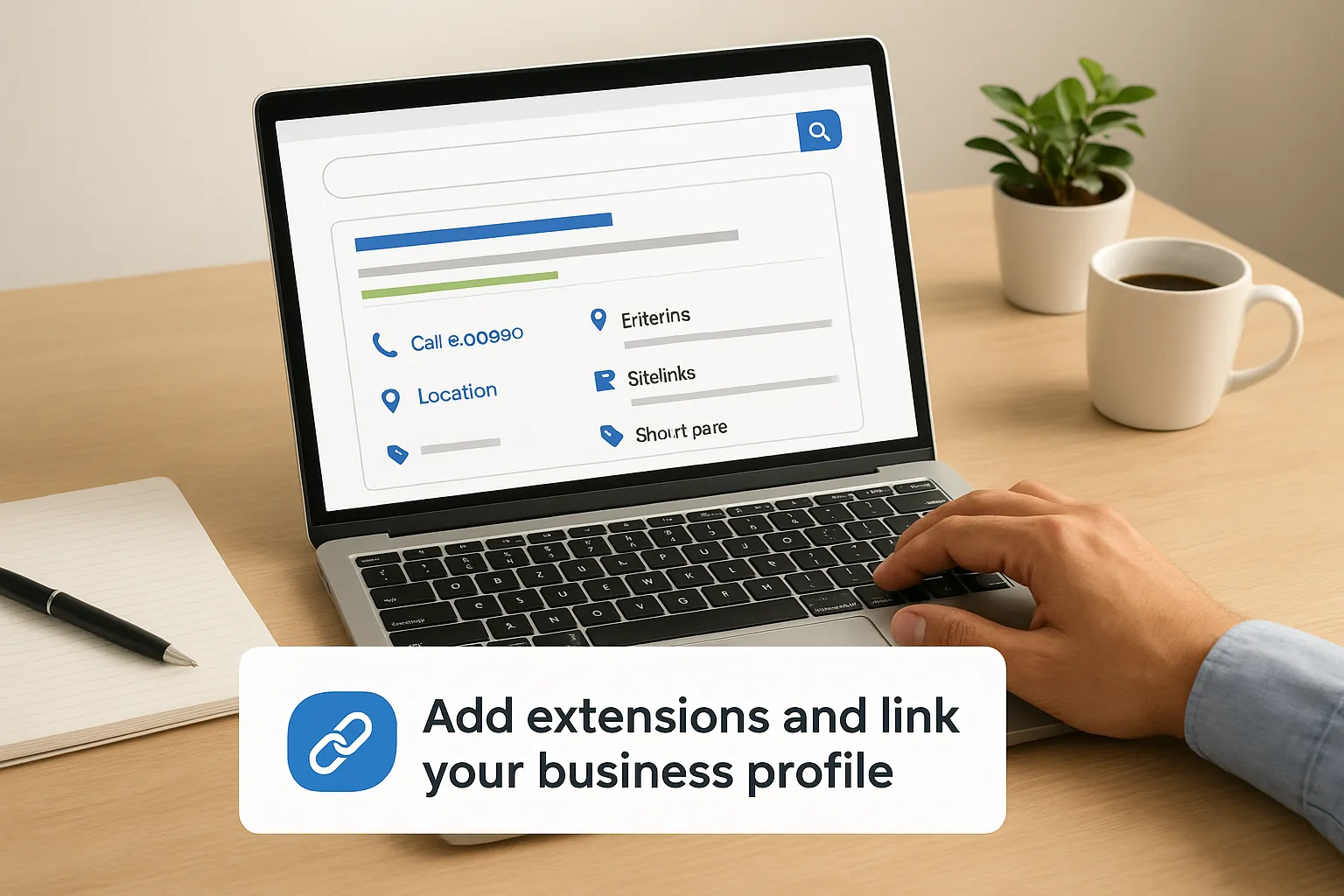
Ad extensions turn a plain text ad into something that takes up more space on the results page and gives searchers more reasons to click. For a local business, extensions aren't optional polish, they're where you show your phone number, address, and specific services without eating into your headline character count. Skipping extensions means your ad sits smaller and less useful next to a competitor who filled theirs in.
Which extensions actually move the needle
Go into your campaign settings and add these before your ads start running, not after:
- Call extensions: show your phone number directly in the ad, with a click-to-call button on mobile
- Location extensions: pull your address from your Google Business Profile so nearby searchers see distance and a map pin
- Sitelink extensions: link to specific pages like "Financing," "Service Area," or "Book Online" instead of just your homepage
- Callout extensions: short trust phrases like "Licensed & Insured" or "24/7 Emergency Service"
- Structured snippets: list your specific services ("Water Heater Repair, Leak Detection, Drain Cleaning") so Google can match you to more precise searches
An ad without extensions is competing at half strength against every competitor who bothered to fill theirs in.
Connecting your Google Business Profile
Link your Google Business Profile to your Ads account under Business Data in the settings menu. This single step powers your location extension, feeds review data into some ad formats, and is required if you plan to run Local Services Ads alongside standard Search campaigns. If your profile is thin, missing photos, outdated hours, or has zero recent reviews, fix that before linking, because a weak profile drags down the extension quality even if your ad copy is strong. Our team handles keeping a business listing complete and fully optimized for clients specifically because this connection between your profile and your ad account gets overlooked far more than it should.
A quick note on Local Services Ads
If your trade qualifies (plumbing, HVAC, legal services, and similar categories), Local Services Ads run on a pay-per-lead model instead of pay-per-click and require a separate background check and profile setup tied to the same Google Business Profile. Many Orange County service businesses run both Search campaigns and Local Services Ads at once, since they capture different stages of buyer intent.
Step 5. Track conversions and optimize performance
None of the previous four steps matter if you can't see which clicks actually turn into paying customers. Google Ads will happily report clicks and impressions all day, but conversion tracking is what tells you whether those clicks became calls, form submissions, or booked appointments. Without it, you're optimizing a campaign based on guesses instead of results, which defeats the entire point of paying for measurable advertising.
Setting up the tracking that matters
Go into Tools & Settings, then Conversions, and start setting up Google Ads conversion tracking step by step for the actions that actually indicate a lead: phone calls from ads, calls from your website, form submissions, and booking confirmations if you use online scheduling. Google's own conversion tracking guide walks through the tag setup, but the short version is this: install the Google Ads tag on your thank-you page, or use call conversion tracking through a forwarding number if most of your leads come by phone. A plumber getting 80% of leads through calls but only tracking form fills is flying blind on the majority of their actual business.
If you can't trace a dollar spent to a call received, you're not running a campaign, you're running an experiment with no data.
What to check and adjust weekly
Build a habit of reviewing these numbers every week for at least the first two months:
- Cost per conversion by ad group, not just by campaign
- Search terms report to catch irrelevant queries triggering your ads
- Ad performance to pause weak headlines and lean into ones getting clicks and calls
- Location report to see if any city or zip is quietly draining budget without producing leads
- Time-of-day and day-of-week data to shift budget toward hours when people actually call
Quarterly, run a full Google Ads audit: revisit your negative keyword list, refresh ad copy that's gone stale, and check whether your cost per lead still matches what your margins can support. Optimizing performance isn't a one-time setup task, it's an ongoing habit, and the businesses that check these numbers weekly consistently outspend and outperform the ones that set a campaign live and walk away.
Keeping your local campaigns on track
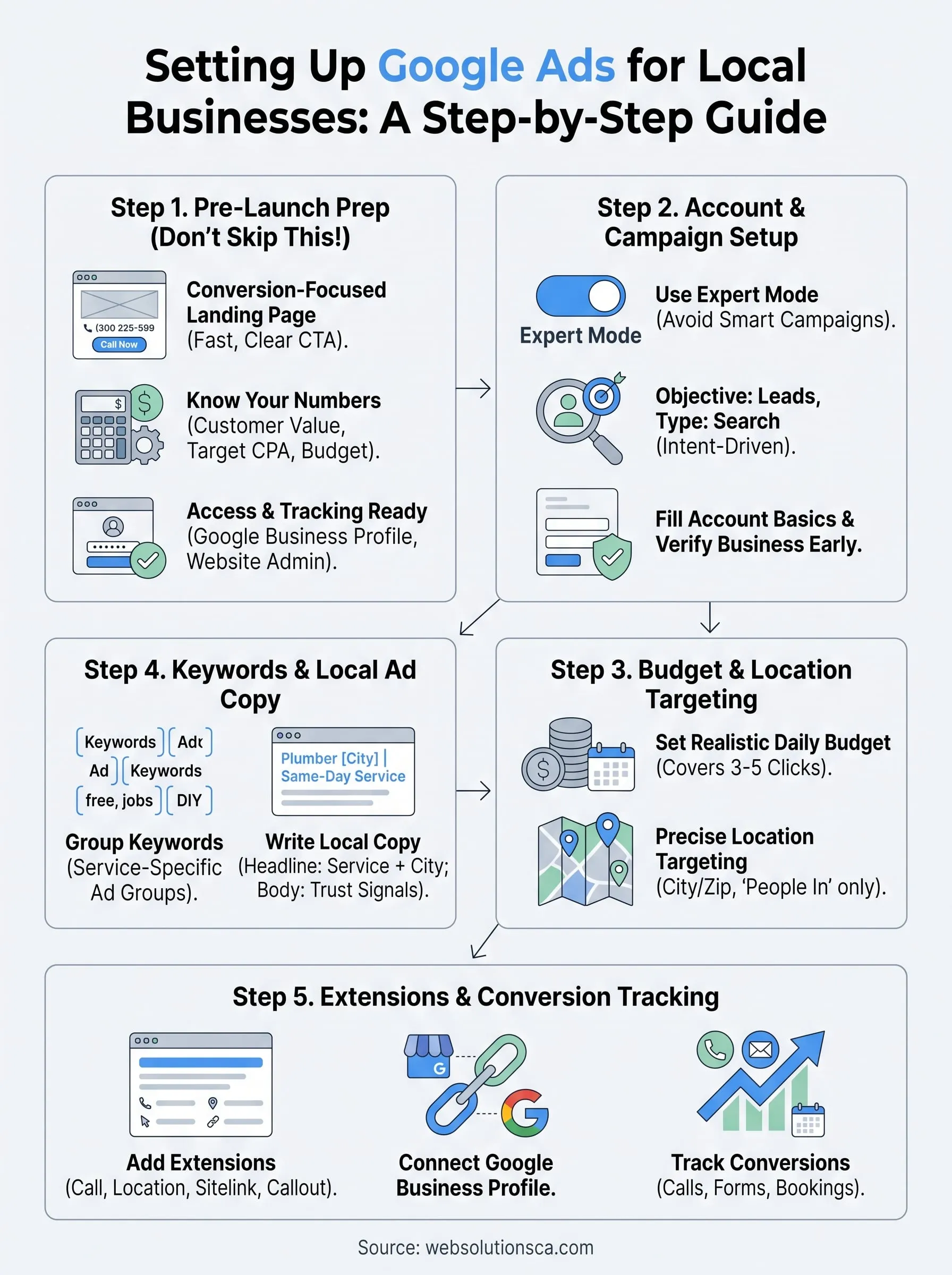
Getting Google Ads for local businesses right isn't about a single perfect setup, it's about the weekly habit of checking numbers and adjusting before small leaks turn into wasted budget. You now have the framework: a landing page that converts, budget and location targeting that matches your actual service area, ad copy written for your zip code, extensions that fill out your ad, and conversion tracking that ties spend to real calls and leads. Skip any one of these and the rest struggle to carry the campaign on their own.
Most Orange County owners don't fail at Google Ads because the platform is complicated, they fail because nobody's watching the account closely enough to catch problems early. If you'd rather hand that weekly grind to people who manage local campaigns every day, see how PPC campaign management for Orange County businesses works at Web Solutions CA and let's build one that actually pays for itself.