
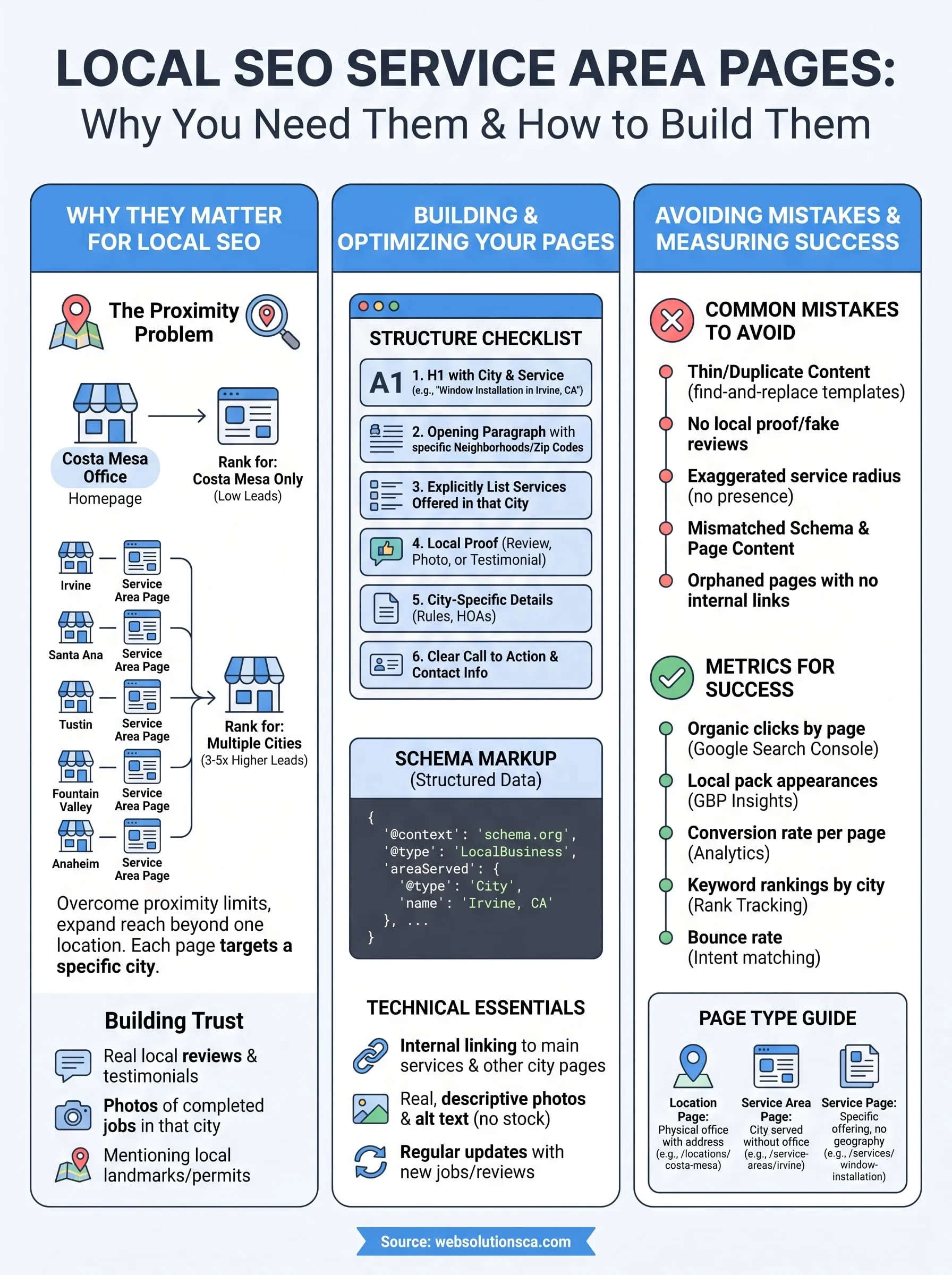
If your business serves Irvine, Santa Ana, and half of Orange County but only has one office in Costa Mesa, you've got a problem: Google mostly wants to rank you for that one city. Service area pages solve this by giving each location you actually serve its own dedicated page, packed with content, keywords, and proof that you show up there, without needing a storefront on every block.
A service area page is a page built for a specific city or neighborhood you work in, separate from your homepage, designed to rank in local search for that exact location. Done right, local seo service area pages help window installers, tax preparers, and immigration consultants alike show up when someone in Tustin or Fountain Valley searches for their service, not just when someone searches your home city.
In this article, we'll break down what these pages actually need to include, how service area page seo differs from standard local SEO, and the exact structure we use when building them for Orange County clients. You'll also learn the mistakes that get pages flagged as thin or duplicate content, and how to avoid them entirely.
Why service area pages matter for local SEO
Google's local algorithm leans heavily on proximity signals, one of several ranking factors that decide who shows up in the local pack, meaning it favors businesses physically close to the person searching. If your only address is in Costa Mesa, your homepage naturally ranks best for "Costa Mesa" searches and falls flat everywhere else, even in cities ten minutes away like Santa Ana or Tustin. This is the core reason service area seo exists as its own discipline separate from standard SEO: you're fighting an algorithm that assumes location equals relevance, and you need a workaround that doesn't involve renting office space in six cities.
Businesses that skip this step often try to fix the problem by stuffing city names into their homepage copy, hoping one page can rank for Irvine, Anaheim, and Garden Grove at once. It doesn't work. Google's Google Business Profile and ranking systems, as confirmed in Google's own guidance on local search ranking factors, reward pages built around a single, clear location intent, not pages trying to be everything to everyone. A homepage diluted across ten cities usually ranks for none of them.
One page can't rank for ten cities, but ten focused pages can each rank for one.
The math behind expanding into nearby cities
Orange County is dense with cities that sit within a 20-minute drive of each other, which means your potential customer base multiplies fast if you're willing to build content for it. Consider the difference between a business that only targets its home city versus one using local seo service area pages for its whole coverage zone:

| Approach | Cities ranking in local pack | Typical monthly leads from organic search |
|---|---|---|
| Homepage only, no service pages | 1 (home city) | Low, inconsistent |
| Dedicated service area page per city | 5 to 12+ | 3 to 5x higher, based on client data |
Those numbers vary by industry, but the pattern holds across the tax prep, window and door, and immigration consulting clients we've built these pages for. Every additional well-built page is another shot at showing up in the map pack and organic results for a search you'd otherwise never touch.
What these pages actually signal to Google
Each service area page tells Google, in plain language and structured data, exactly where you're willing to work and what you do there. That includes your service radius, the specific services offered in that city, and proof you've actually done work nearby, whether that's a testimonial from a Fountain Valley client or a photo from a completed job in Mission Viejo. Adding structured data (schema markup for LocalBusiness or Service) reinforces this signal for search engines, making the connection between your business and that city unambiguous rather than implied.
Google's own documentation on structured data for local businesses confirms that clear, specific markup helps search engines understand and surface relevant business information, which matters even more when you're claiming relevance in a city where you don't have a storefront.
Building trust beyond the ranking algorithm
Rankings only matter if the person who lands on the page actually trusts you enough to call. A page that mentions Huntington Beach once in a paragraph and otherwise reads like generic boilerplate won't convert, even if it somehow ranks. Genuine trust comes from specifics: naming neighborhoods, referencing permit requirements or local regulations that apply in that city, and showing reviews from people who live there.
Small businesses that get this right treat every service area page as its own mini pitch, not a copy-paste template with the city name swapped out. That's the difference between a page that ranks and disappears in a bounce, and one that turns a Tustin search into a booked estimate. Agencies that serve Orange County businesses and build out local SEO service area pages as part of a broader SEO strategy, like the approach we use in Web Solutions CA's SEO services, tend to see this compounding effect across a client's entire service area rather than just one city.
How to create and optimize a service area page
Building a real service area page takes more than swapping the city name in a template. Start with unique content for every location, at least 500 to 800 words that talks about that specific city, the same standard that separates a city page that ranks and converts from a rehash of your homepage with find-and-replace. Google's algorithms are good at spotting duplicate patterns, so if your Irvine page and your Tustin page are identical except for one word, don't expect either to rank well.
Every page needs a clear structure that both readers and search engines can parse quickly. Here's the layout we use for service area pages seo work with Orange County clients:
- H1 with the city name and service (example: "Window Installation in Fountain Valley, CA")
- Opening paragraph naming specific neighborhoods, landmarks, or zip codes you cover
- Services offered in that city, listed explicitly rather than implied
- Local proof: a testimonial, review, or job photo tied to that city
- Any city-specific detail that matters, like permit rules, HOA restrictions, or common local issues
- A clear call to action with your phone number and a contact form
- Schema markup identifying the business and the service area
For a practical example, explore our Santa Ana web design and SEO page. It demonstrates how a Costa Mesa-based agency can create a dedicated service-area page with relevant services, local context, clear calls to action, and links to its main service pages without claiming a physical office in Santa Ana.
A service area page without local proof is just a landing page wearing a city's name.
Don't skip the technical layer either. Structured data tells Google explicitly what you're claiming, and it should match what's on the page word for word. Here's a simplified example of the schema you'd add to a service area page:
{
 "@context": "https://schema.org",
 "@type": "LocalBusiness",
 "name": "Your Business Name",
 "areaServed": {
 "@type": "City",
 "name": "Fountain Valley, CA"
 },
 "telephone": "+1-714-555-0100",
 "priceRange": "$$"
}
Getting service area page seo right also means thinking about internal linking. Every page should link back to your main services page and to a couple of neighboring city pages, so Google can crawl the whole network easily and understand it as one connected service area rather than a pile of disconnected pages. Homepage navigation should link to a hub page listing all your service areas, not bury them three clicks deep.
Images matter more than most business owners assume. Uploading a generic stock photo labeled "Santa Ana window installation" fools no one, least of all Google's image indexing. Real photos from real jobs in that city, with descriptive file names, alt text, and properly compressed image files, add a layer of authenticity that stock photography can't fake.
Finally, treat these pages as living documents, not one-and-done projects. Update them when you complete new jobs in that city, when reviews come in, or when service offerings change. A page frozen since launch day starts to look stale to both readers and search engines, and stale pages slide down the rankings over time. If you're not sure where to start structuring these across your own service area, our Orange County website design team builds this framework in from day one rather than bolting it on later.
Service area pages vs. location pages and service pages
Confusing these three page types is one of the fastest ways to build a site structure that fights itself. A location page describes a physical address, an actual office or storefront you can walk into, complete with hours, parking info, and maybe a map embed. A service area page describes a city you work in without having a building there. A service page describes what you do (window installation, tax prep, immigration filing) regardless of geography, and there are plenty of service page examples built to convert worth studying before you write one. Mixing these up leads to duplicate content, confused visitors, and search engines that can't tell which page should rank for which query.

Here's how the three compare side by side:
| Page type | Purpose | Contains an address? | Typical URL structure |
|---|---|---|---|
| Location page | Describes a physical office you operate | Yes | /locations/costa-mesa |
| Service area page | Describes a city you serve without an office | No | /service-areas/irvine |
| Service page | Describes a specific service you offer | No | /services/window-installation |
Confusing a service area page with a location page is like putting a storefront sign on a truck, it looks fixed when it's actually mobile.
Why the distinction affects your Google Business Profile
Google takes address claims seriously, and pretending you have an office somewhere you don't is one of the fastest ways to get a Google Business Profile set up for local search suspended. If you list a fake address on a location page to game local rankings, Google's guidelines on representing your business explicitly prohibit this, and violations can get your whole profile removed from search entirely. Service area pages exist precisely because they let you claim relevance in a city without lying about having a physical presence there. That's the entire point of the format, and it's why service area seo has become its own recognized approach rather than a workaround businesses invented to skirt the rules.
When you need all three page types working together
Most service-based businesses in Orange County end up needing a combination of all three. A tax prep firm with one Costa Mesa office might have a single location page for that address, a dozen service area pages for surrounding cities like Tustin, Orange, and Garden Grove, and separate service pages for individual offerings like bookkeeping, payroll, or IRS representation. Each page type answers a different search intent: "tax preparer near me" pulls proximity-based results tied to your location page, "tax preparer in Tustin" needs a service area page, and "small business bookkeeping services" needs a dedicated service page regardless of geography.
Overlapping these incorrectly, say, trying to make one page answer all three intents, dilutes your relevance for every query instead of strengthening it. Planning this structure before you start building pages saves you from a rebuild later. If your site currently mixes these page types without a clear system, our website design services team can map out a structure that keeps each page type doing its own job instead of competing against itself.
Common mistakes and how to measure success
Most service area pages fail for the same handful of reasons, and almost all of them trace back to treating the page as a formality instead of a real piece of content. Thin content is the biggest offender: a page with 150 words, a swapped city name, and nothing else reads as duplicate to Google's crawlers even if a human skims past it. Businesses that build dozens of these thin pages at once, hoping volume beats quality, often find none of them rank, and some get quietly dropped from the index entirely.
The mistakes that sink service area pages
Here's what we see most often when auditing an existing site's service area pages seo setup:
- Duplicate template content, where only the city name changes between pages
- No local proof, meaning no reviews, photos, or testimonials tied to that specific city
- Fake or exaggerated service radius, claiming to cover cities 45 minutes away with no real presence there
- Missing or mismatched schema markup, where the structured data lists a different service area than the page text
- Orphaned pages, buried with no internal links from the homepage or navigation, so Google barely crawls them
- Stale content, left untouched for years while the rest of the site gets updated
A duplicate service area page doesn't just fail to rank, it can drag down the pages around it too.
Google has been explicit about this pattern in its guidance on helpful content and spam policies, where auto-generated or scaled content with little added value is treated as a quality signal problem, not just a missed opportunity. If you're running dozens of near-identical pages, that's the first thing to fix.
Metrics that actually tell you if a page is working
Ranking position alone doesn't tell you much. Track these instead to know if your local seo service area pages are pulling their weight:
| Metric | What it tells you | Where to check it |
|---|---|---|
| Organic clicks by page | Whether the page is getting found | Google Search Console |
| Local pack appearances | Whether you're showing up in map results for that city | Google Business Profile Insights |
| Conversion rate per page | Whether visitors actually call or fill out a form | Site analytics with goal tracking |
| Bounce rate | Whether the content matches search intent | Site analytics |
| Keyword rankings by city | Whether specific terms like "[service] in [city]" are climbing | Rank tracking tool |
Judging by client data across our Orange County service area work, a healthy page shows steady month-over-month growth in impressions before clicks catch up, so don't panic if the first six weeks look flat. Keeping a simple spreadsheet with these five numbers per city, updated monthly alongside a rank tracking tool that monitors results city by city, catches a sliding page long before it disappears from rankings altogether, giving you time to refresh the content instead of rebuilding from scratch.
Where to go from here
Getting service area pages right comes down to treating each city like its own small business pitch: real content, real proof, real structure, not a template with the city name swapped out. Handle that well, and you turn a one-city website into a lead generator across Irvine, Tustin, Santa Ana, and everywhere else you actually work.
Jumping straight into a dozen new pages without a plan usually backfires, though. Build the framework first: decide which cities deserve their own page, separate those from your actual location and service pages, and set up the schema and internal linking before you scale.
If that sounds like more than you want to tackle alone, Web Solutions CA builds this structure from the ground up as part of our SEO services for Orange County businesses, pairing it with the web design and automation work needed to actually convert those city searches into booked jobs.