
If your business doesn't show up in the top three results when someone searches "near me" on Google, you're losing customers to competitors who do. Google Maps SEO is the difference between a full appointment book and a phone that never rings, and for small businesses in Orange County, that local pack visibility often matters more than your regular website ranking.
Ranking higher on Google Maps isn't about luck or paying Google more money. It comes down to specific, repeatable actions on your Google Business Profile, your website, and the citations that back up your business information across the web. Get these right, and you compete with companies twice your size for the same local searches. Get them wrong, and you stay invisible no matter how good your service is.
We've optimized Google Business Profiles for tax preparers, window companies, and immigration consultants across Costa Mesa, Irvine, and Santa Ana, so we know what actually moves the needle. This article breaks down eight proven strategies you can start using today, from profile optimization to review management to the technical fixes most agencies skip, and pairs well with our step-by-step local SEO checklist.
1. Claim and fully optimize your Google Business Profile
What it involves
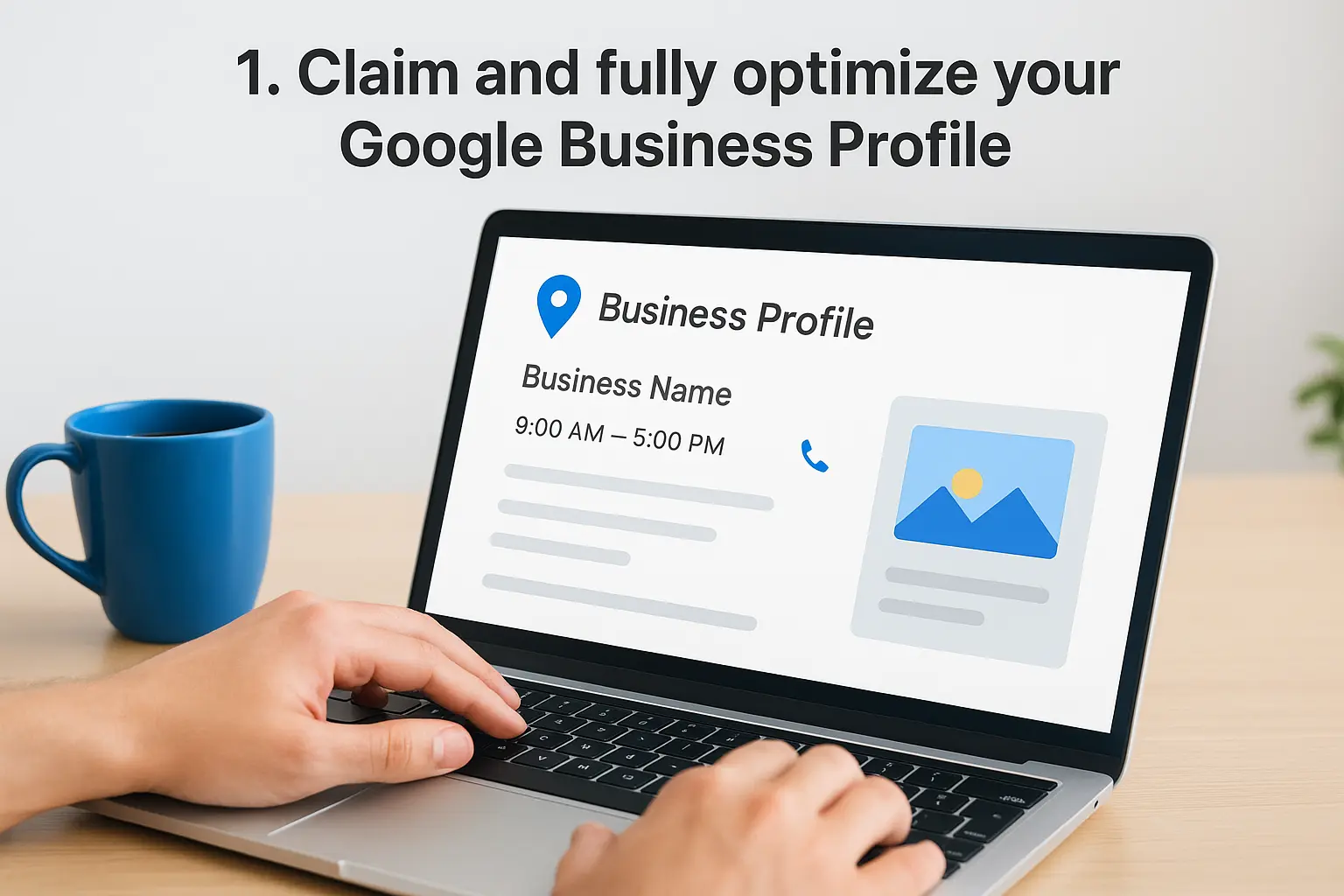
Your Google Business Profile (formerly Google My Business) is the free listing that shows your business name, hours, phone number, photos, and reviews whenever someone searches for you or your services on Google or Maps. Claiming it means verifying you're the legitimate owner, usually through a postcard, phone call, or video verification. Once verified, "optimizing" means filling out every available field completely: business description, services list, attributes, opening date, and accurate hours, instead of leaving the bare minimum and calling it done.
Why it helps you rank higher
Google's local algorithm weighs three main factors when deciding who shows up in the map pack: relevance, distance, and prominence. A complete profile feeds Google more signals to match your business to a searcher's intent, which directly improves relevance. Businesses with fully optimized profiles also tend to earn more clicks and calls, and that engagement data feeds back into your ranking. Sparse profiles with a name, address, and phone number rarely outrank competitors who've taken the time to fill in every section.
A half-finished Google Business Profile is the fastest way to hand your customers to a competitor who bothered to finish theirs.
How to get started
Start by claiming your listing at google.com/business if you haven't already, then work through this checklist:
- Verify ownership through Google's postcard, phone, or email verification method
- Match your NAP (name, address, phone) exactly to your website and other listings
- Write a keyword-rich description that explains what you do and who you serve, without stuffing keywords unnaturally
- Add your services with pricing where possible, not just a generic category
- Upload real photos of your storefront, team, and completed work, not stock images
- Set accurate hours, including holiday hours, so customers don't show up to a closed door
Few business owners realize how many fields Google actually offers, and even fewer fill them all out. If you'd rather have someone handle the setup and ongoing upkeep correctly the first time, learn what it takes to optimize every field on your Google Business Profile, stay consistent across the web, and keep up with changes Google makes to the platform so your listing doesn't fall out of date.
2. Pick the right categories and complete every profile field
What it involves
Google gives you one primary category and up to nine secondary categories to describe your business, and picking the wrong ones is one of the most common mistakes we see in Orange County listings. A tax preparer who chooses "Financial consultant" instead of "Tax preparation service" is telling Google to match them with the wrong searches entirely. This step also means going back through every field in your profile, service areas, attributes like "woman-owned" or "free Wi-Fi," and your booking or appointment links, to make sure nothing is left blank, exactly as our 2026 profile setup guide for California businesses lays out.
Why it helps you rank higher
Categories are one of the strongest local ranking signals Google uses because they tell the algorithm exactly what kind of business you are before it even reads your description. Choosing overly broad categories dilutes your relevance for the specific searches that actually bring you customers. This is core local SEO for Google Maps work: precision here often outweighs volume elsewhere on your profile.
The right category can do more for your ranking than a dozen new reviews.
How to get started
Audit your current categories against what competitors ranking above you are using, then tighten yours to match searcher intent:
- Search your top three services on Google and note the categories your competitors show
- Set the most specific, accurate category as primary, not the broadest one
- Add secondary categories only when they genuinely apply to services you offer
- Fill in every attribute relevant to your business, even minor ones
- Review quarterly, since Google adds new categories over time
Getting this wrong silently caps your visibility, so treat category selection as seriously as your website's homepage copy.
3. Generate and respond to customer reviews consistently
What it involves
Reviews are the star ratings and written feedback customers leave on your Google Business Profile after visiting your business or using your service. This step means actively asking satisfied customers to leave a review right after service, not hoping they remember weeks later, and replying to every review you receive, good or bad, within a day or two. Consistent review generation beats a one-time push for fifty reviews followed by silence for six months.
Why it helps you rank higher
Review count, review velocity, and average rating all factor into Google's prominence signal, one of the three pillars of Maps ranking. A steady stream of new reviews tells Google your business is active and trusted right now, not just years ago. Responding to reviews also matters because it shows engagement, and Google has confirmed that owner responses can influence how a listing performs in local search. Businesses that ignore negative reviews often lose more ground than the bad review itself caused.
A five-star average with three reviews from 2021 loses to a 4.6 average with fresh reviews coming in every week.
How to get started
Build a simple system instead of relying on memory:
- Ask in person or by text immediately after a job is completed or a service is delivered
- Send a direct review link using your Google Business Profile's short URL
- Respond to every review within 48 hours, thanking positive reviewers by name and addressing complaints professionally
- Never buy or fake reviews, since Google actively removes them and can suspend your profile
- Track your review velocity monthly to catch slowdowns before they hurt your ranking
This is one area where automation genuinely helps, and it's a core piece of the workflow automation we build for clients who don't have time to chase reviews manually.
4. Optimize your website for local search
What it involves
Your Google Business Profile doesn't work alone. Google cross-checks it against your website to confirm you're a real, established business worth ranking. Local website optimization means adding your city and service area names to title tags, headers, and page copy, embedding a Google Map on your contact page, and creating dedicated location pages if you serve multiple cities across Orange County. It also covers the technical basics: fast load times, mobile responsiveness, and schema markup that tells Google exactly what your business does and where.
Why it helps you rank higher
Google's algorithm reads your website to verify relevance and confirm the details on your profile aren't isolated claims. A site with local schema markup and location-specific pages gives Google far more confidence to rank you for "near me" searches than a generic homepage with no city mentioned anywhere. Slow, unoptimized sites also hurt you twice: once directly through Google's page experience signals, and again when frustrated visitors bounce back to search results, a signal Google notices.
A website that never mentions where you're located gives Google no reason to show you for local searches.
How to get started
Work through these fixes before touching anything else on your site:
- Add your city and neighborhood names naturally throughout your homepage and service pages
- Install LocalBusiness schema markup with your NAP, hours, and service area
- Create separate local landing pages for each city or region you actively serve
- Test your mobile speed using Google's PageSpeed Insights
- Link your Google Business Profile from your footer or contact page
If your site was built years ago without any of this in mind, our Orange County web design and development team rebuilds it with local SEO baked in from the first page.
5. Build consistent local citations across the web
What it involves
A local citation is any online mention of your business name, address, and phone number, whether it's a full directory listing on Yelp or a simple mention in a Chamber of Commerce member list. This step means auditing where your business already appears, fixing outdated addresses or old phone numbers, and adding new listings on directories that actually matter for Orange County searchers, like Yelp, Apple Maps, Bing Places, and industry-specific directories for your niche.
Why it helps you rank higher
Google uses citations to verify that your business is real, active, and located where you claim. Inconsistent NAP data across the web, one listing showing a suite number and another missing it, quietly erodes the trust signal that feeds into prominence. Strong citation building confirms what your Google Business Profile already says, and that agreement across multiple sources is exactly what separates listings that rank from listings Google treats with suspicion.
Google trusts the business it sees confirmed in ten places over the one it only hears about once.
How to get started
Run a citation audit before adding anything new:
- Search your business name and phone number in Google to find every existing listing
- Fix mismatched addresses or phone numbers on each one you find
- Prioritize high-authority directories like Yelp, Apple Maps, and Bing Places first
- Add niche directories relevant to your industry, such as legal or contractor associations
- Recheck every citation after any office move or phone number change
Cleaning up years of scattered, inconsistent listings takes real time, which is why the best small business local SEO providers include citation audits as a standard part of monthly reporting, not a one-time fix that's forgotten.
6. Earn local backlinks and community mentions
What it involves
A local backlink is a link from another website pointing to yours, and the ones that matter most for Google Maps SEO come from sources tied to your city or region: local news outlets, Chamber of Commerce sites, neighborhood blogs, sponsorship pages, and business associations. Community mentions work the same way even without a link, a press release naming your business, a local event sponsorship, or a feature in an Orange County publication all signal that real people in your area know and talk about you.
Why it helps you rank higher
Google treats backlinks as a vote of confidence, and links from sites already tied to your geographic area carry extra weight for local rankings compared to a generic national link. A tax preparer with a link from the Costa Mesa Chamber of Commerce tells Google something a directory listing never could: this business is embedded in this community. Earning links from local sites strengthens the prominence signal that separates the top three map pack results from everyone else buried below the fold.
One link from your local newspaper often outweighs ten links from unrelated websites.
How to get started
Focus on relationships and relevance over volume:
- Sponsor a local event or little league team that links back to your site
- Join your city's Chamber of Commerce and claim your member listing
- Pitch a local reporter on a story tied to your expertise
- Partner with nearby businesses for co-marketing that includes a mutual link
- Get listed on Orange County business directories specific to your industry
Building these relationships takes patience, and it's part of the outreach work we handle inside our SEO services for clients who'd rather focus on running their business.
7. Post photos, updates, and Q&A regularly
What it involves
Your Google Business Profile isn't a set-it-and-forget-it listing. Google Posts let you share updates, offers, and events directly on your profile, while photo uploads and the Q&A section give searchers a live look at what your business is doing right now. This step means adding fresh photos weekly, publishing a post at least a few times a month, and monitoring the Q&A section so you're the one answering questions instead of a random stranger guessing at your hours or pricing.
Why it helps you rank higher
Activity signals matter to Google's local algorithm just as much as static profile data. A regularly updated profile tells Google your business is operational, engaged, and worth surfacing over a competitor who hasn't touched their listing in a year. Photos also drive engagement directly: profiles with more photos get more requests for directions and website clicks, and that engagement feeds back into your prominence score.
An idle Google Business Profile looks abandoned to Google, even if your business is thriving.
How to get started
Treat this like a lightweight content calendar instead of an afterthought:
- Upload new photos weekly at the right dimensions for profile images, including team members, completed jobs, and your storefront
- Publish a Google Post for promotions, seasonal offers, or new services
- Monitor and answer Q&A before a customer or competitor answers incorrectly
- Seed your own Q&A with common questions customers actually ask
- Delete outdated posts once offers expire so your profile stays accurate
This is exactly the kind of ongoing upkeep that separates listings ranking on autopilot from ones that quietly lose ground every month.
8. Track your Google Business Profile insights and adjust
What it involves
Google Business Profile gives you free performance data right inside the dashboard: how many people found you through a direct search versus a discovery search, how many tapped for directions, called your number, or visited your website. Tracking these insights means checking them monthly, not just glancing once after setup and forgetting the dashboard exists, and reading them against what actually drives local rankings on your profile. You're looking for patterns, which search queries bring people to your listing, which photos get the most views, and whether calls spike or drop after you make a change.
Why it helps you rank higher
You can't fix what you don't measure, and Google Maps SEO rewards businesses that adjust based on real data instead of guessing. If discovery searches are climbing but calls aren't, your profile is getting found but failing to convert, which usually points to missing service details or outdated photos. If a specific keyword phrase drives most of your traffic, that's your signal to double down on it in your description and posts.
Insights without action are just numbers on a screen, the ranking gains come from what you change because of them.
How to get started
Build a habit around these steps:
- Check insights monthly and export the data so you can compare trends over time
- Watch call and direction requests as your real conversion metrics, not just views
- Identify top search queries and reinforce them in your business description
- Compare performance before and after any profile change you make
- Set a quarterly review to reassess categories, photos, and posting frequency
We build this reporting into every client relationship because a profile you never revisit eventually falls behind competitors who are paying attention.
Putting it all together for local visibility
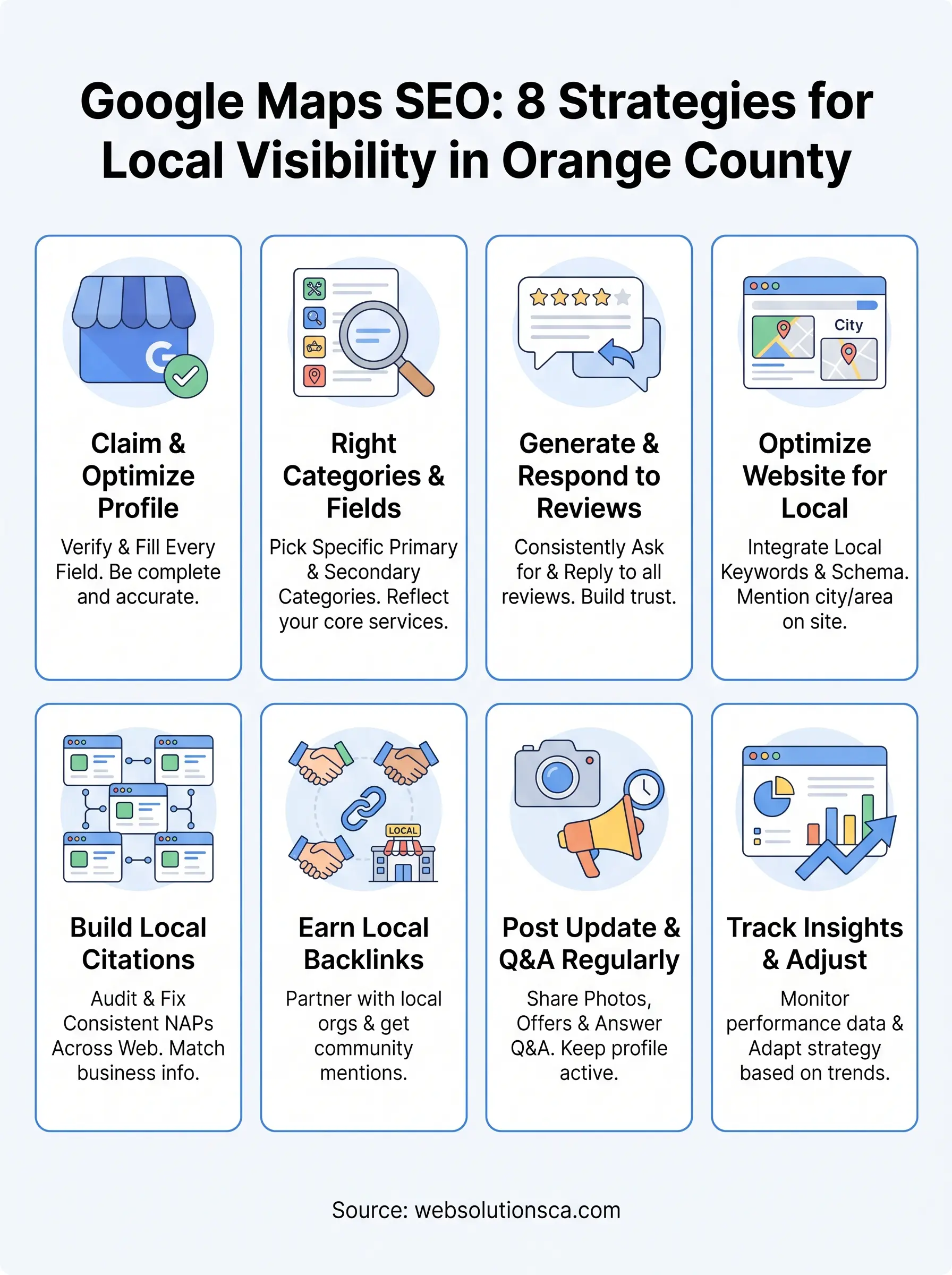
None of these eight strategies work in isolation. A fully optimized Google Business Profile with the wrong category still underperforms, and a steady stream of reviews can't fix a website that never mentions your city. Google Maps SEO is a system, and the businesses winning the local pack in Costa Mesa, Irvine, and Santa Ana are the ones treating it that way, week after week, not as a one-time setup task.
Owning a small business in Orange County already takes every hour you have. You shouldn't have to become a local SEO expert on top of running your day-to-day operations. Pick one strategy from this list and start this week, or hand the whole process to people who do this daily. Either way, the businesses showing up in the map pack a year from now are the ones acting today. If you'd rather have a partner handle it, see how our Orange County local SEO plans can put your business in the map pack.