
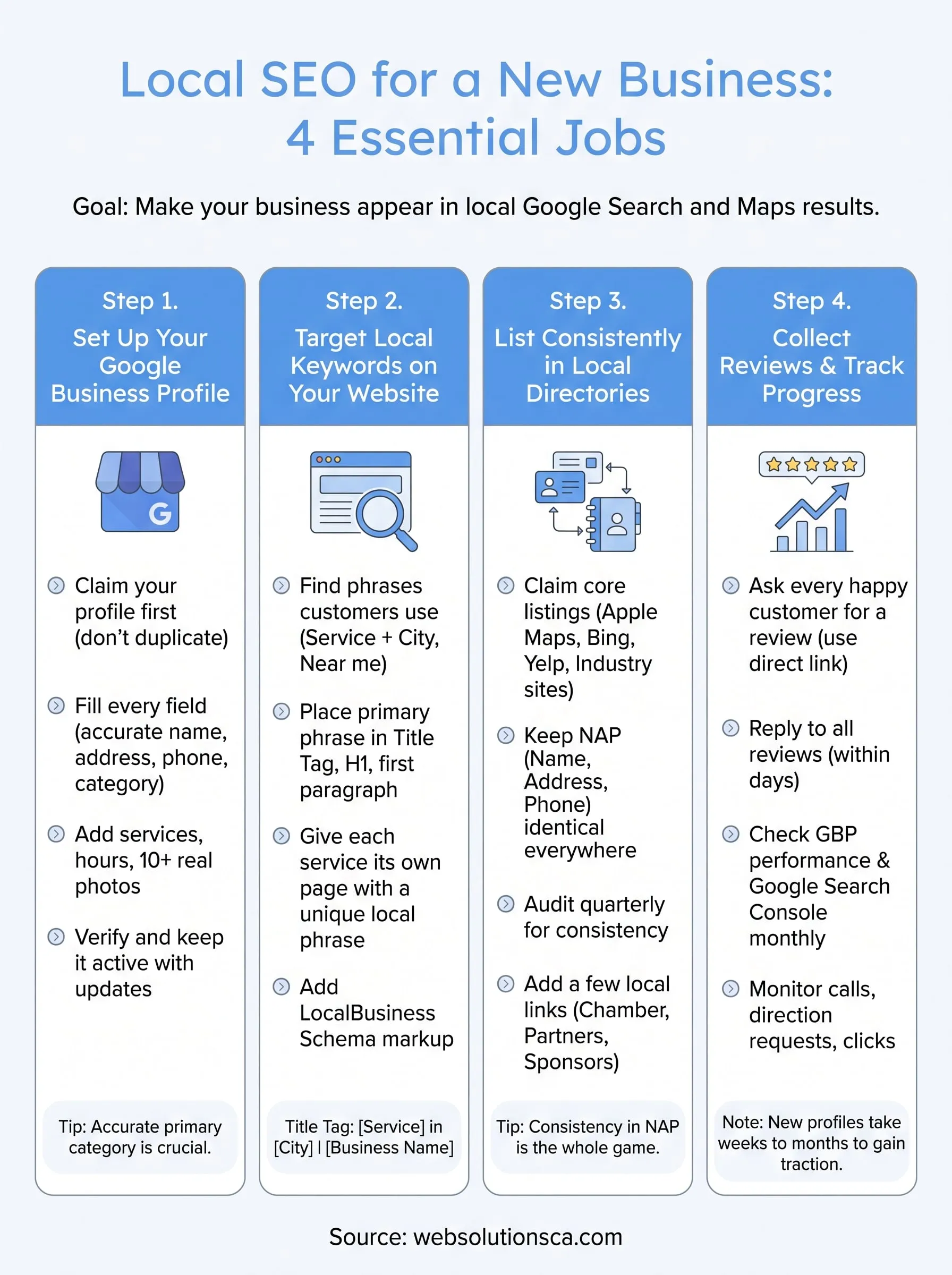
Local SEO for a new business comes down to four jobs: claim and complete your Google Business Profile, put the phrases locals search on your website, list your business consistently in local directories, and collect real customer reviews. You can do all four yourself with free tools. Expect a few focused work sessions to set it up, then short monthly check-ins.
The problem is that a new business starts with nothing. You have no reviews, no links, and no track record. Meanwhile the shop down the street in Costa Mesa or Irvine may have hundreds of reviews and years of listings. Google cannot rank what it cannot verify, so a blank or inconsistent profile stays buried, however good your work is.
This guide walks you through the setup in order. You will see what to prepare first, then four steps with copy-paste templates for your title tags, schema markup, listing records, and review requests. It comes from the work we do at Web Solutions CA, a Costa Mesa agency that helps Orange County small businesses get found on Google. Each step tells you what to enter, what to avoid, and how to check that it worked.
Why local SEO matters for a new business
Local SEO is how you make your business appear in Google Search and Google Maps when people nearby look for what you sell. For a new business it is usually the cheapest way to get in front of ready-to-buy customers, because you do not pay per click and you do not need years of website authority.
What local SEO is and what it earns you
Local SEO is the part of digital marketing that connects your website, your Google listing, and your online mentions to a physical area. Google says it ranks local results on relevance, distance, and prominence, and explains each factor in its own help pages. Relevance is how well your profile matches the search. Distance is how far you are from the searcher. Prominence is how well known you are, based on reviews, links, and mentions across the web.
The payoff is concrete. When someone searches "tax preparer near me," Google shows a map with three businesses, each with a call button and directions. Appearing there brings calls, direction requests, and website visits without ad spend. As a new business you cannot change distance, but you control relevance from day one and you build prominence over time.
Distance you cannot change, relevance you can fix today, and prominence you build one review at a time.
What to gather before you start
Collect the facts below in one document before you touch any account. You will paste the same details into every platform, and small differences between them cause trouble later.
- Your business name exactly as it appears on your sign, invoices, and website
- Your full street address with suite number, or a decision to hide it if you travel to customers
- A local phone number that you actually answer, with a local area code rather than a toll-free number
- Regular hours plus holiday hours
- One primary category and two or three secondary categories
- A list of your services, each with a one-sentence description
- Ten or more real photos: exterior, interior, your team, your work
- Your website address, even if it is only a few pages
Treat this list as your master record. Copy from it every time and never retype details from memory.
Can you do it yourself, and what does it cost?
Yes, you can do local SEO yourself, and the tools in this guide are free. Google Business Profile, Google Search Console, Bing Places, and Apple Business Connect cost nothing. Your real cost is time, which for most new businesses means a few hours of setup and then about an hour a month for reviews and checks.
Hiring help is worth considering when you have no time or your market is crowded. Our Local SEO service at Web Solutions CA starts at $499.99 per month and covers profile work, citations, reviews, and tracking. Nobody can guarantee rankings, and we do not either. If your customers come from within a few miles, the work is almost always worth doing, because the map results sit above the regular listings for many local searches.
Step 1. Set up your Google Business Profile
Your Google Business Profile (GBP) is the free listing that appears in Google Maps and the local results, so it is the first thing to build. A complete, verified profile is the base for every other step in local SEO for a new business.
Claim the profile
Go to business.google.com and search for your business name before you create anything. Google sometimes already has a listing, and claiming it is better than creating a duplicate. Then work through these steps:
- Sign in with a Google account you will keep long term, ideally a business email that you control.
- Claim the existing listing or add a new one.
- Enter your business name exactly as it appears on your sign.
- Choose your primary category, the most specific one that describes your core service.
- Add your address, or hide it and list the cities you serve if customers do not visit you.
- Add your phone number and website.
Do not use a P.O. box or a virtual office as your address. Google's guidelines require a real location where you or your staff work during stated hours, and a profile that breaks them can be suspended.
Claim your profile before you create one, because duplicate listings split your reviews and your rankings.
Fill in every field
Empty fields are missed chances to match a search. Fill in each one using your master record.
| Field | What to enter | Mistake to avoid |
|---|---|---|
| Business name | Your real name, as on your sign | Adding keywords like "Best Irvine Plumber" |
| Primary category | The most specific match for your main service | Choosing a broad category |
| Hours | Regular and holiday hours | Leaving them blank or outdated |
| Description | Two or three plain sentences on what you do and where | Keyword stuffing or promotions |
| Services | Each service with a short description | Skipping the list |
| Photos | Ten or more real photos | Stock images |
The primary category deserves extra thought, because it heavily influences which searches you appear for. Look at the categories that the top three map results use for your service, then pick the one that matches your main revenue source.
Verify, then keep it active
Verification proves you own the business, and an unverified profile will barely show up. Google offers different options depending on your business type, and they may include phone, text, email, or a short video recording. Follow the verification options Google displays for your profile.
Once verified, keep the profile alive. Upload a few new photos each month, update your hours before holidays, and answer any messages quickly. Add a post when you have an offer or news. A profile that stays current tells searchers and Google that you are open and active.
Step 2. Target local keywords on your website
Your website tells Google what you do and where you do it, so the next step is to find the phrases locals use and place them on your pages. Keep this practical: a small set of well-placed phrases beats a long list.
Find the phrases your customers type
Local searches follow a few patterns. Use this table to build your starting list.
| Pattern | Example | Where to use it |
|---|---|---|
| Service + city | "window replacement Irvine" | Service page title and H1 |
| Service + near me | "tax preparer near me" | Homepage and GBP description |
| Urgency + service | "emergency plumber Santa Ana" | Service page for urgent work |
| Service + county | "bookkeeper Orange County" | Homepage and about page |
You do not need to write "near me" on your pages. Google uses the searcher's location for that. Use the city and service words instead.
To find more phrases, type your service into Google and note the autocomplete suggestions. Check the "People also ask" box. Then open the three businesses in the map results and read their service pages and categories. Google Keyword Planner, which is free with a Google Ads account, shows search volume for specific locations, so you can see which phrases people use in your service area.
Give every service its own page and its own primary phrase, with one city attached.
Put those phrases in the right places
Pick one primary phrase per page and use it in the places Google reads first. These are the title tag, the H1 heading, the first paragraph, and the image descriptions. Use the same phrase naturally in the body, and keep the writing for humans.
A title tag formula that works for most service pages:
[Service] in [City] | [Business Name]
Window Replacement in Irvine | Your Business Name
Show your name, address, and phone number as plain text in the footer and on your contact page, not inside an image. Embed a Google Map on the contact page. Then add LocalBusiness schema so search engines read your details without guessing. Swap in your own details:
<script type="application/ld+json">
{
  "@context": "https://schema.org",
  "@type": "LocalBusiness",
  "name": "Your Business Name",
  "url": "https://www.example.com",
  "telephone": "+1-000-000-0000",
  "address": {
    "@type": "PostalAddress",
    "streetAddress": "123 Example Street, Suite 100",
    "addressLocality": "Costa Mesa",
    "addressRegion": "CA",
    "postalCode": "92626"
  }
}
</script>
Test it with Google's Rich Results Test. Build a location page for a city only if you truly serve it and can write something real about it. Copy-pasted city pages with only the name swapped add nothing.
Step 3. List your business in local directories
Directory listings, called citations, are mentions of your name, address, and phone number (NAP) on other sites. They help Google confirm that your business is real and located where you say. For a new business with no history, this is how you start building prominence.
Start with the core platforms
Claim these first. Each one reaches customers directly, and several of them feed other apps and search engines.
| Platform | Why it matters |
|---|---|
| Apple Business Connect | Controls how you appear in Apple Maps for iPhone users |
| Bing Places | Feeds Bing search and Microsoft maps |
| Yelp | Appears in many local results and drives reviews |
| Facebook business page | Often ranks when people search your name |
| Industry directories | Examples include Houzz for contractors or Avvo for lawyers |
| Chamber of commerce | A trusted local listing, often with a link |
Search for your business on each platform before adding it. Claim an existing listing rather than creating a second one, and verify ownership when asked. Skip the paid bundles that promise hundreds of listings. A dozen accurate listings on real platforms do more than a hundred junk ones.
Accurate listings on a dozen real platforms beat a hundred junk directories.
Keep your name, address, and phone identical
Consistency in your name, address, and phone details is the whole game with citations. "Suite 6-210" on one site and "Ste. 6-210" on another, or an old phone number on a forgotten listing, can make Google doubt which details are right. Decide on one format, then use it everywhere.
Keep a master record in a spreadsheet, and record where each listing lives and who owns the login. This template covers what most platforms ask for:
Business name:
Address line 1:
Suite:
City, State ZIP:
Phone:
Website:
Hours:
Categories:
Short description (about 50 words):
Long description (about 150 words):
Audit your listings every quarter. Search your phone number and business name, and fix anything that does not match.
Add a few local links
Links from local sites tell Google that your community knows you. You do not need many. Aim for a handful of real ones:
- Your city's chamber of commerce or local business association
- A partner or supplier that lists you on its website
- A local team, school event, or charity you sponsor, since these pages often link to sponsors
- Local news or community blogs, when you have something worth reporting such as a grand opening
Step 4. Collect reviews and track progress
Reviews are the fastest way for a new business to gain prominence, and tracking tells you whether the first three steps are working. Do both on a schedule, not when you remember.
Ask for reviews the right way
Ask every happy customer, right after the job or sale, while the experience is fresh. In your GBP dashboard you can find a direct review link, so customers do not have to search for you. Send it by text or email, or print it as a QR code at your counter. This message works well:
Hi [Name], thanks for choosing [Business Name] today. If you were happy with the service, would you leave a quick review? It helps other [City] neighbors find us. [Review link]
Follow the platform rules. Never pay for reviews or offer discounts for them, never screen out unhappy customers before asking, and never write reviews of your own business. Google removes reviews that break its policies, and that can hurt your profile.
Here is a worked example. If you serve 20 customers a month and ask all of them, and one in four leaves a review, you earn about 5 reviews a month, or 10 in two months. Reply to each one within a couple of days. Thank people by name, and answer criticism calmly and offer to fix the problem offline.
Ask every customer, make it a single tap, and answer every review.
Check your progress each month
Set a recurring monthly slot and look at the same four things each time:
- GBP performance: calls, direction requests, website clicks, and the searches that showed your profile
- Google Search Console: queries that include your city or service, and which pages earn clicks
- Manual checks: search your main phrase from your home, from your shop, and from a customer's area to see how the map results differ
- Review count and rating compared with the three businesses you studied in Step 2
Be realistic about timing. A new profile typically needs weeks to months to gain traction, and no one can promise a ranking. If you see nothing after about 90 days, work through the likely causes: a weak primary category, NAP differences between listings, thin service pages, or a review count far below your competitors.
Where to go from here
Local SEO for a new business is a short list of habits. Claim and complete your Google Business Profile, give each service a page with a local phrase, keep your listings identical, and ask every happy customer for a review. Do those four things in order and you have covered what most small competitors skip.
If you would rather hand the work off, request a free initial SEO audit from Web Solutions CA. We review your local SEO signals and your Google Business Profile alignment, and we reply to contact requests within 24 hours.