

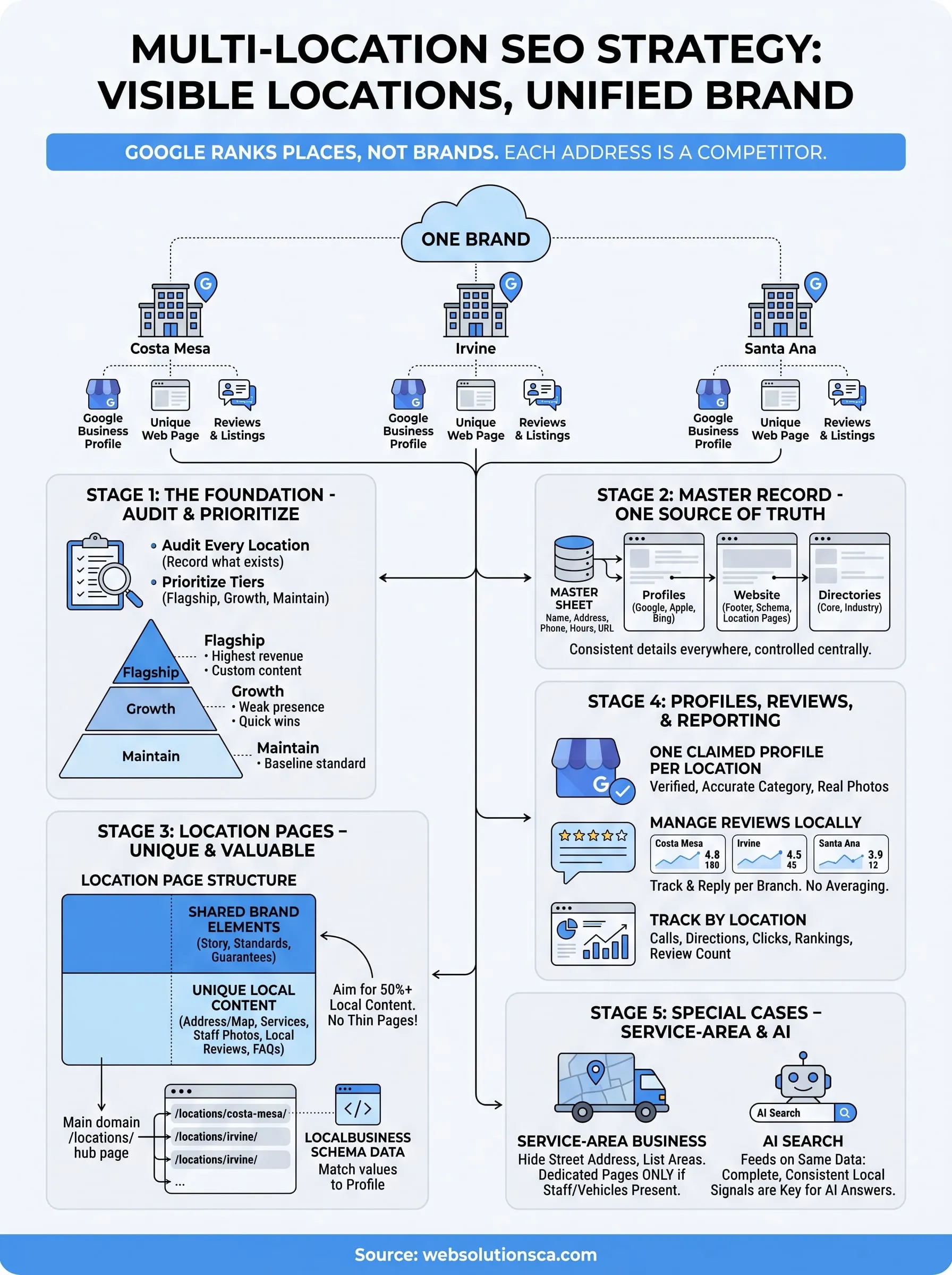
Multi-location SEO is the practice of making each of your business locations visible in search for its own local market, while every location still reads as part of one brand. You will also see it written as multi location SEO. In practice, each branch gets its own Google Business Profile, its own useful page on your website, its own accurate listings, and its own reviews. Google evaluates places one at a time, so a well-known brand name cannot carry a branch that looks neglected online.
This article explains why that matters, then walks through a local SEO strategy for multiple locations in the order you would actually do the work. You will audit and prioritize, build location pages, manage profiles and listings, handle reviews and reporting, and deal with the special cases of service-area businesses and AI search.
Web Solutions CA is a Costa Mesa agency that helps Orange County small businesses get found on Google. The examples below use a typical local setup, a company with offices in Costa Mesa, Irvine, and Santa Ana, but the method works for two locations or twenty.
Why multi-location SEO matters for every branch
Multi-location SEO matters because Google does not rank your company, it ranks your places. Each address competes in its own neighborhood, against its own rivals, with its own evidence. A strong brand helps, but it cannot rescue a branch that has no page, no reviews, or the wrong phone number.
Google ranks locations one at a time
Google says local results are based mainly on relevance, distance, and prominence. Relevance is how well a profile and page match the search. Distance is how far the business is from the searcher, or from the place named in the query. Prominence is how well known the business is, including reviews and links. Google calculates all three for each location separately.
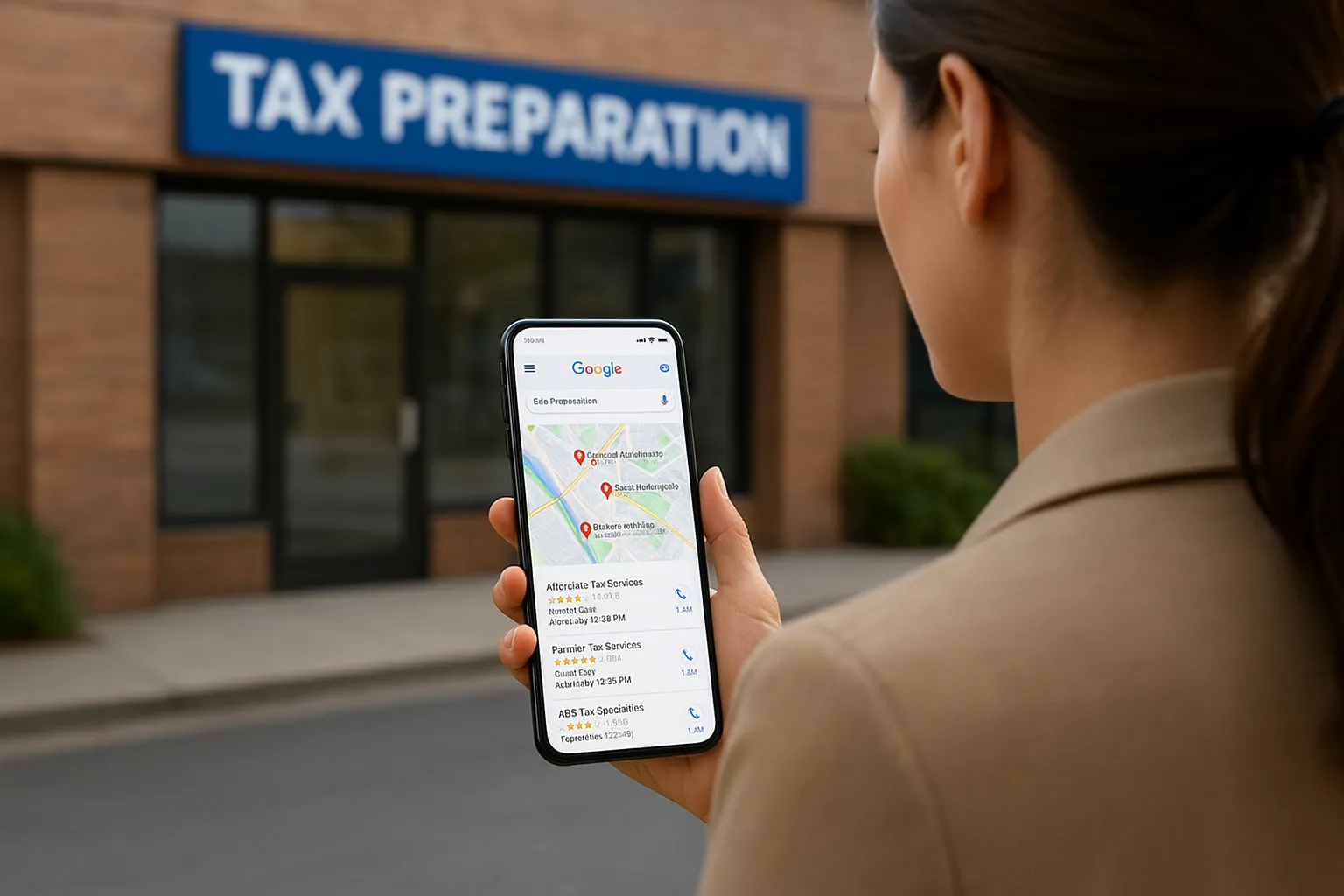
That has a practical consequence. A search for "tax preparation" with no place name is judged from where the searcher is standing. A search for "tax preparation Irvine" is judged against Irvine. You cannot change distance, so your levers are relevance and prominence, applied branch by branch.
Google scores every address on its own, so every address needs its own proof.
How it differs from single-location and standard SEO
Single-location local SEO is a one-time setup plus upkeep. Multi-location SEO is a system, because every task repeats per branch and small errors multiply.
| Single location | Multiple locations | |
|---|---|---|
| Google Business Profile | One profile | One profile per location, managed centrally |
| Website | One page or a few | A locations hub plus one page per location |
| Business details | One set | A master record with many versions to keep in sync |
| Reviews | One pool | Separate pools that cannot be shared |
| Main risk | Neglect | Inconsistency and thin, copied pages |
SEO is often split into four types: technical, on-page, off-page, and local. Multi-location SEO uses all four, but local signals carry the most weight. Technical SEO still matters, because dozens of near-identical pages create duplication and crawling problems.
What skipping it costs you
The usual failure is uneven. One flagship location does well, while the others have unclaimed profiles, an old suite number, or a web page that is only an address in the footer. Customers then call a disconnected number, drive to the wrong building, or never see the branch at all.
The second cost is self-inflicted. Duplicate listings and several pages aiming at the same search split your signals, so your own locations compete with each other. Fixing that later takes longer than building it correctly once.
How to build a local SEO strategy for multiple locations
Build the strategy in this order: audit every location, prioritize, create one master record of business details, then assign owners. Doing it in this order stops you from polishing pages for a location whose listings still show the wrong address.
Audit every location first
Start with a spreadsheet that has one row per location. Record what exists today, not what you assume exists. You will often find an unclaimed profile or a duplicate listing within the first hour.
Location | Profile claimed | Verified | Page URL | NAP matches master | Review count | Average rating | Last review date | Calls (30 days) | Direction requests (30 days)
Fill in the last two columns from each profile's performance data. Those numbers become your baseline, so you can show later what changed.
Prioritize without ignoring anyone
Not every location deserves the same effort. A common rule of thumb says a minority of locations drive most revenue, the 80/20 idea. Treat it as a heuristic and check it against your own numbers. Then sort locations into three tiers:
- Flagship: highest revenue or toughest competition. Custom photos, staff bios, and local case content.
- Growth: strong local demand but a weak online presence. Fix these first, because gains come fastest here.
- Maintain: steady locations that get the baseline standard.
Every location gets the baseline: a claimed profile, accurate details, a unique page, and replies to reviews. Tiers decide the extra effort, not whether a branch is covered at all.
Build one master record and assign owners
Create a single sheet with the definitive name, address, suite format, phone number, hours, holiday hours, categories, and page URL for each location. Decide the formatting rules once, such as "Street" never "St.", and apply them everywhere. That sheet feeds your profiles, your website footer, your schema markup, and your directory listings.
Then name an owner. One central person controls the master record, and local managers get limited access to reply to reviews and add photos. If you would rather hand this off, Web Solutions CA's Local SEO service, which starts at $499.99 per month, covers Google Business Profile work, citation and NAP review, location pages, reviews and reputation signals, and local tracking. Scope is matched to your website, market, and competition.
One master record, many outputs: if the sheet is right, everything downstream starts right.
Location pages that rank without turning thin
Every location needs its own local landing page on your website, and each page must contain information that is true only for that location. A page where only the city name changes is the kind of thin, repetitive content that Google's spam policies on doorway abuse warn about.
What goes on a location page
Split each page into parts that stay the same and parts that must change. This lets you scale without writing every word from scratch.
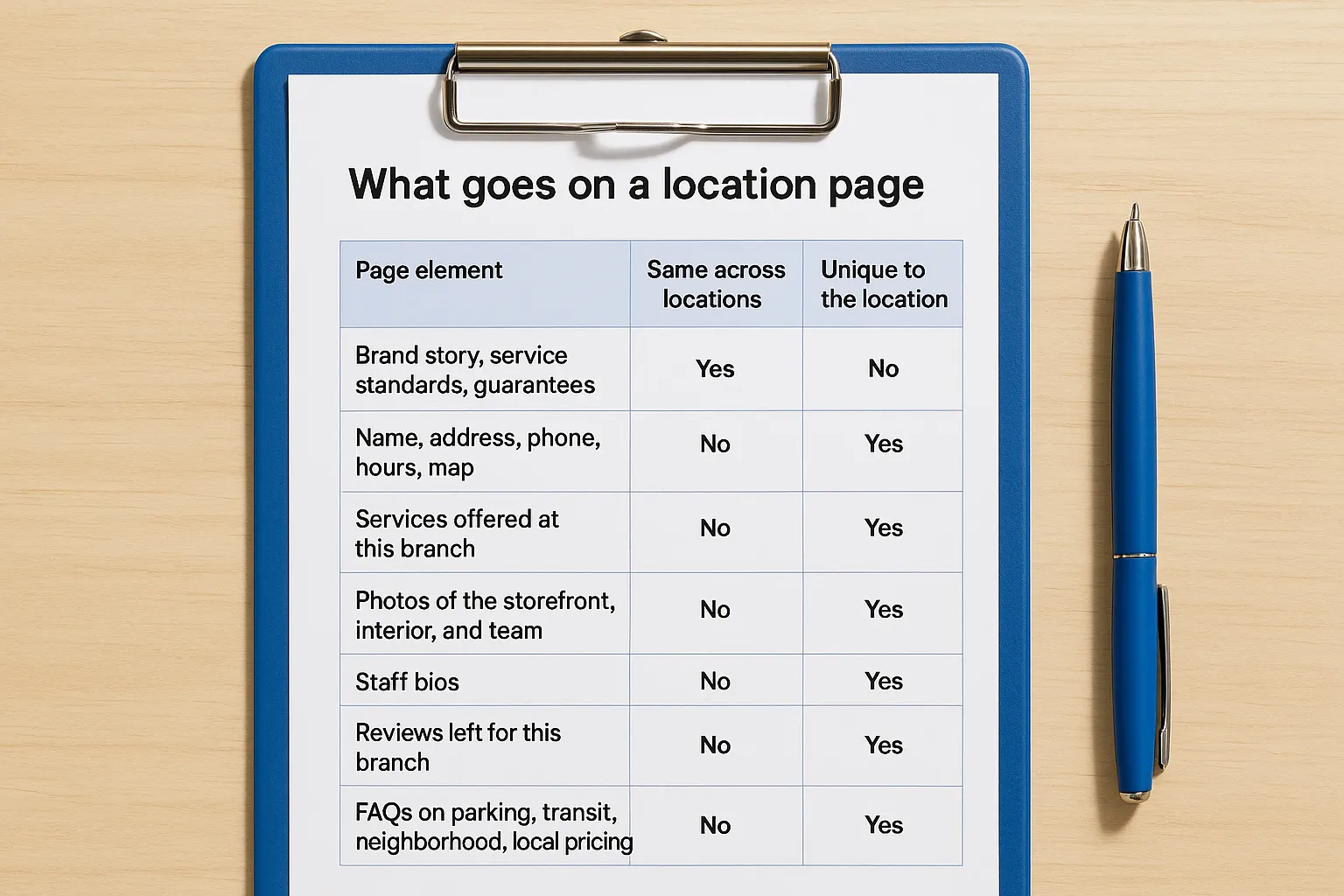
| Page element | Same across locations | Unique to the location |
|---|---|---|
| Brand story, service standards, guarantees | Yes | No |
| Name, address, phone, hours, map | No | Yes |
| Services offered at this branch | No | Yes |
| Photos of the storefront, interior, and team | No | Yes |
| Staff bios | No | Yes |
| Reviews left for this branch | No | Yes |
| FAQs on parking, transit, neighborhood, local pricing | No | Yes |
As a working rule, aim for at least half of each page to be local. A Santa Ana office page might note parking behind the building and which services only that office offers. The Irvine page would say something entirely different.
If a page would still make sense with the city name swapped, it is not a location page yet.
Storefront pages and service-area pages
Storefront pages serve customers who visit. They need directions, parking notes, local photos, and in-person services. Service-area pages serve customers you travel to. They need the neighborhoods you cover, examples of local jobs, and clear travel boundaries, never a made-up street address.
Using a storefront template for a service business confuses customers and search engines alike. Pick the model that matches how people actually use you.
URL structure, hub page, and schema
Keep everything on one domain with a clean path such as /locations/irvine/. A /locations/ hub page links to every location page, and every location page links back to the hub and the homepage. One domain keeps your site's strength in one place and makes reporting simpler than running separate mini-sites.
Add LocalBusiness structured data to each page, using the most specific accurate type. The values must match the visible page and your profile.
{
  "@context": "https://schema.org",
  "@type": "LocalBusiness",
  "name": "Example Business Irvine",
  "url": "https://www.example.com/locations/irvine/",
  "telephone": "+1-555-555-0100",
  "address": {
    "@type": "PostalAddress",
    "streetAddress": "100 Example Way",
    "addressLocality": "Irvine",
    "addressRegion": "CA",
    "postalCode": "92618"
  },
  "openingHours": "Mo-Fr 09:00-17:00",
  "sameAs": "https://www.google.com/maps?cid=YOUR_PROFILE_ID"
}
Replace every value with that location's real details, and give each page its own block.
Google Business Profiles and citations at scale
Each eligible location needs one claimed, verified Google Business Profile, plus consistent listings on the directories that matter. Profiles drive map results, and listings back up your details so search systems can trust them.
One profile per location
Claim and verify a profile for every location that customers can visit. Businesses with 10 or more locations can request bulk verification from Google instead of verifying one at a time. Use business groups and user roles, so local staff can reply to reviews and add photos without being able to change core settings.
Follow Google's guidelines for representing your business: use your real-world name, with no keywords added, and a real address. Virtual offices and PO boxes do not qualify. Choose the primary category carefully, since it carries the most weight, and keep it consistent across similar branches. Link each profile to its own location page, not the homepage, and upload photos taken at that site.
NAP consistency and citations
A citation is any mention of your name, address, and phone number (NAP) on another site. A small formatting slip will rarely sink a ranking by itself. The real damage comes from conflicting records, such as an old phone number on a directory, which split your signals and send customers to the wrong place.
You cannot fix every directory, and you do not need to. Work in tiers:
| Tier | Examples | Action |
|---|---|---|
| Core | Google, Apple Maps, Bing Places, major data aggregators | Own directly, audit quarterly |
| Industry and local | Trade directories, chamber of commerce, major local sites | Review twice a year |
| Low quality | Generic, automated directories | Ignore unless they show wrong data prominently |
Fix the listings customers actually see first, and skip the rest.
Reviews and reporting for each location
Google reviews and reporting both have to happen at the location level. Review equity cannot be shared between profiles, and a company-wide average hides the branches that need help.
Manage reviews location by location
Here is why a brand average misleads. Take three offices:
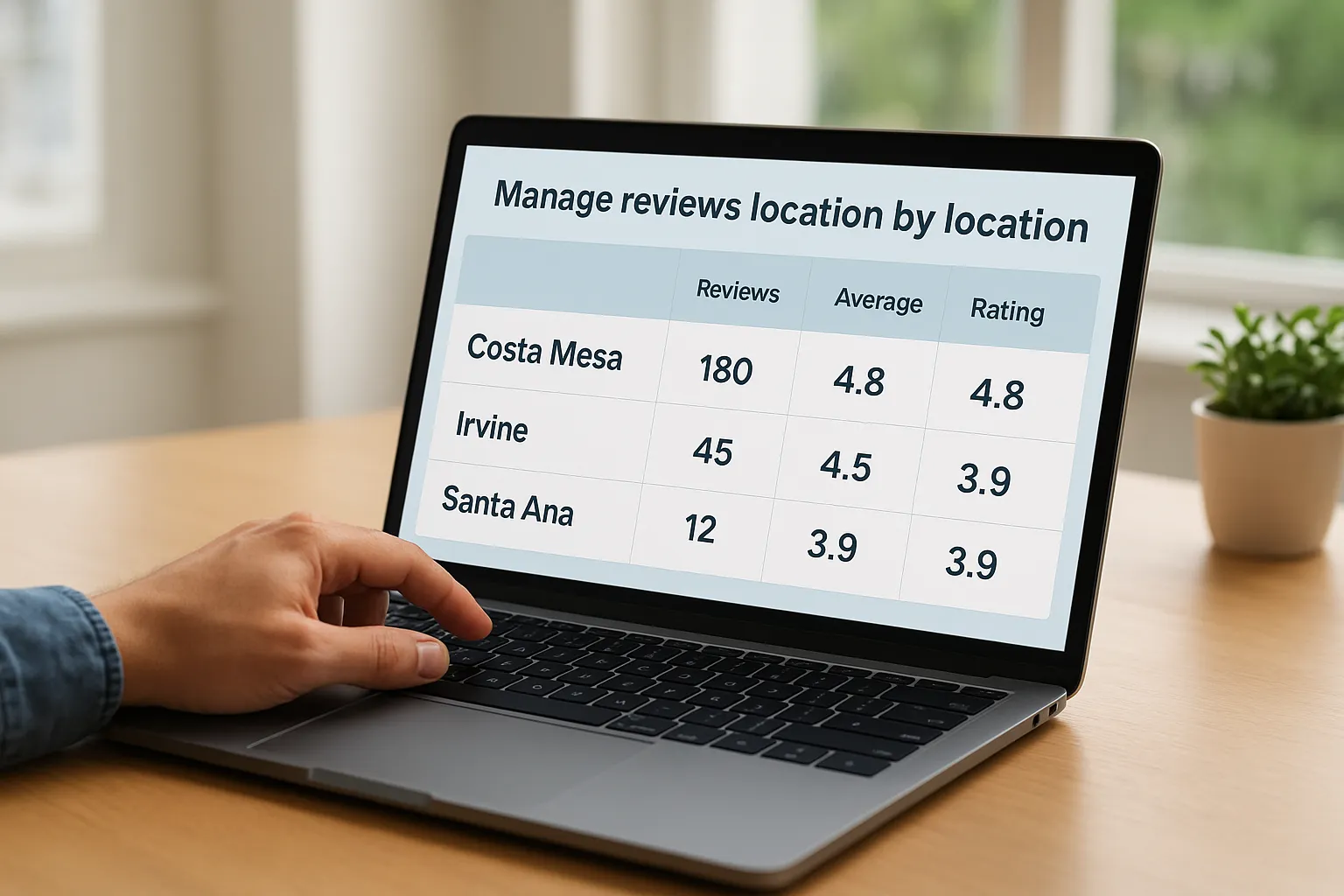
| Location | Reviews | Average rating | Rating x reviews |
|---|---|---|---|
| Costa Mesa | 180 | 4.8 | 864.0 |
| Irvine | 45 | 4.5 | 202.5 |
| Santa Ana | 12 | 3.9 | 46.8 |
| Brand total | 237 | 4.7 | 1,113.3 |
The company looks like a 4.7. But the Santa Ana office, with 12 reviews and a 3.9, is the one a local searcher sees. Review volume, freshness, and rating all count per profile, so Santa Ana needs a steady flow of requests while Costa Mesa only needs maintenance.
Ask every customer at the end of a job or visit, and reply to each review with specifics, such as the service or the staff member. Never offer discounts or gifts in exchange for reviews, because Google's policies prohibit incentivized reviews. Specific, human replies also add useful context to the profile.
Track results by location
Measure each location against its own baseline, not against other branches. A quiet suburb will never match a busy downtown, but it can still improve month over month.
- Google Business Profile performance: calls, direction requests, and website clicks per profile.
- Location page traffic and conversions: sessions, form fills, and calls in your analytics. Add tracking parameters to each profile's website link so profile visits are separated from other traffic.
- Local rankings: use local rank tracking to check position from each branch's own area, not from your office.
- Review count and recency: new reviews per month.
Expect fixes like correcting listings and publishing missing pages to help within weeks. Competitive map movement usually takes months of sustained work, and nobody can honestly promise a specific ranking.
Service-area businesses and AI search
Two situations change the standard playbook: businesses that travel to customers, and the growing role of AI answers in local search. Both reward the same fundamentals, just with extra rules for service-area companies.
Service-area businesses follow different rules
If customers never visit your office, Google's guidelines say to hide your street address and list service areas instead. You can name up to 20 areas, such as cities or postal codes. Google still treats your hidden base as your location, so listing a city far from your office does not make you appear there.
Use your website to cover nearby markets, but only build a dedicated city page when you have real staff or vehicles assigned to that area, real search demand, and something unique to say. A page about older homes and common repair issues in one city is useful. Ten near-identical pages for ten cities are doorway pages.
Where AI search fits and whether SEO still pays
SEO is not dead because of AI. AI answers that recommend local businesses lean on the same material: accurate profile data, consistent listings, specific reviews, and useful local pages. Google says its AI features in Search rely on the same foundational SEO practices.
The practical risk is the reverse. A location with a half-empty profile, conflicting hours, and a generic page gives any system, human or AI, little to work with. For a business whose customers search nearby, multi-location SEO is still worth the effort in 2026, because the work you do also feeds the newer answer formats.
Complete, consistent local data is what both map results and AI answers draw from.
Where to start with your locations
Multi-location SEO comes down to treating each branch as its own local business under one brand. Audit what exists, set one master record, give every location a real page and a verified profile, keep listings clean in priority order, and manage reviews and results branch by branch. Do the baseline everywhere, then spend extra effort where demand is highest.
If you would like a second pair of eyes first, Web Solutions CA offers a free initial SEO audit that reviews your local SEO signals and Google Business Profile alignment. You can contact Web Solutions CA to ask for it, and we reply within 24 hours.