
You update your Google Business Profile once, maybe twice, and then forget about it for months. Meanwhile your competitor down the street in Irvine posts weekly and shows up above you in the map pack. A google business profile post does more than fill space, it signals to Google that your business is active, and it gives potential customers a reason to click through instead of scrolling past.
If you want to know exactly how to write and publish google business profile posts that get clicks, calls, and bookings instead of getting ignored, this guide covers it. You'll learn what makes a post convert versus what just sits there unread, including the offer structure, image choices, and call-to-action buttons that actually move local customers to act.
We put this together after managing profiles for small businesses across Orange County, from tax preparers to window and door companies, and testing what pushes leads to pick up the phone. You'll get a step-by-step process, real examples, and a posting schedule you can start using today to turn your profile into a lead source instead of a digital business card nobody reads.
Why Google Business Profile posts matter for local SEO
Google rewards activity. Profiles that post regularly send a signal that the business behind them is real, open, and paying attention, and that signal joins the other signals Google weighs when ranking local results and the map pack. A google business profile post is one of the few things you control directly inside your listing that Google actively watches for freshness. Businesses that update their profile weekly tend to hold higher map pack positions than competitors who set up their listing once and never touch it again.
Posts feed Google's freshness signals
Search algorithms favor content that looks current. Your website might rank on backlinks and technical SEO, but your Google Business Profile ranks partly on how recently you've engaged with it. Every post you publish adds a timestamped signal that says "this business is active right now." Combine that with reviews, photo uploads, and updated hours, and you build a profile that Google trusts enough to surface for local searches like "tax preparer near me" or "window replacement Costa Mesa."
A profile that posts weekly tells Google you're open for business today, not just when you set up the listing.
Posts show up where customers actually look
Here's what most business owners miss: posts don't just sit buried in your dashboard. They appear directly in your Business Profile on Search and Maps, right where someone is deciding whether to call you or the next result down. If you're running a special on window installations or announcing extended tax season hours, that information appears above the fold, next to your reviews and photos, at the exact moment a customer is comparing options.
Questions and answers, review responses and the ratings behind them, and posts all combine to shape that first impression. Skip posting and you leave that space blank while your competitor fills it with an offer.
The engagement data backs it up
We've tracked click-through behavior across dozens of Orange County client profiles, and the pattern holds: profiles with active posting show measurably higher engagement, more direction requests, and more phone calls than profiles that go quiet. Google itself confirms that a complete, active Business Profile is more likely to appear in local search results and receive customer actions like calls and website visits.
Think about the difference between two competing businesses in the same category and same neighborhood:
| Profile Behavior | Typical Result |
|---|---|
| No posts in 6+ months | Lower map pack visibility, fewer profile views |
| Posts once a month | Some visibility gain, inconsistent engagement |
| Posts 1-2 times per week | Higher engagement rate, more calls and clicks |
| Posts include offers or events | Highest click-through and conversion rate |
Small businesses that treat their profile like a mini landing page, updated often with real offers, tend to outperform ones that treat it like a business card they filled out once.
Posts build trust before the first phone call
Local customers rarely visit five websites before choosing a service provider. They scan the map pack, glance at reviews, and check whether the business looks active, which is why getting your listing to rank on Google Maps matters so much. Consistent posting builds that trust before a customer ever picks up the phone or fills out a form. A window and door company we work with in Orange added weekly project photos through posts, and their profile started pulling in calls from people who mentioned seeing a specific before-and-after picture.
Getting every field on your listing right isn't a one-time task, and posting is the piece most businesses skip because it feels like extra work with no clear payoff. It has a payoff. If you're already investing in a monthly SEO plan built for Orange County businesses to improve your Google visibility, posts are the fastest, cheapest lever you're probably not pulling. The next section walks through picking the right post type so you're not just posting for the sake of posting.
Step 1. Choose the right post type for your goal
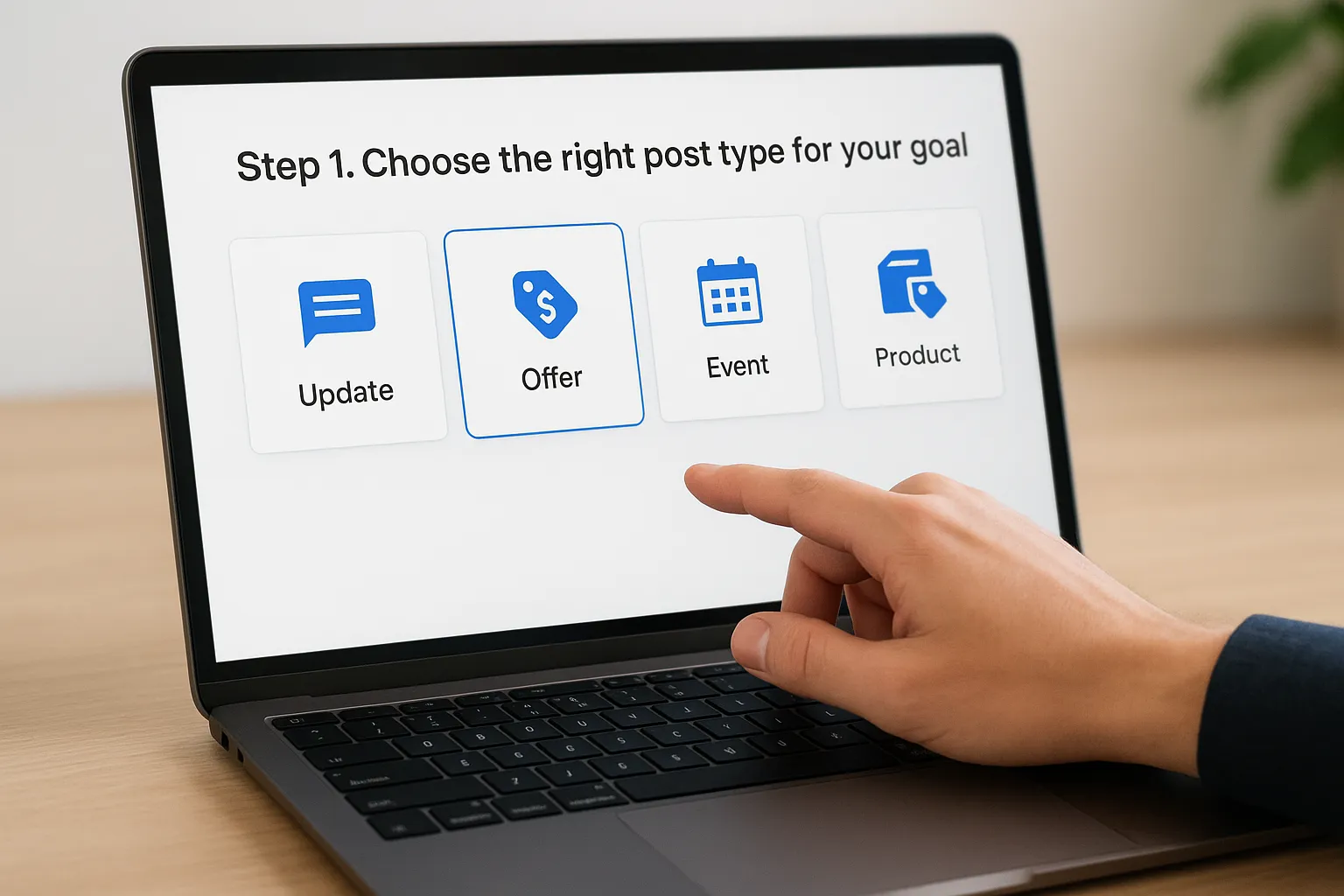
Google gives you four post types, and picking the wrong one is why some posts get ignored while others get clicked. Before you write a single word, decide what you want the reader to do after seeing it. Book a call? Redeem a discount? Show up to an event? Each google business profile post type is built for a different job, and mixing them up wastes the slot Google gives you.
The four post types explained
Understand what each type is designed to do before you open the dashboard:
| Post Type | Best For | Example Use Case |
|---|---|---|
| Update (What's New) | General announcements, tips, behind-the-scenes | New service added, staff spotlight, seasonal tip |
| Offer | Discounts, promotions, limited-time deals | "$50 off window installation this month" |
| Event | Time-bound happenings with a start and end date | Free tax prep workshop, open house |
| Product | Highlighting a specific service or item with a price | "Document notarization, $25" |
Offer posts pull the highest click-through rate for most of the small businesses we manage, because they show a badge with the deal terms directly in search results. Event posts work well for seasonal service businesses, think tax season deadlines or holiday HVAC tune-ups, since they let you set an end date so the post disappears once it's no longer relevant.
Match the post type to the action you want, and the click rate takes care of itself.
Match the type to your business goal
Start with the outcome, not the format. If your goal is phone calls this week, an Offer post with a clear discount and a "Call now" button beats a generic Update every time. If you're trying to build trust and show you're active, rotate in Update posts between offers, things like a finished project photo or a quick tip related to your service. If you're hosting a workshop, webinar, or open house, use the Event type so Google displays the date and lets people add it to their calendar.
Going after immigration consultation sign-ups? An Offer post announcing a free 15-minute consultation converts better than a plain announcement, because it gives the reader a reason to act today instead of bookmarking the page for later. A tax preparation service near a filing deadline should lean on Event posts to create urgency around a specific date.
Jumping between post types without a plan is common, but a simple rotation works better: one Offer post every two weeks, Update posts filling the gaps, and Event posts whenever something time-bound is coming up. That mix keeps your profile fresh without turning every post into a hard sell, and it sets you up for the next step, actually getting into your dashboard to publish it.
Step 2. Open your Google Business Profile dashboard
Getting to the posting screen trips up more business owners than it should. Google has moved this feature around a few times, and if you last used the tools for editing your listing a year ago, the interface probably looks different now. Before you can create a google business profile post, you need to confirm you're logged into the right Google account, the one that actually manages your listing, not a personal Gmail you used once to leave a review.
Finding the posting screen
Here's the fastest path to the composer window:
- Search your business name directly on Google, or go to google.com/business.
- Log in with the Google account tied to your listing.
- On mobile, look for the "Add update" button on your Business Profile card. On desktop, search your business name and click into the profile panel on the right side of the results page.
- Tap or click "Add update" to open the post composer.
If you can't find the post button, you're either logged into the wrong account or you still need to complete Google's verification process.
Google folded a lot of profile management directly into Search and Maps rather than a separate app, so don't waste time hunting for a standalone dashboard that no longer exists the way it did a few years back.
Verifying you have the right access
Ownership matters here. If someone else set up your listing, an old employee, a web developer, a marketing agency you no longer use, you'll need to be added as an owner or manager before you can post anything. Google's own Business Profile help center walks through requesting access if you're locked out. Skipping this check wastes time later when your post won't publish because you don't have permission.
Multiple locations change the process
Managing more than one location changes how you get here. Multi-location businesses use Google Business Profile Manager, where you select the specific location before the composer opens, rather than posting from a single search result. If you're juggling posts across five locations in Irvine, Santa Ana, and Anaheim, this bulk view saves you from logging in and out of separate accounts every time.
Once you're in the composer with the right account and location selected, you're one step from writing the post itself. That's where most of the actual conversion work happens, and it's worth doing carefully rather than typing whatever comes to mind first.
Step 3. Write copy that grabs attention and converts
Words do the heavy lifting once someone spots your post in the map pack. Google gives you roughly 1,500 characters, but only the first 100 or so show before a reader has to tap "more," so your opening line carries the whole post. A google business profile post that buries the offer in the third sentence loses the reader before they get there. Lead with the benefit, not the backstory.
Front-load the offer or the news
Start with what's in it for the reader, then fill in details after. "Free 15-minute consultation for new immigration cases this month" beats "We wanted to let our customers know about a new offering we're running" every time, because the first version answers the reader's question in five words instead of fifteen. Cut filler words like "we're excited to announce" or "just wanted to share." Nobody clicks because you're excited. They click because you solved a problem or saved them money.
If the first ten words don't answer "what's in it for me," rewrite the post before you publish it.
Keep sentences short and specific
Specific numbers beat vague claims. "$50 off window installation through October 31" converts better than "special pricing available for a limited time,” because the reader knows exactly what they're getting and when it ends. Swap generic phrases for concrete details wherever you can:
| Weak Copy | Stronger Copy |
|---|---|
| "Great deals this month" | "$50 off any window install, booked by Oct 31" |
| "We do great work" | "200+ windows installed across Orange County this year" |
| "Contact us to learn more" | "Call now for a free quote, same-day response" |
Offers with a real dollar amount or a real deadline pull noticeably higher engagement than posts that just describe the business in general terms.
Use a repeatable copy template
Dropping in a template speeds up writing and keeps every post structured for conversion instead of rambling. Try this format for offer and update posts:
[Hook: benefit or offer in 5-8 words]
[One sentence with a specific detail, price, or deadline]
[One sentence building trust or urgency]
[Call to action matching your button]
Example: "Free tax filing review before April 15. Save up to $200 in missed deductions our clients found last season. Booked out fast during filing season. Call now to grab a spot." That's four short lines, no wasted words, and a clear next step. Once your copy is tight, the image or video you attach next either reinforces that message or undercuts it.
Step 4. Add a photo or video that stands out
A blank text post looks unfinished, and a stock photo looks worse. Every google business profile post needs a real image or a short video attached, because that visual is what stops someone mid-scroll in the map pack. Google displays your post as a thumbnail before anyone reads a word of copy, so the picture decides whether the post gets opened at all.

Skip stock photos and use real ones
Customers can spot a stock photo instantly, and it kills trust faster than no image at all. Photograph the actual job, the actual staff, the actual storefront. A window and door company posting a real before-and-after shot from a job in Fountain Valley pulls more clicks than any generic image of a house from a photo library. If you're announcing a tax season offer, a quick photo of your team at the desk beats a clip-art calculator every time. Real images signal that a real business is behind the post, and that's exactly what a local searcher is trying to confirm before they call.
A real photo of your actual work beats a polished stock image every single time.
Match the format Google expects
Google has specific image sizes and format requirements, and getting these wrong means a blurry or cropped image on the live post. Check these before uploading:
| Element | Requirement |
|---|---|
| Photo format | JPG or PNG |
| Minimum resolution | 720px by 720px |
| Aspect ratio | 4:3 recommended |
| Video length | Up to 30 seconds |
| Video file size | Under 100MB |
Upload a photo that's too small and Google stretches it, which makes even a great picture look amateurish next to a competitor's crisp image.
Video works when you have it
A short video outperforms a static photo for services that are hard to explain in a sentence, think a quick walkthrough of a finished remodel or a 15-second clip of a consultation in progress. You don't need production value here. A phone recording of a finished install, shot in good light with the camera held steady, does the job. Keep it under 30 seconds since Google caps video length in posts, and lead with the visual payoff in the first few seconds rather than a slow intro.
Build a simple photo habit
Set a reminder to snap one usable photo per completed job, before the crew packs up. That single habit solves the biggest reason posts stall out, running out of fresh images to attach. If your team already handles this inconsistently, our website design and profile management work often starts by fixing exactly this gap. Once your image is uploaded, the button you attach next decides whether the click turns into a call.
Step 5. Add a call-to-action button and link
Every google business profile post lets you attach one call-to-action button, and skipping it is like writing a great ad with no phone number on it. Google gives you a short list of options, and the button you pick should match the action you already promised in your copy. If your post says "call now," the button needs to say Call, not Learn More. That mismatch alone kills conversions on posts that otherwise read well.
Pick the button that matches your goal
Google offers a fixed set of CTA buttons, and each one sends the reader somewhere different:
| Button | Sends Reader To | Best Post Type |
|---|---|---|
| Book | Your booking page or scheduling tool | Offer, Update |
| Order Online | Your ordering system | Product |
| Buy | A specific product page | Product |
| Learn More | Any URL you choose | Update, informational posts |
| Sign Up | A registration or opt-in page | Event |
| Call Now | Your business phone number | Offer, urgent posts |
Call Now works best for local service businesses because it removes a step. Instead of clicking through to a website, filling out a form, and waiting for a callback, the reader taps once and their phone dials you directly. For a tax preparer near a filing deadline, that immediacy matters more than a polished landing page.
The button on your post should never make the reader think twice about what happens next.
Point the link somewhere useful
Don't send every click to your homepage. Direct the Learn More or Book button to the exact page that matches the offer, a booking calendar for consultations, a specific service page for window installations, or a page designed to turn that click into a lead. Sending traffic to a generic homepage forces the reader to hunt for the offer again, and most won't bother. If your site doesn't have a page built for the offer yet, that's usually a sign your website needs a quick update before you lean harder on posts, something our website design and development work handles regularly for clients running active offers.
Test the link before you publish
Open the link yourself on your phone before you hit publish. Broken links, expired booking pages, and forms that don't load on mobile are common reasons a post gets clicks but zero conversions. Check that the page loads fast, matches the offer mentioned in the post, and has a clear next step once someone lands there. Once your button and link are locked in, you're ready to actually publish, or better yet, schedule the post so it goes live at the right time without you having to remember.
Step 6. Publish, schedule, and track results
Hitting publish feels like the finish line, but a google business profile post only earns its keep if you check what happened after it went live. Google gives you basic insights on every post, views and clicks, right inside the dashboard, and reading them alongside the rest of your profile's local search performance beats guessing at what works.
Publish at the right time, not just any time
Timing matters more than most business owners assume. Posting early morning, before the typical local search rush around 8 to 10 a.m., gives your update time to settle in before people start comparing options for the day. Standard update posts stay visible for about seven days before Google archives them, while event posts remain live until the event date passes. That window means a weekly posting habit keeps your profile from ever going quiet in search results.
A post that sits unpublished in a draft folder does nothing for your ranking or your phone.
Build a simple posting calendar
Random posting beats no posting, but a calendar beats random posting every time. Map out your month in advance so you're never scrambling for an idea the morning you're supposed to publish:
| Week | Post Type | Example Topic |
|---|---|---|
| Week 1 | Offer | Seasonal discount or limited-time deal |
| Week 2 | Update | Recent job photo or quick tip |
| Week 3 | Offer or Event | Workshop, deadline, or repeat promotion |
| Week 4 | Update | Team spotlight or customer story |
Google doesn't offer native scheduling for every account type, so many small businesses use a third-party scheduling tool or simply block 15 minutes on the same day each week to publish manually. Either approach works as long as you stick to it.
Track what actually converts
Open the insights panel after each post and note the view count and click count. Patterns show up fast: offer posts with a dollar amount usually outperform vague announcements, and posts with a real photo outperform ones with none. Keep a simple log, even a spreadsheet with the post date, type, and click count works, so you can spot which format brings in calls versus which ones get scrolled past.
Within a month or two, you'll have enough data to know your own audience better than any generic best-practices list could tell you. Adjust the rotation, drop the formats that flop, and lean harder into whatever's pulling clicks. That feedback loop is what turns posting from a chore into a real part of your local SEO strategy, whether you run it yourself or hand it to one of the companies that handle local search for small businesses.
Making posts a regular habit
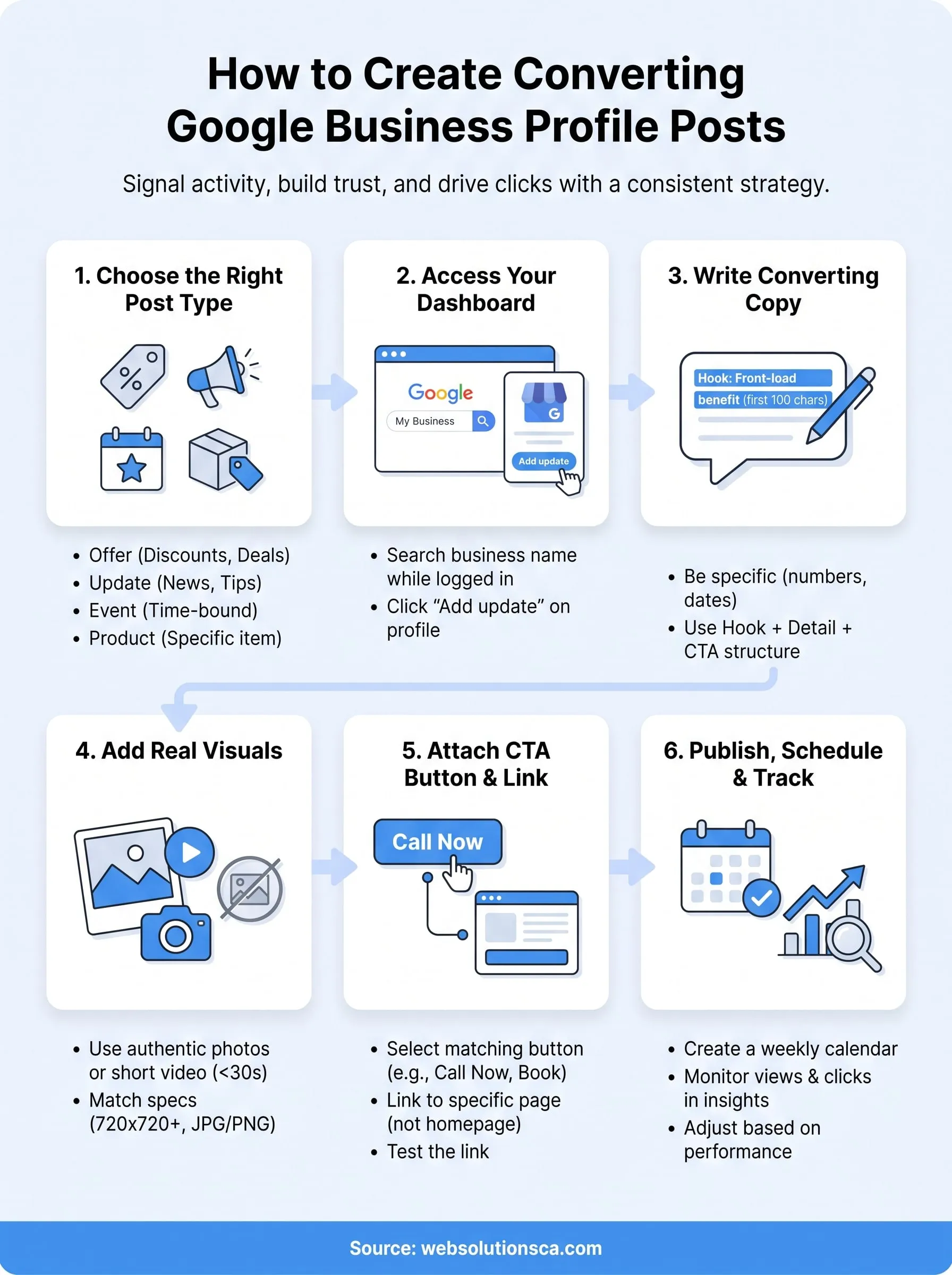
Posting once and walking away wastes everything you just learned. A google business profile post only pays off when it's part of a routine, not a one-time task you check off and forget. Picture the offer post, the real photo, the matching call-to-action button, all working together on a schedule you actually keep.
Getting there means treating your profile like a small marketing channel instead of a listing you set up years ago. Block 15 minutes a week, rotate through offers, updates, and events, and check your insights often enough to know what's converting. Small businesses that stick with consistent posting for even a couple months usually see it in their call volume before they see it in any report.
Running a business already fills your calendar, and profile management is easy to let slide. If you'd rather hand that off, see how our Orange County local SEO and Google Maps team can manage your profile so posting never falls through the cracks again.