
You searched how to rank higher on Google Maps because you know something's off. Maybe your competitor's window and door company shows up in the map pack every time, and yours is buried on page two. That's not luck. Google Maps rankings run on specific signals, and once you know which ones matter, you can fix them without hiring a full marketing team.
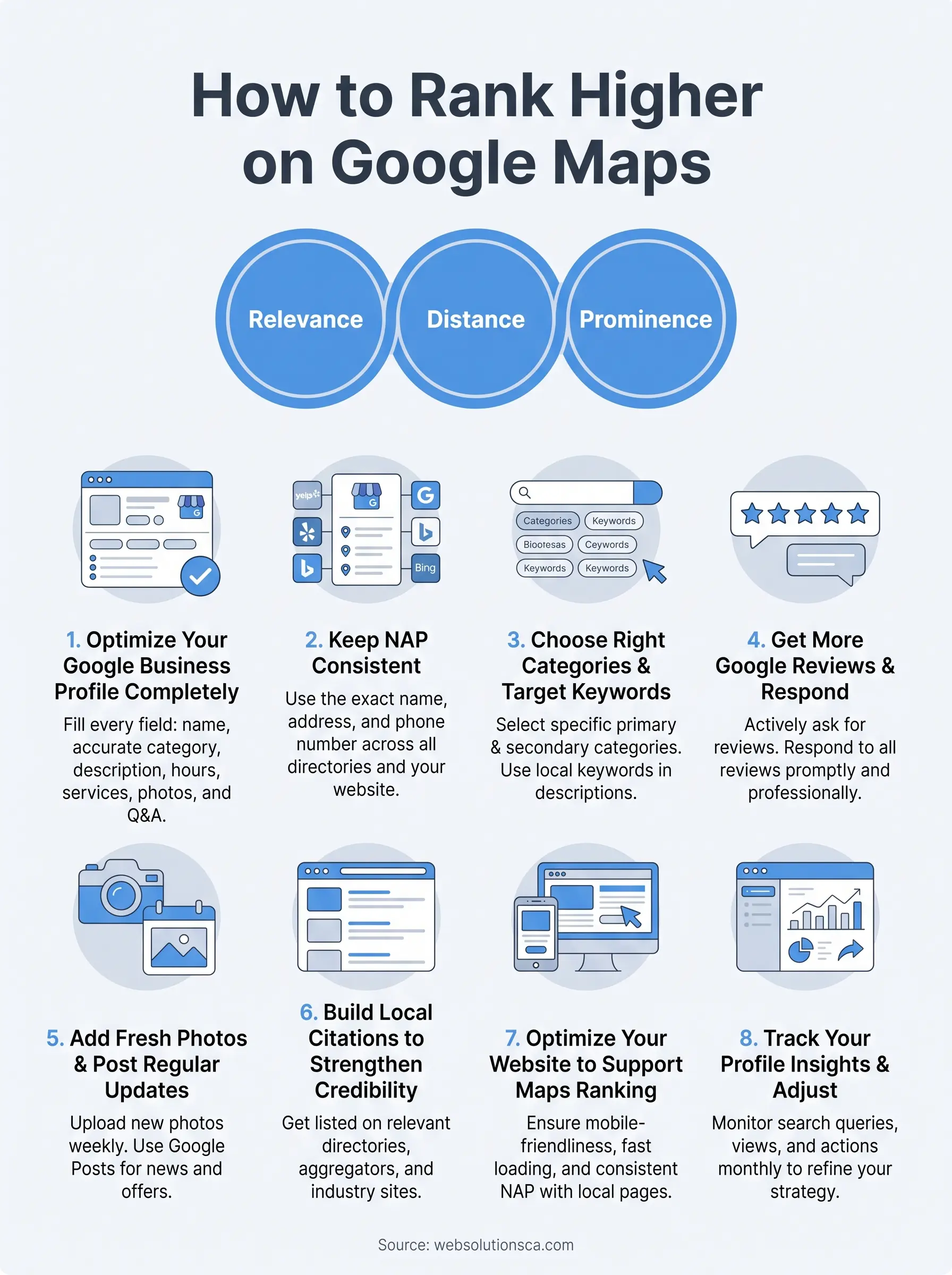
Ranking higher comes down to three things: relevance, distance, and prominence. Your Google Business Profile needs to be complete and active, your website needs to back up what your profile claims, and your business needs consistent signals (reviews, citations, links) telling Google you're the real deal in your service area. Skip any one of these and you'll stay stuck below the businesses working through a full local SEO checklist the right way.
Below are 8 proven steps we use with small businesses across Costa Mesa, Irvine, Santa Ana, and the rest of Orange County to move local rankings in weeks, not months. Each step is something you can act on this week, whether you're a solo tax preparer or running a growing service company. No fluff, no guesswork, just the specific changes that actually move the needle on Google Maps rankings.
1. Optimize your Google Business Profile completely
Your Google Business Profile (formerly Google My Business) is the single biggest lever you have for local pack rankings. It's the free listing that shows your hours, phone number, photos, and reviews right inside Google Maps and the local search results. If you haven't claimed and verified yours yet, stop here and do that first, because nothing else on this list works without it.

Why it matters
Google pulls almost everything it knows about your business from this one profile, so profile completeness directly feeds the relevance and prominence signals that decide who ranks. A half-filled profile with no hours, no description, and three-year-old photos tells Google you're not actively managing your presence, and it treats you accordingly. Businesses with fully optimized profiles consistently outrank competitors with thinner listings, even when both have similar review counts, because profile depth is one of the signals that decide local pack placement.
A complete Google Business Profile is the closest thing to a ranking shortcut Google Maps offers.
How to do it
Work through your profile section by section and fill in every field Google gives you access to:
- Business name exactly as it appears on your signage and paperwork
- Correct primary category, plus every relevant secondary category
- Full business description using natural language and your core services
- Complete service area or physical address
- Accurate hours, including holiday hours
- Products and services with descriptions and pricing where possible
- Q&A section seeded with the questions customers actually ask you
Once it's live, update it monthly. Stale profiles lose momentum, and Google Maps SEO rewards accounts that stay active. If this feels like a lot to manage on top of running your business, our complete guide to optimizing a Google Business Profile walks through the same setup and ongoing upkeep we handle for clients.
Common mistakes to avoid
The most damaging mistake is leaving fields blank because you assume Google will fill in the gaps from your website. It won't. Another common error is picking a broad primary category ("Contractor" instead of "Window Installation Service") to seem like you do everything, which actually dilutes your relevance for the searches that matter most to your revenue.
2. Keep your business name, address, and phone number consistent
Your NAP consistency (name, address, phone number) across the web tells Google whether it can trust the information on your Google Business Profile. Think of every directory, social page, and citation as a vote confirming your business is real and located where you say it is.
Why it matters
Search engines cross-check your listing against dozens of other sources before trusting it enough to rank you locally. When your phone number on Yelp doesn't match the one on your website, or your address is written "Ste 200" in one place and "Suite 200" in another, Google sees conflicting signals. That confusion weakens the local citation trust score that feeds directly into your Maps ranking, even if everything else on your profile is perfect.
Inconsistent business information is the quiet ranking killer most business owners never think to check.
How to do it
Pick one exact format for your name, address, and phone number and use it everywhere, no abbreviations swapped mid-stream. Audit your listings on Yelp, Facebook, Apple Maps, Bing Places, and any industry-specific directories, then update anything that doesn't match. Keep a simple spreadsheet of every place your NAP appears so future updates stay consistent.
Common mistakes to avoid
Don't use a tracking phone number on your Google profile that differs from your website. Also avoid listing a P.O. box or virtual address if you serve customers from a real physical location, since Google can flag that as suspicious and suspend your listing until you appeal.
3. Choose the right categories and target local keywords
Categories tell Google exactly what kind of business you run, and they carry more ranking weight than most owners realize. Your primary category should match your core service almost word for word, since it's one of the strongest relevance signals Google Maps uses to decide who shows up for a given search.
Why it matters
Getting your categories right connects your listing to the exact phrases your customers type, which is how you start showing up for local keyword targeting without touching your website. A tax preparer categorized under "Accountant" instead of "Tax Preparation Service" competes against a broader, tougher field for searches that don't fit their business. Choosing precisely also helps Google match your profile to nearby searchers looking for that specific service right now.
Your primary category does more ranking work than almost anything you write in your description.
How to do it
Start by researching what categories your top-ranking competitors use, then pick the most specific primary category available and layer on secondary categories for every related service you genuinely offer. Weave the same local keywords into your business description, services list, and posts, always in natural sentences rather than stuffed lists, and start from real local keyword research for small businesses. Our team builds this keyword research into every SEO service package we run for Orange County clients.
Common mistakes to avoid
Avoid selecting categories for services you don't actually provide just because they seem popular. Google penalizes that mismatch, and customers who click through get frustrated fast.
4. Get more Google reviews and respond to every one
Reviews are the loudest trust signal Google Maps has, and they're the one small businesses neglect most. A steady flow of fresh Google reviews tells Google your business is active and tells customers you're worth calling before they even see your website.
Why it matters
Review count, review recency, and average rating all factor into local pack rankings, but the star rating alone isn't the whole story. Google also reads the text of your reviews for keywords that match search queries, so a review mentioning "fast window installation in Irvine" reinforces your relevance for that exact phrase.
Every unanswered review is a missed chance to show Google, and future customers, that you're paying attention.
How to do it
Ask happy customers for a review right after the job wraps up, when the experience is still fresh:
- Send a direct Google review link by text or email
- Ask in person before you leave the site
- Follow up once, politely, if they forget
Respond to every review within 48 hours, thanking positive reviewers by name and addressing complaints calmly and specifically. This kind of ongoing review management is something we build into our SEO services for clients who don't have time to chase reviews weekly.
Common mistakes to avoid
Never buy reviews or offer discounts in exchange for them. Google can detect unnatural review patterns, and the penalty costs far more than the reviews were worth.
5. Add fresh photos and post regular updates
Photos and posts are the easiest way to show Google, and searchers, that your business is alive and active right now. A profile stacked with recent images and weekly updates signals profile activity, one of the freshness cues Google Maps weighs when deciding which listings deserve the top spots.

Why it matters
Listings with new photos added regularly get more clicks and calls than ones sitting on the same five images from three years ago. Google also uses Google Posts as a mini content feed, treating each update as a fresh piece of relevant text tied to your business. Combined, these signals feed directly into your Google Maps SEO performance without requiring any changes to your website.
A Google Business Profile that looks abandoned gets treated like it's abandoned.
How to do it
Upload new photos every few weeks, covering:
- Completed jobs or finished projects
- Your team at work
- The storefront or service vehicle
- Before-and-after shots when relevant
Post weekly updates about promotions, new services, or recent projects, and always include a photo. If you offer our website and SEO packages, we handle this posting schedule as part of ongoing profile management.
Common mistakes to avoid
Don't upload stock photos or generic images that don't show your actual business, since customers notice and Google's algorithm favors authentic, geotagged photos uploaded at the recommended image dimensions for your listing. Skipping months between posts also erases any freshness advantage you'd built up.
6. Build local citations to strengthen your credibility
Citations are mentions of your business name, address, and phone number on other websites, directories, and industry platforms, even without a link back to your site. Every accurate mention adds another data point Google can use to confirm your business is legitimate and located where you claim, which is exactly what local citation building is designed to do.
Why it matters
Google treats citations as votes of confirmation, similar to how it treats backlinks for regular search rankings, which is why earning links from local sites pairs so well with citation work. A business with dozens of consistent citations on relevant directories signals prominence, one of the three core ranking factors Google Maps weighs. Thin citation profiles make it harder for Google to trust your listing enough to rank it above competitors with stronger footprints across the web.
Citations don't need links to matter, they just need to be accurate and everywhere Google looks.
How to do it
Start with the big data aggregators and general directories, then move into industry-specific and local Orange County sites:
- Yelp, Bing Places, Apple Maps, and Facebook
- Better Business Bureau and chamber of commerce listings
- Industry directories specific to your trade
- Local news or community business directories
We build citation building into our full SEO packages so clients don't have to track down dozens of listings manually.
Common mistakes to avoid
Skip low-quality directories that exist only to sell links, since they add no trust and sometimes flag your profile as spammy. Never let old, duplicate listings from a previous address linger uncorrected.
7. Optimize your website to support your Maps ranking
Your website works alongside your Google Business Profile, not separately from it. Google cross-checks what your profile claims against what your site actually shows, and a mismatch or a slow, broken site drags your Maps ranking down even when your profile looks great.
Why it matters
Once a searcher taps your listing, Google watches what happens next. If your website optimization for local SEO is weak, meaning slow load times you haven't diagnosed yet, no mobile-friendly design, or a broken contact form, visitors bounce right back to the search results. Google reads that bounce as a sign you weren't the right answer, which quietly erodes your ranking over time even though the drop-off happened on your site, not your profile.
Your website is the proof that backs up every claim your Google Business Profile makes.
How to do it
Make sure your site matches your profile exactly:
- Same NAP details in your footer and contact page
- A dedicated page for each service and a local landing page for each city you serve
- Fast load times and mobile-responsive design
- Local business schema markup identifying your business type and location
Our website design and SEO services build these elements in from the start, so your site actively reinforces your Maps listing instead of undercutting it.
Common mistakes to avoid
Don't run an outdated site with no local pages and expect your profile to carry all the ranking weight. Also avoid mismatched NAP details buried in old footer code, since that quietly conflicts with the citation consistency you built in step two.
8. Track your Google Business Profile insights and adjust
Every Google Business Profile comes with a free analytics dashboard, and most owners never open it. Skipping this step means you're guessing at what's working instead of knowing, which makes every other effort on this list harder to fine-tune.
Why it matters
Without tracking profile insights, you can't tell whether your new photos, category change, or review push actually moved your ranking or did nothing at all. Google shows you exactly how customers found your listing, what actions they took, and which searches triggered your profile to appear, which is the feedback loop behind tuning a profile for local search. That data turns guesswork about how to rank higher on Google Maps into a repeatable process you can adjust month over month.
Insights turn Maps ranking from a mystery into a monthly checklist you can actually measure.
How to do it
Check your insights dashboard at least monthly and watch these numbers:
- Search queries bringing people to your profile
- Calls, direction requests, and website clicks
- Photo views compared to competitors
- Whether traffic comes from direct or discovery searches
Adjust your categories, posts, or photos based on what the data shows, then measure again next month. If tracking and reporting isn't something you have time for, our SEO reporting included with every package covers this monthly review for you.
Common mistakes to avoid
Don't check insights once and forget about them. Also avoid making multiple changes at once, since you won't know which one actually moved the needle.
Making Google Maps work for your business
None of these eight steps work in isolation. A complete Google Business Profile means little if your NAP is inconsistent across the web, and fresh reviews won't save you if your website loads slowly on mobile. Ranking higher on Google Maps comes from stacking small, consistent efforts until Google has no doubt you're the most relevant, trustworthy option nearby. Start with your profile, tighten your citations, then move through the rest of the list at a pace you can sustain.
If you'd rather hand this off to someone who does it daily across Orange County, that's exactly what we built our agency to do. We manage the profiles, the citations, the reviews, and the website work together, so nothing falls through the cracks. See our SEO plans for Orange County businesses and how we get your business showing up where customers are actually looking.