
Pick the wrong Google Business Profile categories and you can rank on page one for the wrong searches, or worse, disappear from local results entirely for the customers you actually want. This single setting influences which searches trigger your listing, which features show up on your profile, and how Google weighs you against competitors in the Local Pack. Most small business owners in Orange County set it once during signup and never look at it again, even after their services change.
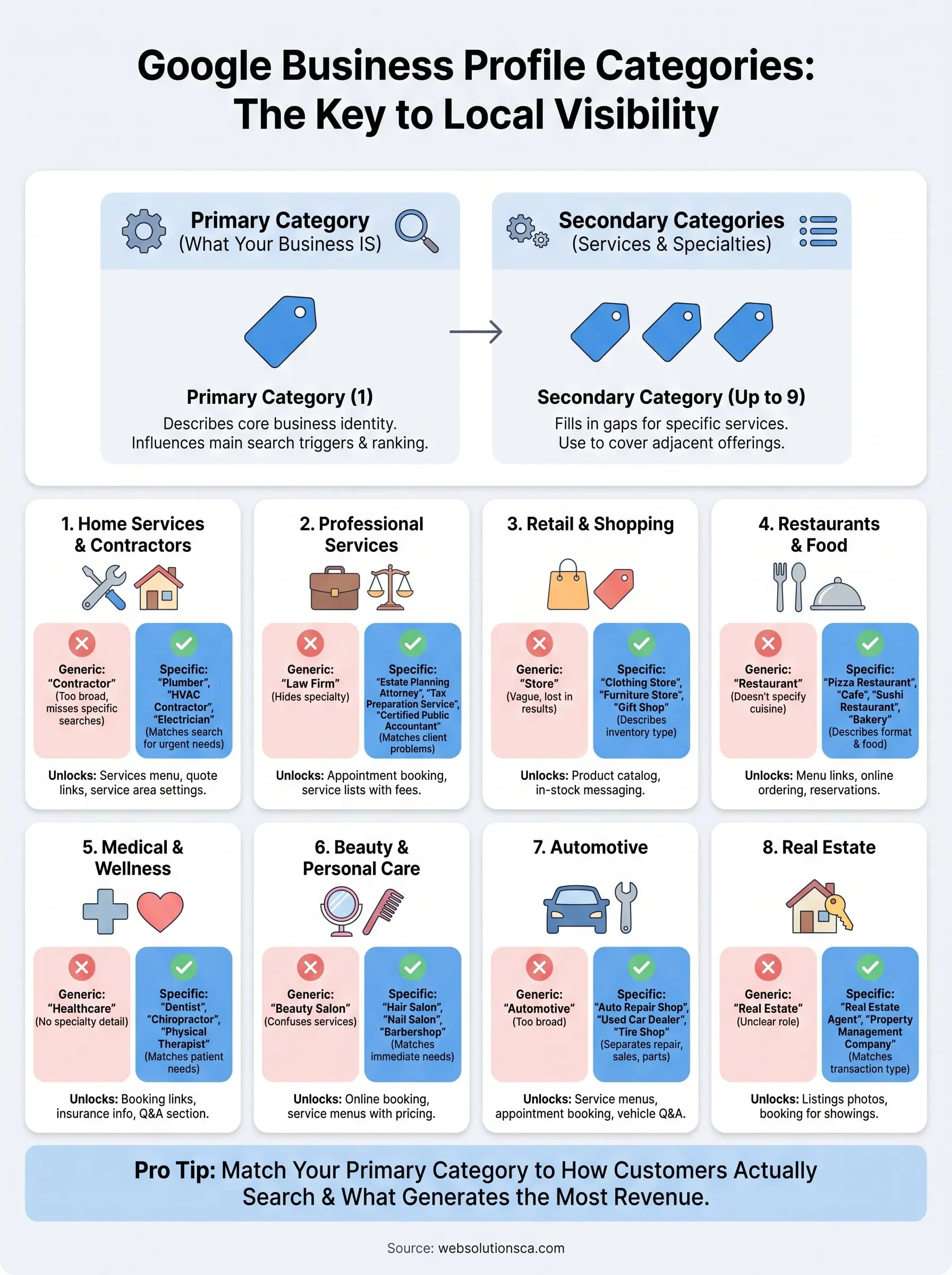
Here's the direct answer: your primary category should describe what your business is, not every service you offer, and Google gives you room for up to nine additional secondary categories to fill in the gaps. Choosing correctly, or fixing a mismatched category, often produces faster visibility gains than months of link building.
This article gives you the full breakdown you need. You'll get a practical walkthrough of how categories work, a searchable list of options across common industries, and a step-by-step process for auditing your current selection and editing your listing without hurting your existing rankings. If you've set up a Google Business Profile for a local service business in Costa Mesa, Irvine, or anywhere else, this is where to start.
1. Home services and local contractors
Home service businesses make up a huge share of the local searches happening in Orange County right now, and Google treats this category group as one of its most competitive. If you're a plumber in Santa Ana or a roofer in Anaheim, the category you pick determines whether you show up when someone searches "emergency plumber near me" versus just "plumber." Google Business Profile categories for home services are also unusually granular, which is good news if you take the time to use them right.

Categories to consider
Google offers dozens of specific options here instead of one generic "contractor" label, and picking the narrow one almost always beats the broad one. Common categories include:
- HVAC contractor
- Plumber
- Electrician
- Roofing contractor
- Landscaper
- General contractor
- Handyman
- Pest control service
- Painter
- Window installation service
- Garage door supplier
- Locksmith
- Appliance repair service
Each of these has its own search demand, so a business that installs and repairs garage doors should never default to "general contractor" just because it sounds more established.
How to choose the best fit
Start with the single service that brings in the most revenue and search volume, and make that your primary category. A window and door company we've worked with in Fountain Valley, for example, sells more replacement windows than doors, so "Window installation service" became the primary category while "Door supplier" moved into the secondary slots. That single change moved their visibility for window-specific searches within weeks.
Your primary category should match the service that pays your bills, not the service you're proudest of.
Match your primary category to how customers actually search, not to your own internal job title. A "general contractor" who mostly does kitchen remodels will lose ground to a competitor listed as "Kitchen remodeler" every time someone searches that exact phrase. Use the secondary category slots, up to nine of them, to cover adjacent services: a roofer might add "Gutter cleaning service" and "Siding contractor" without diluting the primary listing.
Features and tools you unlock
The category you select also turns on or off specific profile features, and home service categories unlock some of the most useful ones. Choosing a recognized service-area category like plumber or electrician typically enables the services menu, where you can list individual jobs with price ranges, plus the ability to mark yourself as a service area business if you don't want your street address shown. Booking buttons, request-a-quote links, and messaging also activate more reliably when Google recognizes the category as a home service.
Getting this right matters more than most business owners realize, because a mismatched category can quietly cap your visibility no matter how good your Google reviews are. If you're not sure your current setup is pulling its weight, our listing optimization service audits exactly this kind of detail alongside the rest of your listing.
2. Professional, legal, and financial services
Professional service firms face a different challenge than contractors. Your work happens behind closed doors, so the category you choose is often the only clue Google and searchers have about what you actually do. Attorneys, accountants, and financial advisors in Newport Beach and Irvine compete in tight local markets where the right Google Business Profile categories decide who shows up for high-value searches like "estate planning attorney" versus generic "lawyer."
Categories to consider
Google breaks legal and financial work into narrow specialties rather than one catch-all listing. Options worth reviewing include:
- Tax preparation service
- Bookkeeping service
- Certified public accountant
- Estate planning attorney
- Immigration attorney
- Divorce attorney
- Financial planner
- Insurance agency
- Document preparation service
- Notary public
A firm offering multiple practice areas shouldn't hide behind "law firm" alone. That label is too broad to win competitive searches.
How to choose the best fit
Identify the practice area that generates your most consistent client volume and set that as primary. A document preparation service we've supported in Santa Ana initially listed itself as a general business service, then switched to "Document preparation service" as primary with "Notary public" and "Immigration document service" as secondary categories. Calls from qualified leads increased almost immediately.
Clients search for the specific problem they have, not the general profession that solves it.
Resist the urge to list every practice area as primary since Google only allows one. Use secondary slots for adjacent specialties instead.
Features and tools you unlock
Professional service categories typically enable appointment booking links, a services list with consultation fees, and messaging, all features that matter more here than photos or menus. Financial and legal categories also tend to trigger stricter verification requirements, since Google treats these as sensitive industries tied to trust and money. If your firm hasn't been verified properly on Google, our Google Business Profile optimization service can walk through the requirements with you.
3. Retail and shopping stores
Retail is a visual, browsing-driven business, and your Google Business Profile categories need to reflect exactly what a shopper expects to find on your shelves. A boutique in Laguna Beach and a hardware store in Orange compete for completely different searches, so lumping every retailer under "store" wastes the specificity Google actually wants from you. Getting this narrow choice right also affects whether your products show up when someone searches nearby inventory rather than just your business name.
Categories to consider
Google offers highly specific retail categories instead of one generic "shop" label. Common options include:
- Clothing store
- Shoe store
- Furniture store
- Gift shop
- Jewelry store
- Hardware store
- Bookstore
- Sporting goods store
- Pet store
- Electronics store
- Home goods store
A store that sells both furniture and home decor, for instance, should pick whichever category matches the bulk of its inventory rather than defaulting to something vague like "retail store."
How to choose the best fit
Base your primary category on what customers buy most often, not on your storefront sign. A gift shop that mostly sells greeting cards and small home accents belongs under "Gift shop," even if the owner privately thinks of it as a boutique. Add secondary categories for smaller product lines you carry, like "Jewelry store" if you stock a modest accessories case.
Shoppers search for what they want to buy, so your category should describe your inventory, not your ambition.
Features and tools you unlock
Retail categories typically activate the product catalog feature, letting you upload items with photos, prices, and descriptions directly on your profile. They also tend to enable in-stock messaging and store hours highlighting busy times, both of which push casual browsers toward an in-person visit. If your product listings aren't showing up the way they should, our Orange County web design and profile audit work often catches gaps between your Google catalog and your actual site inventory.
4. Restaurants, cafes, and food and drink businesses
Food and drink businesses live and die by Google Maps searches happening in real time, often from someone standing a few blocks away deciding where to eat right now. The Google Business Profile categories you pick here determine whether you show up for "brunch near me" or get buried under competitors who picked a sharper label. A cafe in Tustin and a food truck in Garden Grove need completely different categories even though both sell coffee and pastries.

Categories to consider
Google splits food service into narrow formats instead of one "restaurant" bucket. Common options include:
- Restaurant
- Cafe
- Coffee shop
- Bakery
- Pizza restaurant
- Sushi restaurant
- Food truck
- Caterer
- Bar
- Deli
- Juice shop
A business that serves both dine-in meals and catering shouldn't default to "restaurant" alone if catering drives most of the revenue.
How to choose the best fit
Pick the format and cuisine that matches how locals actually describe you, not how you describe yourself on your menu design. A Mission Viejo spot known for tacos should list "Mexican restaurant," not the vaguer "Restaurant," even if it also serves burgers. Reserve secondary categories for things like "Caterer" or "Bar" if those add real revenue beyond your main format.
If locals describe your food before they describe your business name, that description belongs in your category.
Features and tools you unlock
Food and drink categories unlock some of the richest features on the platform, including menu links, online ordering buttons, reservation integrations, and delivery partner connections. They also tend to surface photo prompts for dishes and popular times data that influences whether someone walks in during a rush. If your menu isn't syncing correctly with your profile, our small business website design team can connect your ordering system directly to Google so customers see accurate hours and offerings.
5. Health, medical, and wellness practices
Health and medical searches carry real urgency, and Google treats this category group as sensitive because it directly affects patient safety and trust. A dentist in Huntington Beach and a chiropractor in Costa Mesa both need Google Business Profile categories that match a patient's actual condition, not a generic "healthcare" label that tells searchers nothing about what you treat. Getting this specific also affects whether Google surfaces you for symptom-based searches like "back pain doctor near me."
Categories to consider
Google breaks medical and wellness work into detailed specialties rather than one broad clinic label. Common options include:
- Family practice physician
- Dentist
- Chiropractor
- Physical therapist
- Dermatologist
- Optometrist
- Mental health service
- Urgent care center
- Pediatrician
- Podiatrist
- Acupuncture clinic
A practice offering both general checkups and a specialty like sports medicine shouldn't hide the specialty inside a vague primary category.
How to choose the best fit
List the credential or specialty patients search for first, then use secondary slots for adjacent services. An Irvine physical therapy clinic we've reviewed initially sat under "Health consultant," a category with almost no search volume, then switched to "Physical therapist" as primary with "Sports medicine clinic" secondary. Their appointment requests through the profile roughly doubled within a month.
Patients search by symptom or specialty, so bury the wrong label and you bury your appointment book.
Avoid combining two unrelated specialties under one profile; separate locations or listings usually serve patients better than one confused category.
Features and tools you unlock
Medical categories typically enable appointment booking links, insurance information fields, and a Q&A section patients actually use before calling. Google also applies extra verification steps here, often requiring license numbers, since these categories fall under sensitive YMYL topics that affect people's health and financial stability. If your verification stalled or your booking link isn't showing, our team handles that profile setup for California businesses directly.
6. Beauty, spa, and personal care businesses
Beauty and personal care searches are often booked same-day, which means your Google Business Profile categories need to match exactly what a client wants right now, whether that's a haircut, a facial, or a last-minute manicure before an event. A salon in Mission Viejo and a barbershop in Anaheim serve completely different searches even though both fall under "personal care," so picking the sharper label matters more than it seems at first glance.
Categories to consider
Google offers specific formats instead of one generic "beauty business" label. Common options include:
- Hair salon
- Barbershop
- Nail salon
- Day spa
- Massage therapist
- Waxing hair removal service
- Tanning studio
- Makeup artist
- Tattoo shop
- Skin care clinic
A business offering both hair and nail services shouldn't default to "beauty salon" if one service clearly drives most of the bookings.
How to choose the best fit
Set your primary category to whichever service brings the most repeat clients, then push the rest into secondary slots. A day spa in Laguna Beach that built its reputation on massage should list "Massage therapist" or "Day spa" as primary rather than the broader "Spa," then add "Facial spa" and "Waxing hair removal service" underneath.
Clients search for the service they want done, not the umbrella term for your industry.
Avoid stacking unrelated specialties, like tattoo work and massage therapy, under one primary category since Google struggles to match mixed signals to the right searches.
Features and tools you unlock
Beauty and personal care categories typically activate online booking links, a services menu with pricing tiers, and photo galleries that showcase your work directly on the profile. Many also unlock messaging so clients can ask about availability without calling. If your booking button isn't showing or your service menu looks incomplete, our service for optimizing a profile for local SEO can get those features working correctly.
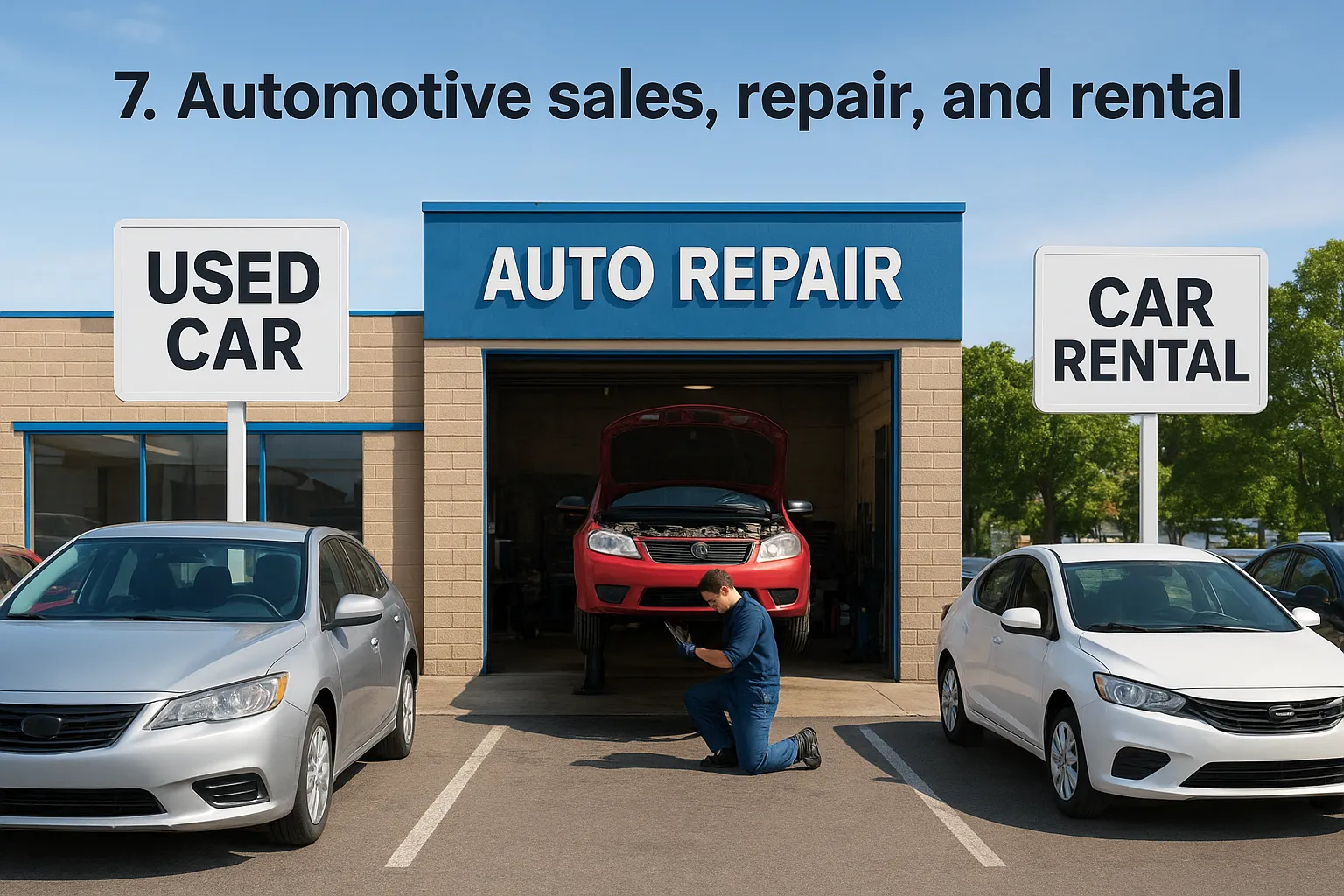
7. Automotive sales, repair, and rental
Automotive searches split into three very different customer intents: buying a car, fixing one, or renting one for the weekend. Your Google Business Profile categories need to signal which of those you actually do, because a used car lot in Orange and a transmission shop in Tustin compete for entirely different searches even though both live under the same broad "automotive" umbrella most owners default to.
Categories to consider
Google separates automotive businesses by function instead of grouping everything under one label. Common options include:
- Auto repair shop
- Used car dealer
- New car dealer
- Tire shop
- Auto body shop
- Car wash
- Auto parts store
- Car rental agency
- Oil change service
- Transmission shop
- Auto glass shop
A shop that does both bodywork and mechanical repair shouldn't hide behind "auto repair shop" alone if collision work drives most of its revenue.
How to choose the best fit
Question your assumptions before you set a primary category, since many shops default to the broadest option available. Match your primary category to the repair or transaction type customers search most, and reserve secondary slots for add-on services. A Garden Grove shop we've worked with sat under generic "Auto repair shop" for years despite doing mostly transmission rebuilds, then switched primary to "Transmission shop" with "Auto repair shop" secondary. Calls for their specialty work increased within weeks.
A generic automotive label buries the specialty that actually pays your shop's bills.
Rental operations should never default to a repair category just because the owner also fixes cars on the side; separate the two if both are real revenue streams.
Features and tools you unlock
Automotive categories often enable service menus with price ranges, appointment booking, and vehicle-specific Q&A sections customers use before dropping off a car. Dealer categories additionally unlock inventory-style features tied to vehicle listings. Our Google Business Profile optimization service checks whether your category is pulling its full weight for these features.
8. Real estate and property services
Real estate searches almost always include a neighborhood or city name, so your Google Business Profile categories need to match the exact transaction type someone is looking for, whether that's buying, renting, or managing property. An agent in Newport Beach and a property management company in Santa Ana compete for entirely different searches, even though both get lumped into "real estate" by owners who never dig deeper into the category list.
Categories to consider
Google splits real estate into distinct roles instead of one broad listing. Common options include:
- Real estate agency
- Real estate agent
- Property management company
- Apartment rental agency
- Real estate appraiser
- Mortgage lender
- Home inspector
- Commercial real estate agency
- Real estate consultant
An agent who also manages rental units for clients shouldn't rely on "real estate agency" alone to cover both services.
How to choose the best fit
Question whether you're a solo agent or an agency before picking a primary category, since Google treats those differently. Match your primary category to the transaction side you handle most, whether that's listing homes for sale or managing rentals for landlords, then push the other role into a secondary slot. A property manager in Tustin we've reviewed had listed under "Real estate agency" for years despite never selling homes directly, then switched primary to "Property management company" with "Apartment rental agency" secondary. Inquiries from landlords increased noticeably within a month.
Pick the category that matches the transaction, not the license you hold.
Features and tools you unlock
Real estate categories typically enable a listings-style photo gallery, messaging for inquiries, and appointment booking for showings or consultations. Property management categories also tend to surface a services menu that separates leasing from maintenance requests, which helps tenants find the right contact faster. If your listings aren't syncing with your profile correctly, our website design team can connect your property feed directly to Google.
9. Education, training, and childcare providers
Parents searching for childcare or tutoring want reassurance fast, and your Google Business Profile categories either build that trust instantly or leave you buried under generic "school" listings. A daycare in Fountain Valley and a test-prep tutor in Irvine serve completely different searches, so treating both as the same broad education category wastes the precision Google offers.
Categories to consider
Google separates learning and childcare into specific formats instead of one "school" label. Common options include:
- Preschool
- Day care center
- Tutoring service
- Language school
- Music school
- Driving school
- Vocational school
- Montessori school
- After school program
- Special education school
A center offering both infant care and after-school tutoring shouldn't default to "school" alone if childcare drives most enrollment.
How to choose the best fit
Question which age group and service actually fills your seats before picking a primary category. Set your primary category to the program parents search for most, then use secondary slots for extras. A tutoring business in Santa Ana we've reviewed sat under generic "Educational institution" for over a year, then switched primary to "Tutoring service" with "Test preparation center" secondary. Inquiries from parents nearly doubled within weeks.
Parents search for the program that solves today's problem, not the institution's full mission statement.
Vocational and driving schools especially benefit from a narrow category, since generic labels rarely surface for skill-specific searches like "forklift certification" or "behind the wheel lessons."
Features and tools you unlock
Education and childcare categories typically enable enrollment inquiry buttons, a services menu listing programs by age group, and messaging for scheduling tours. Google also applies extra scrutiny to childcare listings given the trust involved, sometimes requiring licensing details before full verification. If your enrollment features aren't showing correctly, our Google Business Profile optimization service can review your setup and licensing fields directly.
10. Hotels, travel, and hospitality
Hospitality searches almost always happen while someone is planning a trip or already stranded somewhere unfamiliar, so your Google Business Profile categories need to match the exact type of stay or service a traveler expects. A boutique inn in Laguna Beach and a vacation rental manager in Newport Beach compete for entirely different searches, even though both get filed under generic "hotel" by owners who never look past the first suggestion.
Categories to consider
Google breaks lodging and travel into specific formats instead of one broad "hotel" label. Common options include:
- Hotel
- Bed and breakfast
- Motel
- Vacation home rental agency
- Resort hotel
- Extended stay hotel
- Hostel
- Tour operator
- Travel agency
- Campground
A property offering both short stays and extended corporate housing shouldn't default to "hotel" alone if long-term guests make up most of the bookings.
How to choose the best fit
Start by identifying the guest type your property actually attracts most often, then set your primary category to match that stay length and style. A family-run bed and breakfast shouldn't compete under "Hotel," a category dominated by larger chains with far more reviews and rooms. Push amenities like "Tour operator" or "Campground" into secondary slots if they bring in real bookings beyond your core lodging type.
A small property fighting for rank under "Hotel" is fighting a battle it can't win against chains with hundreds of rooms.
Features and tools you unlock
Lodging categories typically enable a photo gallery highlighting rooms and amenities, direct booking links, and guest messaging for pre-arrival questions. Many also surface star ratings and price range indicators that help travelers compare properties at a glance before clicking through. If your booking links aren't syncing with your reservation system, our website design team can connect the two so guests see accurate availability directly on your profile.
11. Arts, entertainment, and recreation
Entertainment venues live on impulse decisions, someone deciding tonight where to take the kids or where to spend a Saturday afternoon, and your Google Business Profile categories need to answer that decision instantly. A trampoline park in Anaheim and an art gallery in Laguna Beach both fall under "entertainment" in casual conversation, but they compete for entirely different searches, so the specific label you choose carries more weight here than in almost any other industry.

Categories to consider
Google splits recreation and entertainment into narrow formats rather than one generic label. Common options include:
- Amusement park
- Movie theater
- Bowling alley
- Art gallery
- Escape room center
- Museum
- Amusement center
- Golf course
- Event venue
- Live music venue
- Recreation center
A venue that hosts both private events and public recreation shouldn't hide the events side inside a vague "recreation center" label if bookings drive most of its revenue.
How to choose the best fit
Think about what a first-time visitor searches for, not how you describe the venue internally. Set your primary category to the activity people book most often, then push secondary features into the extra slots Google gives you. An escape room business in Tustin we've reviewed originally sat under "Entertainment agency," a category with almost no direct search volume, then switched to "Escape room center" as primary. Direct bookings through the profile rose within the first month.
If your category doesn't match the activity someone wants to do tonight, they'll book somewhere else.
Features and tools you unlock
Entertainment and recreation categories typically enable ticketing links, event listings, and a photo gallery that showcases the actual experience rather than just a storefront. Many also surface popular times data, which helps visitors avoid crowds or plan around them. If your event calendar isn't syncing with your profile, our website design team can connect your booking system directly to Google.
12. Nonprofits, religious, and government organizations
Nonprofits and civic organizations often skip the category question entirely, assuming a generic "organization" label is close enough. It isn't. Your Google Business Profile categories here determine whether a food bank in Santa Ana shows up when someone searches "donation drop off near me" or gets lost among unrelated civic listings. Government offices and religious groups face a similar problem: residents searching for a specific service rarely think to search your organization's official name first.
Categories to consider
Google offers distinct labels for civic and community organizations instead of one broad nonprofit category. Common options include:
- Non-profit organization
- Church
- Synagogue
- Mosque
- Community center
- Homeless shelter
- Food bank
- Government office
- Social services organization
- Youth organization
A community center that also runs a food pantry shouldn't rely on "community center" alone if the pantry drives most of its foot traffic and calls.
How to choose the best fit
Question which service the public actually seeks you out for, not what your mission statement says. Match your primary category to the specific service residents search for, then use secondary slots for programs layered on top. A youth organization in Garden Grove we've reviewed sat under generic "Non-profit organization" for years, then switched primary to "Youth organization" with "Community center" secondary. Inquiries about program enrollment picked up within weeks.
Residents search for the service you provide, not the tax status your organization files under.
Features and tools you unlock
Civic and religious categories typically enable service hours separate from office hours, event listings for services or meetings, and messaging for volunteer or donation inquiries. Government office categories often surface department-specific information that helps residents avoid calling the wrong line. If your listing isn't surfacing the right service hours, our Google Business Profile optimization service can review the setup with you directly.
13. Marketing, technology, and business services
Agencies and B2B service providers face a strange problem: the work is often invisible to the public, so your Google Business Profile categories carry almost all the burden of explaining what you do. A web design shop in Costa Mesa and an IT support company in Irvine both get lumped into vague "business services" by owners who never dig past the default suggestion, and that vagueness costs them qualified leads searching for something specific.
Categories to consider
Google offers distinct labels for marketing, tech, and consulting work instead of one catch-all category. Common options include:
- Marketing agency
- Web designer
- Software company
- Computer support and services
- Advertising agency
- Business management consultant
- SEO agency
- IT service
- Graphic designer
- Public relations firm
A shop offering both web design and SEO shouldn't default to "marketing agency" if one service clearly drives most of the client work.
How to choose the best fit
Start with the service that fills your calendar, not the title on your business card. Set your primary category to that specific offering, then use secondary slots for adjacent work, like adding "SEO agency" under a primary of "Web designer" if search visibility work rounds out most projects. An IT consultant in Tustin we've reviewed sat under generic "Business management consultant" for years, then switched primary to "Computer support and services" with "IT service" secondary. Inquiries from businesses needing actual tech support increased within a month.
A vague business-services label hides the exact skill a client is searching for right now.
Features and tools you unlock
Marketing and tech categories typically enable a services menu with project types, messaging for quote requests, and appointment booking for consultations. Consulting-heavy categories also tend to surface a Q&A section prospects use before reaching out. If your listing isn't converting inquiries into calls, a local SEO audit can check whether your category is working against you.
Keeping your categories accurate as your business grows
Your Google Business Profile categories aren't a set-it-and-forget-it detail. As your services shift, your primary and secondary categories should shift with them. A plumber who starts offering full remodels, or a salon that adds a spa wing, needs to revisit this setting every time the business changes shape, not just at signup. Check your categories every few months against what's actually paying the bills right now, and compare them against what competitors in your Local Pack are using.
Small businesses across Orange County lose visibility every day to competitors who simply picked the sharper label. Don't let that be you. If auditing nine category slots, verification requirements, and feature settings feels like more than you have time for, our Google Maps and local SEO services in Orange County handle this alongside your website, SEO, and lead generation, so your profile actually works as hard as you do.