
Running one location is hard enough. Once you add a second, third, or tenth, your SEO problems multiply just as fast. Pages compete against each other for the same keywords, Google Business Profiles get flagged for duplicate content, and one location's five-star reviews do nothing to help another struggling across town. If you're searching for seo for multiple locations, you already know a single-location playbook doesn't work here.
The fix isn't complicated, but it does require a different structure than standard local SEO. You need a dedicated landing page for every location, a clean Google Business Profile for each address, location-specific keywords, and citations that stay consistent across every directory. Skip any of these steps and you'll see locations cannibalizing each other's rankings instead of each one showing up in its own local pack.
We've built this exact system for window and door companies, tax prep firms, and other Orange County businesses expanding into new cities, so this guide walks through what actually works. You'll get a practical, step-by-step approach to structuring your site, optimizing each location, and tracking results so every branch pulls its own weight in search.
What is SEO for multiple locations?
Multi-location local SEO is the practice of optimizing your online presence so every physical branch, whether you run two offices or twenty, ranks in local search for its own city, its own "near me" searches, and its own Google Business Profile listing. Instead of one website tuned for a single city, you're managing a whole network of location-specific signals: pages, listings, citations, and reviews that each need to point search engines toward the right address for the right searcher. Google decides which business to surface based on proximity, relevance, and prominence, and it calculates those three factors separately for every address you operate under your brand, as Google's own local ranking guidance explains.
Why a single-location playbook breaks down
Applying standard SEO to a multi-location business almost always backfires, because that approach assumes one target market, one service area, and one set of local keywords. Spread that same content across five city pages and you get duplicate or near-duplicate copy, which search engines treat as low-value and often refuse to rank more than one version of. Worse, your locations start competing against each other in search results instead of each one claiming its own local pack. This is the single biggest reason a multi location seo strategy needs its own framework rather than a copy-paste job of your original site.
Every location needs its own digital front door, not a shared one borrowed from headquarters.
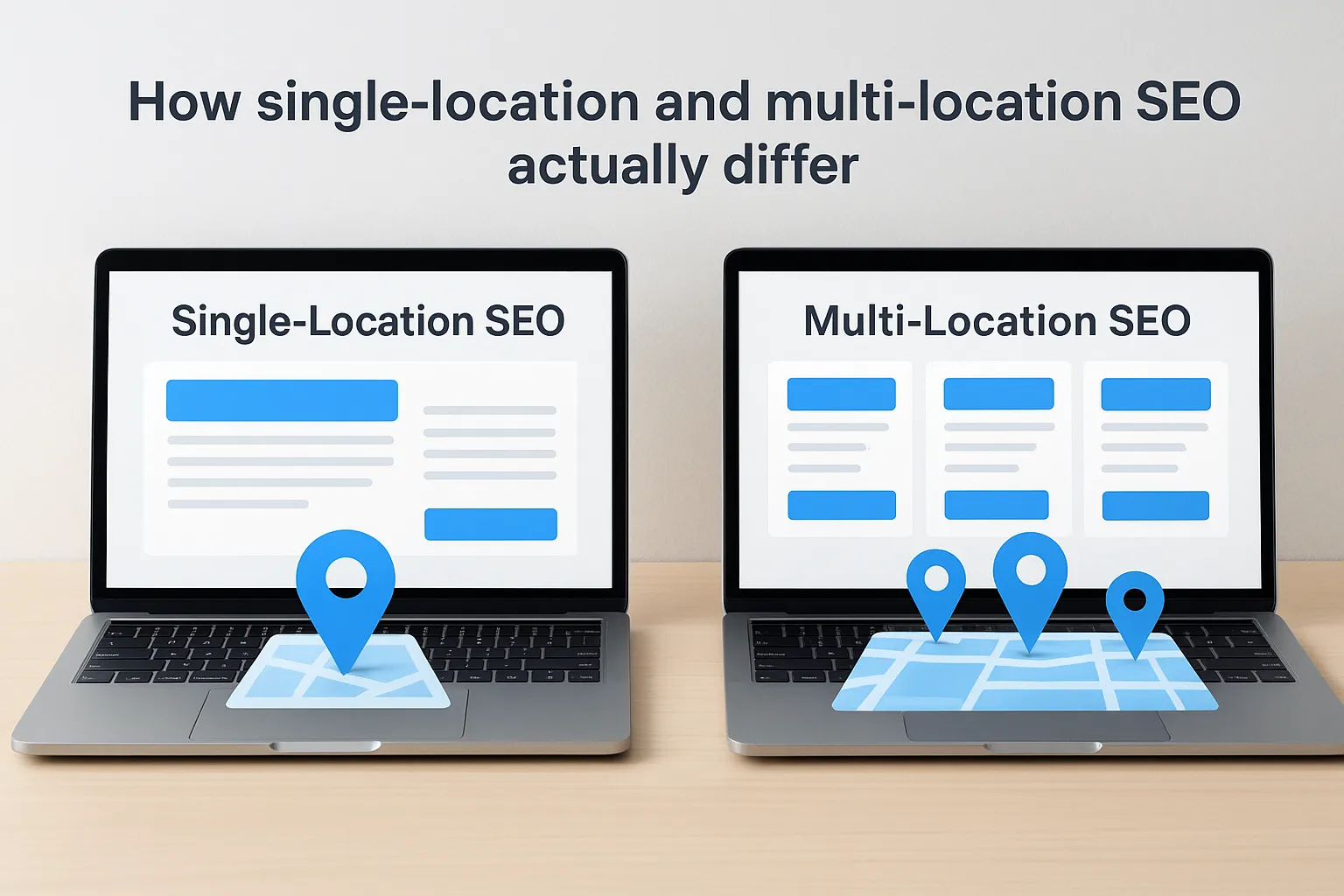
How single-location and multi-location SEO actually differ
Comparing the two side by side makes the shift in approach obvious. Here's how the core pieces of local SEO change once you're managing more than one address:
| Factor | Single-Location SEO | Multi-Location SEO |
|---|---|---|
| Website structure | One homepage targets one city | Dedicated, unique page for each location |
| Google Business Profile | One profile to manage | One profile per address, matched to its own page |
| Keywords | City + service phrase | City + neighborhood + service, repeated and varied per branch |
| Reviews | All reviews live in one place | Reviews tracked and generated location by location |
| Citations | One NAP to keep consistent | Same NAP details matched to the correct address across dozens of directories |
That table is the whole game in miniature. Get any one row wrong across ten locations and you've got ten problems instead of one.
The challenges you're actually solving for
Keyword cannibalization is the most common issue we see when auditing multi-location sites: two nearby locations both try to rank for "tax preparation Orange County," Google can't tell which one to show, and neither ranks well. Duplicate content flags come next, since thin or copied location pages read as spam to Google's algorithms even when the intent behind them is legitimate. Review consolidation rounds out the list, because a five-star reputation at your Irvine office does nothing for search visibility in Santa Ana if reviews aren't tied to the right Google Business Profile. Once you understand these three failure points, the rest of this guide is really just a set of fixes for each one, applied consistently across every address you operate.
Step 1. Choose the right website structure
Before you write a single word of location page copy, decide how your site will organize those pages. This decision shapes everything downstream, from how Google crawls your site to how easily you can add a new branch next year. Get the website structure wrong and you'll be rebuilding it later, usually after you've already lost rankings to a competitor who set theirs up correctly the first time.
Subdirectories beat subdomains for most small businesses
For almost every business we work with, a subdirectory structure like websolutionsca.com/locations/irvine outperforms subdomains such as irvine.websolutionsca.com. Subdirectories keep all your domain authority in one place, so links and trust built by one location page still lift the whole site. Subdomains, by contrast, often get treated by search engines as semi-separate sites, which spreads your authority thin right when you need it concentrated. Unless you're running dozens of locations under genuinely different brand names, skip the subdomain route entirely.
A clean URL structure is the foundation every other local SEO tactic gets built on.
A simple structure you can actually scale
Here's the pattern we set up for clients expanding past their first location:

websitename.com/locations/ (hub page listing every city served)
websitename.com/locations/costa-mesa/
websitename.com/locations/irvine/
websitename.com/locations/santa-ana/
You can see this approach in practice on our Santa Ana web design and digital marketing page. It provides a dedicated destination for Santa Ana businesses while connecting visitors to broader Orange County services and nearby location pages. For service-area businesses, remember that a city page does not imply a separate physical branch.
That hub page matters more than most business owners expect. It gives search engines one clear place to discover every location page, and it gives visitors a directory to find the branch nearest them. Link to it from your main navigation, not buried three clicks deep in a footer.
Plan for growth now, not later
Owners who skip this planning step tend to bolt on location pages wherever seems convenient at the time, mixing URL patterns as they grow. Fixing that later means redirects, lost rankings during the transition, and confused search engines trying to figure out which version of a page to trust. Setting the pattern correctly before you launch your second location saves that headache entirely, and it's the difference between a multi location seo strategy that scales cleanly and one you're constantly patching. If you're only running two locations today but expect ten within a few years, build the structure for ten now.
Step 2. Build unique, high-quality location pages
Once your structure is set, the real work starts: building location pages that earn their own ranking. A location page built from a template with the city name swapped out won't cut it. Google's algorithms compare your pages against each other just as easily as they compare you to competitors, and near-duplicate content across your own site gets filtered out rather than ranked. This step is where seo optimization for multiple locations either succeeds or quietly fails.
What belongs on every location page
Each page needs enough unique, specific information that it could stand alone as its own small business website. At minimum, include:
- Full NAP details (name, address, phone number) matched exactly to that location's Google Business Profile
- An embedded Google Map pinned to the correct address
- Service details specific to that branch, including any offerings unique to that market
- Staff names or a local manager, when it's genuine and available
- Location-specific reviews and testimonials
- Photos taken at that actual location, not stock images
- Neighborhoods and nearby landmarks you serve, written naturally into the copy
A location page should read like it was written for that city, not translated for it.
Write for the neighborhood, not just the city
Generic city-plus-service phrasing gets you only so far, so dig into neighborhood-level keyword research for each branch. Instead of repeating "tax preparation Irvine" five times, mention the specific neighborhoods, business districts, or landmarks near that office, like University Park or the Irvine Spectrum area. This kind of specificity does two things: it naturally works in the long-tail searches real customers type, and it gives Google clear signals that this page serves a distinct, real audience rather than existing purely for website seo for multiple locations purposes.
Skip the shortcuts that hurt you later
Copying one page's paragraph structure across every city and swapping a handful of words counts as thin content, even if every fact on the page is accurate. Real differentiation takes more upfront effort per page, but it's the only version of local seo for multiple locations that holds up once Google starts comparing your pages side by side. Budget real writing time per location, even if that means launching two or three pages well before you launch ten pages poorly.
Step 3. Set up and optimize a Google Business Profile for every location
Your location pages tell Google what to rank; your Google Business Profile tells Google where to show it in Google Maps results and local packs. Every physical address needs its own separate profile, created from scratch, verified independently, with no shortcuts. Skipping this step or trying to manage five locations under one listing is the fastest way to get flagged for guideline violations and lose visibility across the board.
One profile per address, no exceptions
Google requires a distinct profile for each location that has its own physical address and is staffed during posted hours, and each one goes through its own verification process, usually by postcard, phone, or video. Never list a virtual office or a location you don't actually staff just to rank in another city; Google's guidelines on representing your business are explicit about this, and violations can get every profile you own suspended, not just the offending one. Treat each verification as its own project, tracked separately, so nothing slips through while you're juggling multiple applications at once.
What every profile needs filled out completely
A half-finished profile leaves ranking signals on the table. For each location, make sure you cover:
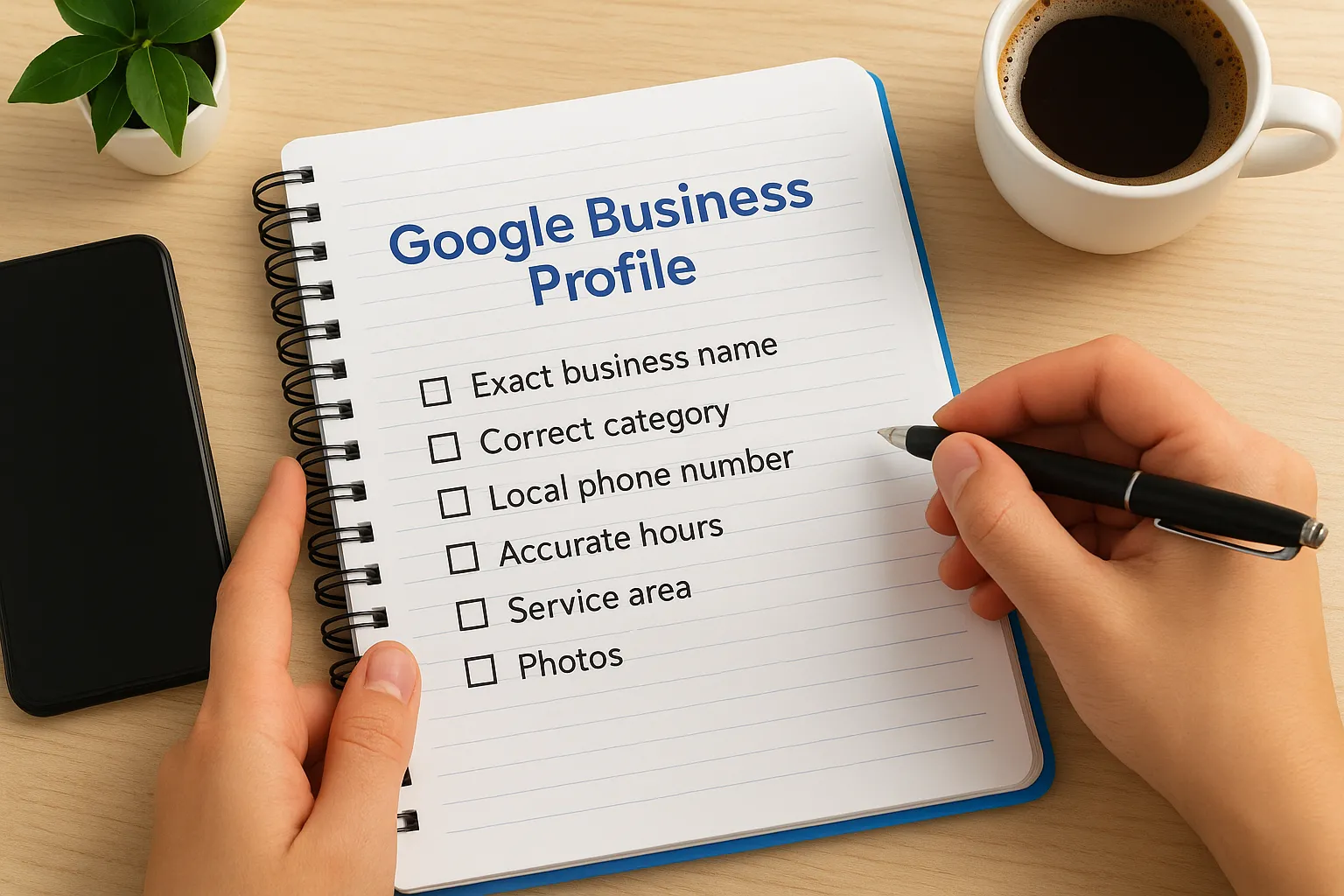
- Exact business name, matching your signage and website (no keyword-stuffed variations)
- Correct category, plus relevant secondary categories
- Local phone number tied to that address, not a shared call center line
- Accurate hours, including holiday hours
- Service area, if you serve customers beyond the office itself
- Photos from that specific location, updated regularly
- Weekly posts or updates unique to that branch
A Google Business Profile that's only half-filled out is handing rankings to a competitor who bothered to finish theirs.
Keep every listing active, not just launched
Setting up the profile is only half the job. Locations that post updates, answer questions, and respond to reviews consistently outrank ones that go quiet after launch. If managing this across five, ten, or twenty locations feels unmanageable in-house, our team's work keeping each listing fully optimized handles exactly this kind of ongoing, location-by-location maintenance so nothing gets neglected as you grow.
Step 4. Keep your name, address, and phone number consistent
Every directory, review site, and social profile that lists your business is a signal Google cross-checks against your Google Business Profile. When those signals agree, Google trusts the address enough to rank it. When they don't, the algorithm hedges its bets and ranks nothing confidently. Consistent NAP (name, address, phone number) data across the web is the quiet, unglamorous work behind almost every successful multi location local seo campaign, and it's the step most owners skip because it doesn't feel like real marketing.
Why inconsistent listings quietly kill rankings
Google uses citations, mentions of your business name, address, and phone number on other websites, as a trust signal that confirms your location actually exists where you say it does. If Yelp lists "123 Main St, Suite B" and your website lists "123 Main Street, #B," that's technically the same address to a human, but it reads as a mismatch to a crawler comparing strings across thousands of listings. Multiply that small inconsistency across ten locations and dozens of directories, and you've built a trust problem you don't even know exists until rankings stall.
A single mismatched suite number across your directories can cost a location its spot in the local pack.
Where to audit and fix your citations
Start with the directories that carry the most weight, then work outward:
- Google Business Profile (the master record every other listing should match)
- Yelp, Facebook, Apple Maps, and Bing Places
- Industry-specific directories relevant to your business type
- Local chamber of commerce and city business listings
- Your own website's footer, contact page, and location pages
Build one master record and copy from it
Create a single spreadsheet row per location with the exact NAP formatting you want used everywhere, then paste that same formatting into every directory rather than retyping it from memory each time. This sounds tedious for two locations and genuinely painful for ten, which is exactly why we built citation management into the SEO services we run for growing businesses, auditing and correcting mismatched listings location by location so nothing falls through as you expand into new cities.
Step 5. Build reviews and reputation location by location
Reviews are one of the few ranking signals behind local pack placement your competitors can't copy from you, which is exactly why Google weighs them so heavily in local pack results. A multi location business seo strategy lives or dies on whether each address builds its own review base, because a glowing reputation at your Costa Mesa office does nothing to help a brand-new Tustin listing that's still sitting at zero reviews. Treat reputation building as a per-location task, not a company-wide average you check once a quarter.
Ask at the right moment, every time
Timing beats scripting when it comes to review requests. Ask right after a job finishes, a service is completed, or an invoice gets paid, while the experience is still fresh, and always send the request to that specific location's Google Business Profile link, not a generic company page. A text message with a direct review link converts far better than an email buried in someone's inbox, so build the ask into your existing follow-up workflow rather than treating it as a separate campaign.
The best time to ask for a review is the moment the customer is happiest, not a week later.
Respond to every review, good or bad
Google tracks owner responses as an activity signal, and customers researching a location read them just as closely. Reply to positive reviews with a specific detail from the visit, not a copy-pasted "thanks for your feedback," and respond to negative reviews calmly, acknowledging the issue and offering to make it right offline. Silence on a bad review reads worse to a future customer than the complaint itself.
Set a simple system so no location falls behind
Here's a workflow that keeps review generation consistent without turning into a full-time job:
- Trigger a review request automatically after every completed job or transaction, tagged to the correct location.
- Check each Google Business Profile weekly for new reviews needing a response.
- Flag any location with fewer reviews or a lower average rating than the others for extra outreach that week.
- Report review counts and ratings by location monthly, right alongside your other SEO metrics.
Our workflow automation services handle the trigger-and-tag part of this automatically, so review requests go out the same day without anyone remembering to send them manually across five or ten separate locations.
Step 6. Track results and create repeatable systems to scale
Once your pages, profiles, and reviews are live, you need a way to see which locations are pulling their weight and which ones are quietly falling behind. Tracking by brand average hides the real story. A multi location seo strategy only works long-term if you can measure each address on its own and catch problems before they cost you customers.
Track every location separately, not as one blended number
Set up per-location rank tracking, Google Business Profile insights, and analytics goals for each location individually, not rolled into one company-wide dashboard. Watch these numbers per address every month:
| Metric | What it tells you |
|---|---|
| Local pack ranking for core keywords | Whether that location shows up when nearby customers search |
| Google Business Profile calls, clicks, and direction requests | Whether the listing is converting visibility into action |
| Location page organic traffic | Whether the page itself is earning search visibility |
| Review count and average rating | Whether reputation building is keeping pace |
If you can't see how each location is performing on its own, you can't fix the one that's falling behind.
Build a checklist you reuse for every new location
Expansion gets easier once you turn this whole process into a repeatable checklist, built on the same fundamentals as any local SEO checklist, instead of reinventing it every time you open a new address. Use something close to this before any new location goes live:
- New location page published on your subdirectory structure
- NAP details matched exactly to the master record
- Google Business Profile created, verified, and fully filled out
- Location added to the citation audit list
- Review request workflow tagged to the new address
- Rank tracking and analytics goals set up before launch
Running through this list for a second location takes a few hours. Skipping it for a tenth location can cost you months of rankings.
Report on it monthly so nothing slips
Generate a simple monthly report broken out by location, covering rankings, traffic, calls, and reviews side by side. This is exactly the kind of ongoing work our SEO services handle for multi-location clients, since a business managing ten addresses rarely has the bandwidth to audit each one manually every month, and a missed dip in one city can quietly drag down the whole brand's local visibility if nobody's watching.
Turning local visibility into steady leads
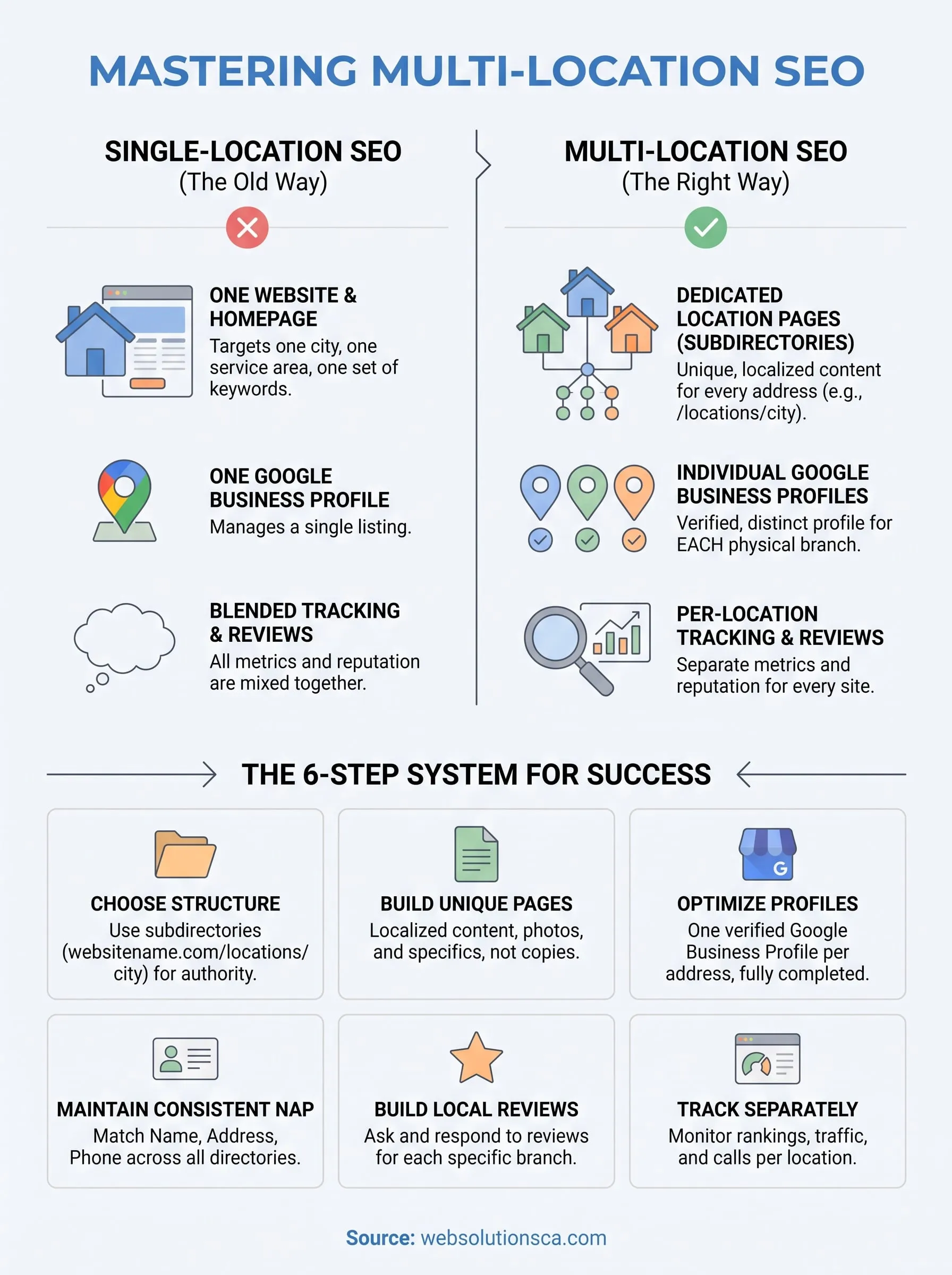
Getting seo for multiple locations right isn't about one clever trick, it's about consistency applied across every address you operate. Structure your site correctly, write real content for every location page, keep every Google Business Profile complete and verified, match your NAP everywhere, build reviews city by city, and track each address on its own. Skip any single step and one location quietly drags down the rest.
Handling this alone across five, ten, or twenty locations eats up time most small business owners don't have, and small mistakes compound fast when they're repeated across every branch. That's exactly why we built a system around this process instead of treating each location as a one-off project. If you're expanding into new cities and want every location pulling its own weight in search, take a look at our Orange County local SEO services and let's map out a multi-location strategy built for your business.